Hi.
So my software synth allows me to import my own single cycle waveforms.
I'm interested in creating them by chopping up audio samples.
I've managed to do this in the right format, looped, etc...
It always requires a lot of messing around with several pieces of software and the tuning is always out of whack.
1. Is there a decent wave editor (mac) that I can use to do this?
2. Is there any reading material on the subject that anybody can suggest?
Thanks.
Matthew
HELP: How Do I Create Single Cycle Waveforms?
HELP: How Do I Create Single Cycle Waveforms?
Just a fan of music...
Re: HELP: How Do I Create Single Cycle Waveforms?
Hi Matthew!
Creating single cycle waveforms can be (as you've found) incredibly rewarding but also terminally tedious
For reading material I'd suggest you pay a visit to the Adventure Kid (aka Kristoffer Ekstrand):
www.adventurekid.se/akrt/waveforms/
For a start, over the years he's created thousands of such waveforms and made them available as free downloads.
However, there's a 'draw your own' waveform utility out there somewhere, certainly for PC but I'm not sure about Mac - let me have a think and get back to you.
Martin
Creating single cycle waveforms can be (as you've found) incredibly rewarding but also terminally tedious
For reading material I'd suggest you pay a visit to the Adventure Kid (aka Kristoffer Ekstrand):
www.adventurekid.se/akrt/waveforms/
For a start, over the years he's created thousands of such waveforms and made them available as free downloads.
However, there's a 'draw your own' waveform utility out there somewhere, certainly for PC but I'm not sure about Mac - let me have a think and get back to you.
Martin
-

- Martin Walker
Moderator -
Posts: 22581 Joined: Wed Jan 13, 2010 8:44 am
Location: Cornwall, UK
Contact:
Re: HELP: How Do I Create Single Cycle Waveforms?
Damn - it was Audio-term by Mathias Gurk, which sadly is PC-only:
https://www.dropbox.com/s/czri7yth56lel ... 29.7z?dl=0

There's a KVR forum thread started by its designer here:
http://www.kvraudio.com/forum/viewtopic ... =Audioterm
I'll get back to you if I track down a Mac equivalent
Martin
https://www.dropbox.com/s/czri7yth56lel ... 29.7z?dl=0
There's a KVR forum thread started by its designer here:
http://www.kvraudio.com/forum/viewtopic ... =Audioterm
I'll get back to you if I track down a Mac equivalent
Martin
-
- Martin Walker
Moderator -
Posts: 22581 Joined: Wed Jan 13, 2010 8:44 am
Location: Cornwall, UK
Contact:
Re: HELP: How Do I Create Single Cycle Waveforms?
Thank you VERY much Martin!
I will read everything that you've posted here
I've also downloaded Audio-Term. Will see if my old Windows computer can handle it
Matthew
I will read everything that you've posted here
I've also downloaded Audio-Term. Will see if my old Windows computer can handle it
Matthew
Just a fan of music...
Re: HELP: How Do I Create Single Cycle Waveforms?
I've no idea if it would work in this particular instance, but you might also try running it under Wine/Wine Bottler on OSX. I've run a few useful Windows-only utilities like that (eg. Suite Spot Studios' Cleaver and AATranslator)
http://winebottler.kronenberg.org/
http://winebottler.kronenberg.org/
-
- Matt Houghton
Frequent Poster - Posts: 1603 Joined: Wed Aug 08, 2007 12:00 am
SOS Reviews Editor
Re: HELP: How Do I Create Single Cycle Waveforms?
Two words: Xfer Serum.
-

- siderealxxx
Frequent Poster - Posts: 662 Joined: Sat Jan 24, 2009 12:00 am Location: Somerset
Excess makes the heart grow fonder
Re: HELP: How Do I Create Single Cycle Waveforms?
siderealxxx wrote:Two words: Xfer Serum.
Wow - those two words sent me scurrying off for a closer look, whereupon I found the SOS review:
http://www.soundonsound.com/reviews/xfer-records-serum
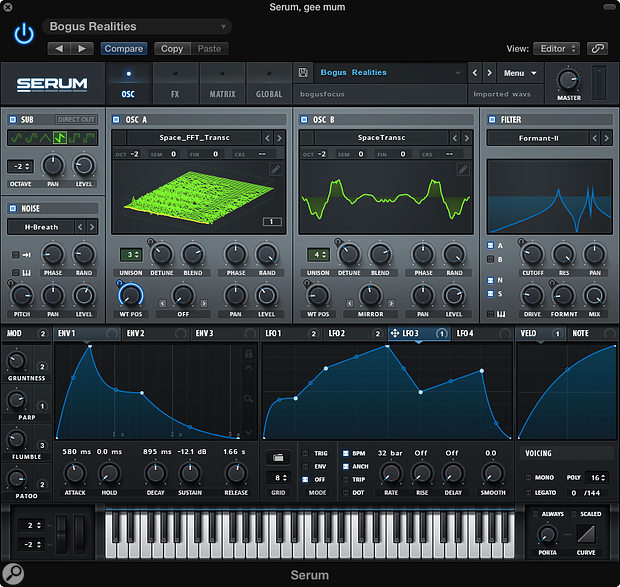
Strictly speaking, Matthew was asking for the simple creation of single cycle waveforms rather than fully-blown wavetables, but Serum's drawing facilities do look MOST impressive, and it's available for both Mac and PC!

Martin
Last edited by Martin Walker on Wed Nov 30, 2016 3:23 pm, edited 1 time in total.
-
- Martin Walker
Moderator -
Posts: 22581 Joined: Wed Jan 13, 2010 8:44 am
Location: Cornwall, UK
Contact:
Re: HELP: How Do I Create Single Cycle Waveforms?
Not my area of interest but you can expand waveforms virtually ad inf and easily top and tail them in Samplitude.
The trial of Pro X 3 is valid for 30days and if you like it search out "Samplitude Silver ProX" . Only 8 tracks but free.
Dave.
The trial of Pro X 3 is valid for 30days and if you like it search out "Samplitude Silver ProX" . Only 8 tracks but free.
Dave.
Re: HELP: How Do I Create Single Cycle Waveforms?
Excellent!
I was hoping to get a discussion going. There doesn't seem to be a whole lot of chatter about this out there so it is nice to hear some ideas.
Matt - Thanks! Wine Bottler may solve more than one problem for me.
siderealxxx - Cheers mate. My 2006 MBP struggles a little with Serum but it is definitely on my radar for the future. Very powerful. Just checked out a few videos on YT where a fellow does just what I'm talking about using Serum and Audacity for Mac.
https://www.youtube.com/watch?v=e1T99XofElo - #12 of the series.
ef37a - Awesome! I will try Samplitude the minute I get a free afternoon. Thanks a million!
Do you know if Samplitude allows you to change meta information in the .wav header?
If anybody else knows of a wave editor that is optimized for the creation of single cycle waveforms, please share. Ideally, I would like to be able to edit, tune and tag my waves in one application.
I will try my best to report my findings.
Thanks again for the help.
Matthew
I was hoping to get a discussion going. There doesn't seem to be a whole lot of chatter about this out there so it is nice to hear some ideas.
Matt - Thanks! Wine Bottler may solve more than one problem for me.
siderealxxx - Cheers mate. My 2006 MBP struggles a little with Serum but it is definitely on my radar for the future. Very powerful. Just checked out a few videos on YT where a fellow does just what I'm talking about using Serum and Audacity for Mac.
https://www.youtube.com/watch?v=e1T99XofElo - #12 of the series.
ef37a - Awesome! I will try Samplitude the minute I get a free afternoon. Thanks a million!
Do you know if Samplitude allows you to change meta information in the .wav header?
If anybody else knows of a wave editor that is optimized for the creation of single cycle waveforms, please share. Ideally, I would like to be able to edit, tune and tag my waves in one application.
I will try my best to report my findings.
Thanks again for the help.
Matthew
Just a fan of music...
Re: HELP: How Do I Create Single Cycle Waveforms?
For the record, I am using discoDSPs Corona.
I started using it a few years back because I liked it's smooth sound and cpu efficiency.
It's intuitive layout is great for the novice, a.k.a. me
Corona lets you import your own loops and single cycle waveforms. It also lets you combine these using mathematical functions (ADD/SUB/MUL/AND/OR/XOR/PYTHAG...). All this makes for some pretty unique sounds.
The developers at discoDSP formatted a bunch of AK waveforms for Corona, so I have been playing around with those for a while:
http://www.adventurekid.se/akrt/waveforms/adventure-kid-waveforms/
Now its time to roll my own.
Corona likes mono 16/44.1 .wavs
It needs them looped and the midi note set to C4 - in the .wav header.
I'm not into video production but once I know how to do this, with the right program, I will post the steps here.
Thanks again.
Matthew
Corona: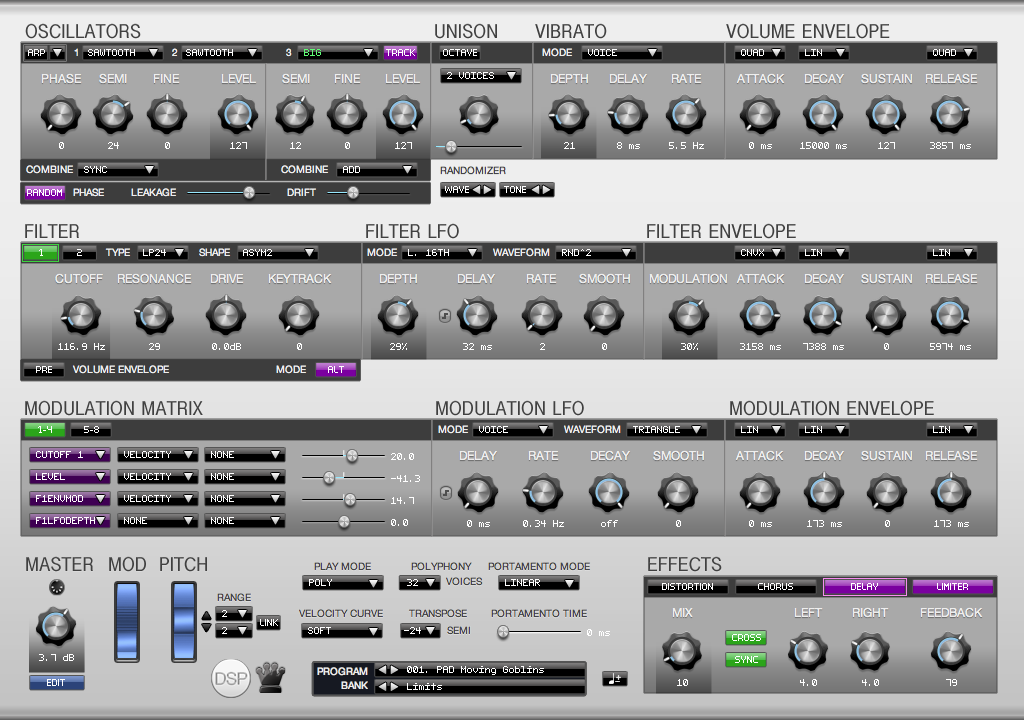
I started using it a few years back because I liked it's smooth sound and cpu efficiency.
It's intuitive layout is great for the novice, a.k.a. me
Corona lets you import your own loops and single cycle waveforms. It also lets you combine these using mathematical functions (ADD/SUB/MUL/AND/OR/XOR/PYTHAG...). All this makes for some pretty unique sounds.
The developers at discoDSP formatted a bunch of AK waveforms for Corona, so I have been playing around with those for a while:
http://www.adventurekid.se/akrt/waveforms/adventure-kid-waveforms/
Now its time to roll my own.
Corona likes mono 16/44.1 .wavs
It needs them looped and the midi note set to C4 - in the .wav header.
I'm not into video production but once I know how to do this, with the right program, I will post the steps here.
Thanks again.
Matthew
Corona:
Just a fan of music...
Re: HELP: How Do I Create Single Cycle Waveforms?
Mattyy wrote:Now its time to roll my own.
Corona likes mono 16/44.1 .wavs
It needs them looped and the midi note set to C4 - in the .wav header.
I'm not into video production but once I know how to do this, with the right program, I will post the steps here.
Hi again Matthew!
If you want a step-by-step guide to creating single cycle waveforms within a fairly standard audio editor, look no further than this link:
http://groovesizer.com/make-your-own-si ... waveforms/
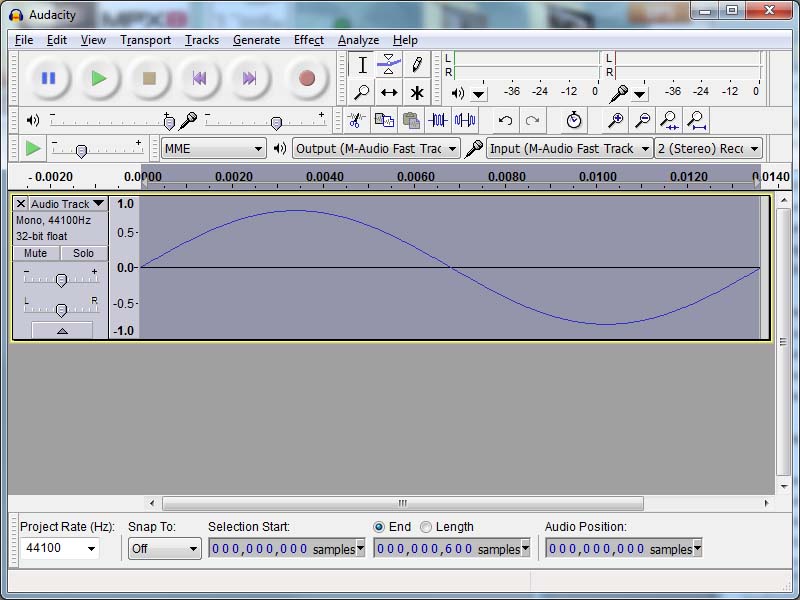
In this case it uses Audacity, but you can easily adapt the instructions for different formats/applications/utilities.
Martin
-
- Martin Walker
Moderator -
Posts: 22581 Joined: Wed Jan 13, 2010 8:44 am
Location: Cornwall, UK
Contact:
Re: HELP: How Do I Create Single Cycle Waveforms?
Thanks again Martin.
Excellent read.
Quick update (still in progress):
I've managed to figure out how to format and tune a single cycle waveform for Corona.
The audio quality is a little suspect so I will continue working on it.
I used iZotope's RX to convert the bit depth and downmix a stereo clav sample.
I used an old version (1.5) of Adobe Audition to trim and tune (600 samples) my SCWF.
I used Audition again to adjust the .wav header to loop the waveform and set a midi note of C4. There were a few other things I had to change as well that I'm not as familiar with. I used discoDSP's formatting of AK's waveforms as a template.
And that's it.
It's pretty cool creating a new instrument from the audio DNA of an acoustic tone.
Very rewarding.
Cheers.
Matthew.
Excellent read.
Quick update (still in progress):
I've managed to figure out how to format and tune a single cycle waveform for Corona.
The audio quality is a little suspect so I will continue working on it.
I used iZotope's RX to convert the bit depth and downmix a stereo clav sample.
I used an old version (1.5) of Adobe Audition to trim and tune (600 samples) my SCWF.
I used Audition again to adjust the .wav header to loop the waveform and set a midi note of C4. There were a few other things I had to change as well that I'm not as familiar with. I used discoDSP's formatting of AK's waveforms as a template.
And that's it.
It's pretty cool creating a new instrument from the audio DNA of an acoustic tone.
Very rewarding.
Cheers.
Matthew.
Just a fan of music...
Re: HELP: How Do I Create Single Cycle Waveforms?
Mattyy wrote:Thanks again Martin.
Excellent read.
Quick update (still in progress):
I've managed to figure out how to format and tune a single cycle waveform for Corona.
The audio quality is a little suspect so I will continue working on it.
Hi Matthew!
If you're suffering from dodgy audio quality this may be due to pitch-shifting a single 'perfect' waveform beyond its best range.
To have a waveform usable over quite a few octaves you really need a wavetable with at least several band-limited waveforms, each tailored to suit a particular frequency range, so you avoid aliasing with high notes and dull bass notes because they lack the required upper harmonics.
Have a read here to learn more:
http://www.earlevel.com/main/2012/05/04 ... %94part-1/
Martin
-
- Martin Walker
Moderator -
Posts: 22581 Joined: Wed Jan 13, 2010 8:44 am
Location: Cornwall, UK
Contact:
Re: HELP: How Do I Create Single Cycle Waveforms?
Thanks again Martin.
Read the article and it appears, that is where I'm headed next. I think that Corona might support wavetables as there are a few drumset oscillators in the ones that come with the synth.
To report my progress:
First of all, I managed to get Wine and Wine Bottler on my mac - yipeE!
I also installed Audio-Term and Audition 1.5.
So here's what I did (temporary audio sample at the bottom):
1. I found a suitable D2 clav sample.
2. I used iZotope's RX to:
a) Mix it to mono.
b) Normalize it.
c) Denoise.
d) Trim.
e) Normalize again.
f) Convert to 16bit (w/ dither)
3. I used Adobe Audition 1.5 to:
a) Convert to mono.
b) Resample from 637 samples to 600.
c) Adjust the wave properties (set as loop and set root note to C4)
Then I imported the single cycle waveform into Corona and here's what it sounds like over 9 octaves: https://soundcloud.com/musicmw/clav-single-cycle-waveform-in-corona-synth
It holds its tuning over 5 octaves or so but outside that, pitch wanders and the sound gets harsh. I'm not really sure what is supposed to happen so any feedback on this from more experienced ears would be gold
If I've omitted anything, please feel free to add or ask.
Otherwise, I hope this helps anyone else who wanders down this rabbit hole.
Cheers.
Matthew
PS. Does anyone have any experience with Wavelab for these types of tasks? It definitely looks promising
Read the article and it appears, that is where I'm headed next. I think that Corona might support wavetables as there are a few drumset oscillators in the ones that come with the synth.
To report my progress:
First of all, I managed to get Wine and Wine Bottler on my mac - yipeE!
I also installed Audio-Term and Audition 1.5.
So here's what I did (temporary audio sample at the bottom):
1. I found a suitable D2 clav sample.
2. I used iZotope's RX to:
a) Mix it to mono.
b) Normalize it.
c) Denoise.
d) Trim.
e) Normalize again.
f) Convert to 16bit (w/ dither)
3. I used Adobe Audition 1.5 to:
a) Convert to mono.
b) Resample from 637 samples to 600.
c) Adjust the wave properties (set as loop and set root note to C4)
Then I imported the single cycle waveform into Corona and here's what it sounds like over 9 octaves: https://soundcloud.com/musicmw/clav-single-cycle-waveform-in-corona-synth
It holds its tuning over 5 octaves or so but outside that, pitch wanders and the sound gets harsh. I'm not really sure what is supposed to happen so any feedback on this from more experienced ears would be gold
If I've omitted anything, please feel free to add or ask.
Otherwise, I hope this helps anyone else who wanders down this rabbit hole.
Cheers.
Matthew
PS. Does anyone have any experience with Wavelab for these types of tasks? It definitely looks promising
Last edited by Mattyy on Mon Jan 09, 2017 4:52 pm, edited 1 time in total.
Just a fan of music...
Re: HELP: How Do I Create Single Cycle Waveforms?
"Bach BWV 847 Fugue in Cm"
https://musicmw.bandcamp.com/track/bach-fugue-bwv847
Just an update on my progress with single cycle wave forms:
I recently sequenced this fugue using single cycle wave forms for the 3 parts.
For the bass part I extracted the wave form from a bamboo percussion instrument.
For the mid part, I used an ancient harp.
For the treble, I used a giant bell.
I think that it turned out pretty interesting.
I would appreciate any comments/feedback - negative or positive.
This is only the beginning for me so I do feel that I have a LOT to learn.
One thing that I would like to improve upon is the somewhat static sound of the instruments. Corona allows you to combine the oscillators using various mathematical operators. This path could lead to some interesting timbre changes over the dynamic range of the instrument. We'll see
Thanks.
Matthew
https://musicmw.bandcamp.com/track/bach-fugue-bwv847
Just an update on my progress with single cycle wave forms:
I recently sequenced this fugue using single cycle wave forms for the 3 parts.
For the bass part I extracted the wave form from a bamboo percussion instrument.
For the mid part, I used an ancient harp.
For the treble, I used a giant bell.
I think that it turned out pretty interesting.
I would appreciate any comments/feedback - negative or positive.
This is only the beginning for me so I do feel that I have a LOT to learn.
One thing that I would like to improve upon is the somewhat static sound of the instruments. Corona allows you to combine the oscillators using various mathematical operators. This path could lead to some interesting timbre changes over the dynamic range of the instrument. We'll see
Thanks.
Matthew
Just a fan of music...
Re: HELP: How Do I Create Single Cycle Waveforms?
Martin Walker wrote: ↑Thu Dec 08, 2016 3:28 pm To have a waveform usable over quite a few octaves you really need a wavetable with at least several band-limited waveforms, each tailored to suit a particular frequency range, so you avoid aliasing with high notes and dull bass notes because they lack the required upper harmonics.
Have a read here to learn more:
http://www.earlevel.com/main/2012/05/04 ... %94part-1/
Martin
This is gold. Cheers. I have saved those pages as HTML as I'm due to go down the rabbit hole to start sampling some of my synths (ROMplers and maybe my Juno/JX-8P DCOs though I might just see if those DCO waves are in my Roland Fantom already) to get together some single cycle waves for the UDO Super 6.
No doubt I'll be asking for some help even though that's a thorough 3 part run through

All I had to go on was that I probably was gonna sample at 96kHz in order to give finer granulation to choose cleaner/more accurately pitched loop points? Not sure if that's needed. Then I need to think about what filters I use (most likely in Wavelab) in order to bandlimit at 512Hz.
One thing I've found with poor single cycle loops is that you can often have an overly strong fundamental/low harmonic due to I suppose whatever sample length being an integer multiple of your chosen note. In the case of the Super 6 it uses 4096 samples so I'm not sure what this might enable you to do over 2048 or 1024? Answers on a 16-bit signed integer binary file containing no header data

One more thing, it occurred to me that some of the waves I'll want to sample are actually a bit longer than single cycles thus unusable without adding unwanted low harmonics. But with the wonders of modern resynthesis I wondered if there might be some program/synth that you could put a long sample in that then derived a static average of the sample's frequency profile? Is that something Serum does? Another program perhaps? Wavetable in Ableton? I have Steinberg Padshop 2 (with its Spectral Oscillator side) and Melodyne both of which do some nifty things. I've made whole bar rhythmic timbral loops before by opportunistically appropriating the sound of scrubbing through samples in Melodyne.