Hi all! I have a mixer with only 4 mic inputs, but i have 8 mics for my drums that i want to record. I don't want to buy a new mixer with more inputs.
So?
Is there somkind of box that has about 8 XLR inputs. But only has on XLR output?
Thanks
Flopro
How to record drums?

Re: How to record drums?
Hi Flopro. Welcome to the forum. What you're describing there is another mixer!
Do you need to record each kit part separately? There are plenty of good drum recording techniques that only require 3 or 4 microphones, so if you don't want to use more inputs, I'd recommend you start there. Search on 'Glynn Johns' and 'Recorderman technique' and you'll find some good examples on this forum, on Youtube and elsewhere.
If you DO need more inputs, then you could always opt for an audio interface with eight inputs and avoid using the mixer altogether.
Do you need to record each kit part separately? There are plenty of good drum recording techniques that only require 3 or 4 microphones, so if you don't want to use more inputs, I'd recommend you start there. Search on 'Glynn Johns' and 'Recorderman technique' and you'll find some good examples on this forum, on Youtube and elsewhere.
If you DO need more inputs, then you could always opt for an audio interface with eight inputs and avoid using the mixer altogether.

Re: How to record drums?
There is such a box,
Its called - a mixer.
go old school -
1 mic Bass Drum,
1 Mic Snare Drum,
1 mic OverHead.
1 spare line.
go 2 OHs if youre really into using up all four ins.
so much good music was recorded this way!!
Its called - a mixer.
go old school -
1 mic Bass Drum,
1 Mic Snare Drum,
1 mic OverHead.
1 spare line.
go 2 OHs if youre really into using up all four ins.
so much good music was recorded this way!!
Re: How to record drums?
Mixedup wrote:Hi Flopro. Welcome to the forum. What you're describing there is another mixer!
Do you need to record each kit part separately? There are plenty of good drum recording techniques that only require 3 or 4 microphones, so if you don't want to use more inputs, I'd recommend you start there. Search on 'Glynn Johns' and 'Recorderman technique' and you'll find some good examples on this forum, on Youtube and elsewhere.
If you DO need more inputs, then you could always opt for an audio interface with eight inputs and avoid using the mixer altogether.
I have a drum mic kit that i got: Here
But i would like to record them all at the same time.
 So i'm still looking lol.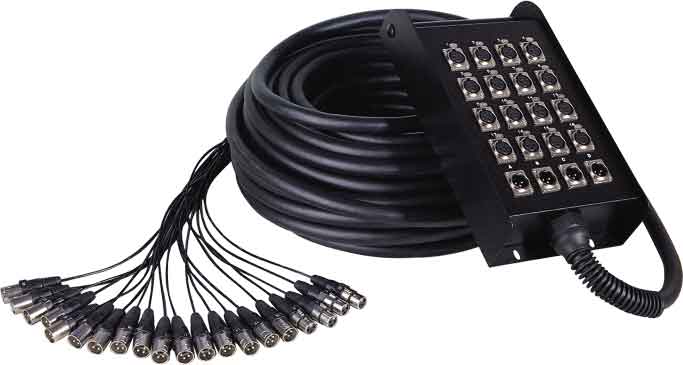
Need some think like that but with one XLR output cable.
Flopro
I must be the youngest audio person here! I hope!
Re: How to record drums?
That would be a mic combiner: they are relatively expensive (lots of expensive transformers and stuff in the good ones). For instance this Audio Technica box is £71 to run two mics down one cable. You'd need about four of these. EMO do a version that's about £113, and you don't have to stop there...
You would be far better off getting a small Behringer or Tapco or Alesis or Phonic mixer, any of which should give you change out of £100.
You would be far better off getting a small Behringer or Tapco or Alesis or Phonic mixer, any of which should give you change out of £100.
-

- Steve Hill
Frequent Poster - Posts: 3206 Joined: Tue Jan 07, 2003 12:00 am
Re: How to record drums?
Flopro wrote:I have a drum mic kit that i got: Here
Okay. Sit down, take a few deep breaths, and try to think calmly and logically for a moment.
The reason for installing seven mics around a drum kit is to allow individual and separate control of each drum source
If you combine the drum mic outputs without having that degree of control you forfeit most if not all of the benefits, and you would genuinely be better off and get considerably better results from using fewer mics that you can balance individually.
So, if your system has only four microphone inputs you can only record four microphone signals at once. There is no room for flexibility there. It doesn't matter how may microphones are included in your bargain box of mics... You only have four inputs!
There are several highly regarded drum miking techniques that do use only four mics, as has been suggested above. That approach is worth serious consideration nd actually has some significant advantages over a seven mic approach in some situations.
If you insist on using all seven of your bargain bucket of mics then you have just two choices:
1). Acquire an additional mixer to sub-mix the seven drums mics down to one or two outputs which you can then route to your existing sytem to be recorded as a complete mono or stereo drum mix.
This approach has the advantage that you can balance the levels of each mic individually to optimise the resulting sound mix and, if working with a stsreo output, you can even pan the drums to crate a lifelike stereo image....
2. Use some kind of passive mic combiner, like the ones Steve has suggested, to combine the signals from two (or more) mics together and feed into a single mic channel on your system.
The first problem with this is that each combiner is going to cost close to the price of a separate budget mixer and you'd need at least three of them. That's really not a cost-effective solution. (Okay, so there are cheap ones around with inferior transformers, but they won't have the dynamic range capability really needed for combining drum mics, so the results will sound poor anyway).
In any case, these kinds of combiners are really intended for applications where the two sources are closely related and don't require individual control -- like combining the outputs of violin bugs so that each string desk provides a single output instead of two... for example. In that case, the two violins would be producing very similar levels and can be used easily in a combined format.
That approach doesn't apply to drum mics since each source is likely to have different levels and the signals from each mic are radically different. Okay, so you could probably get away with combining the rack tom mics, but that's about it. You need individual control of the kick, snare and overheads as an absolute minimum. What similar signal could you combine the hihat mic with?
The second and third problems of course are that you lose any ability to separate (pan) the two mics spatially, or to adjust their relative balance.
The bottom line, I'm afraid, is that there is no simple solution involving a piece of cable with seven or eight female XLRs at one end and a single XLR at the other. It just doesn't exist -- because that kind of solution doesn't work and serves no useful purpose.
I would recommend acquiring a mixer or a computer interface with sufficient input channels for your requirements....
Hugh
-

- Hugh Robjohns
Moderator -
Posts: 43683 Joined: Fri Jul 25, 2003 12:00 am
Location: Worcestershire, UK
Contact:
Technical Editor, Sound On Sound...
(But generally posting my own personal views and not necessarily those of SOS, the company or the magazine!)
In my world, things get less strange when I read the manual...
(But generally posting my own personal views and not necessarily those of SOS, the company or the magazine!)
In my world, things get less strange when I read the manual...
Re: How to record drums?
A mixer with sufficient inputs will be less painful in use and likely a better long-term investment.
Just to check - how are you recording these drums? And what will you be doing with the recording afterwards?
These points might make a big difference to the best tool for the job. A lot of folks head for a mixer, only to be disappointed that they can't alter the mix of the drums after recording a stereo pair.
Just to check - how are you recording these drums? And what will you be doing with the recording afterwards?
These points might make a big difference to the best tool for the job. A lot of folks head for a mixer, only to be disappointed that they can't alter the mix of the drums after recording a stereo pair.

An Eagle for an Emperor, A Kestrel for a Knave.
Re: How to record drums?
Flopro wrote:I had a look around a saw THIS!
I would hook it up to my USB Alesis mixer, from the head phone output. If that would work?
Sell the usb mixer, take the money from that and the £300 you wanted to spend above and get an 8 input, usb/firewire interface. I picked up the saffire pro40 for £360 ish (currently 380), 8 inputs down firewire, which would give you individual control of each channel. Buying a mixer, to record the headphone output would be a dire waste of money.
If not, you would be better recording 4 good individual tracks using your existing setup and retaining that flexibility, rather than botching together a bounce down which greatly reduces what you can do after recording the tracks for the sake of using the mics you have.
Re: How to record drums?
Mowens800 wrote:Flopro wrote:I had a look around a saw THIS!
I would hook it up to my USB Alesis mixer, from the head phone output. If that would work?
Sell the usb mixer, take the money from that and the £300 you wanted to spend above and get an 8 input, usb/firewire interface. I picked up the saffire pro40 for £360 ish (currently 380), 8 inputs down firewire, which would give you individual control of each channel. Buying a mixer, to record the headphone output would be a dire waste of money.
If not, you would be better recording 4 good individual tracks using your existing setup and retaining that flexibility, rather than botching together a bounce down which greatly reduces what you can do after recording the tracks for the sake of using the mics you have.
Amen to all of that!
A new audio interface with the number of inputs you need would be a much better use of your money than the bodges so far discussed. Mowens is steering you in the right direction!
An Eagle for an Emperor, A Kestrel for a Knave.
Re: How to record drums?
It's a good idea but..... I don't realy want to sell the 4 input USB mixer. But i has one more look around and saw.....

It's the ALESIS, LineLink. I would hook that up to the mixer, and to my macbook. Would that work. I know i'm being a pain but.
It's the ALESIS, LineLink. I would hook that up to the mixer, and to my macbook. Would that work. I know i'm being a pain but.
I must be the youngest audio person here! I hope!
Re: How to record drums?
To use the Linelink as well as your USB mixer you'd need to set up an aggregate device in the MacBook - I've never tried this using USB devices, so I can't comment on the chances of it being successful and it certainly seems clumsy.
I'd like to know why you're so attached to the USB mixer, unless you use it for live work, the solution suggested would give you sufficient inputs, better pre-amps and an (arguably) more secure protocol with Firewire.
But before you continue with your shopping spree, you mentioned at the very beginning that your Alesis USB mixer had only 4 mic inputs. Browsing through the Alesis catalogue, I notice their USB mixers that have 4 mic inputs have additional line inputs. Perhaps you can tell us exactly what Alesis USB mixer you have, it's possible, and more logical, if you hook up an additional mixer or pre-amps through the line inputs on your current mixer (if it has them).
One thing we've all learned over the years is that it's very useful to make purchasing decisions that make sense in the longer term. There's nothing worse than having to sell something a year or two down the track. It's akin to burning money, but much less fun.
So perhaps a wise approach would be to experiment with using four mics first, there's a great deal to learn from using a more simplistic approach, and then review your priorities after that.
Bob
I'd like to know why you're so attached to the USB mixer, unless you use it for live work, the solution suggested would give you sufficient inputs, better pre-amps and an (arguably) more secure protocol with Firewire.
But before you continue with your shopping spree, you mentioned at the very beginning that your Alesis USB mixer had only 4 mic inputs. Browsing through the Alesis catalogue, I notice their USB mixers that have 4 mic inputs have additional line inputs. Perhaps you can tell us exactly what Alesis USB mixer you have, it's possible, and more logical, if you hook up an additional mixer or pre-amps through the line inputs on your current mixer (if it has them).
One thing we've all learned over the years is that it's very useful to make purchasing decisions that make sense in the longer term. There's nothing worse than having to sell something a year or two down the track. It's akin to burning money, but much less fun.
So perhaps a wise approach would be to experiment with using four mics first, there's a great deal to learn from using a more simplistic approach, and then review your priorities after that.
Bob
-

- Bob Bickerton
Longtime Poster -
Posts: 5634 Joined: Fri Dec 20, 2002 12:00 am
Location: Nelson, New Zealand
Contact:
Re: How to record drums?
The problem there is that most DAWs assume you're using one interface, and only one. ASIO can only handle one interface too. There is software which will pretend to be a single interface to keep your DAW happy, whilst joining up the two (or more) interfaces plugged in. But it tends to be relatively slow, hence high latencies.
Martin Walker wrote an article on this a few years ago, and it's still relevant.
<a href="/sos/feb06/articles/pcmusician.htm" target="_blank">http://www.soundonsound.com/sos/feb06/a ... ian.htm</a>
+1 on other posters saying "get a proper interface". If you want a new mixer to use live, then by all means go for the Soundcraft - they're a good bit of kit. But if you only want this for recording, there are *lots* of better ways of using that money! The M-Audio ProFire 2626 for instance is currently £360 from GAK, and would be perfect for you.
There really is *NO* point spending over £300 to cobble together a crappy botched system that does everything badly, when for an extra £50 you can get *precisely* what you need!
Martin Walker wrote an article on this a few years ago, and it's still relevant.
<a href="/sos/feb06/articles/pcmusician.htm" target="_blank">http://www.soundonsound.com/sos/feb06/a ... ian.htm</a>
+1 on other posters saying "get a proper interface". If you want a new mixer to use live, then by all means go for the Soundcraft - they're a good bit of kit. But if you only want this for recording, there are *lots* of better ways of using that money! The M-Audio ProFire 2626 for instance is currently £360 from GAK, and would be perfect for you.
There really is *NO* point spending over £300 to cobble together a crappy botched system that does everything badly, when for an extra £50 you can get *precisely* what you need!
Re: How to record drums?
grab wrote:Martine Walker wrote an article on this a few years ago, and it's still relevant.
That must have been before his gender reassignment operation then...


hugh
-
- Hugh Robjohns
Moderator -
Posts: 43683 Joined: Fri Jul 25, 2003 12:00 am
Location: Worcestershire, UK
Contact:
Technical Editor, Sound On Sound...
(But generally posting my own personal views and not necessarily those of SOS, the company or the magazine!)
In my world, things get less strange when I read the manual...
(But generally posting my own personal views and not necessarily those of SOS, the company or the magazine!)
In my world, things get less strange when I read the manual...
Re: How to record drums?
Flopro wrote:It's a good idea but..... I don't realy want to sell the 4 input USB mixer. But i has one more look around and saw.....
It's the ALESIS, LineLink. I would hook that up to the mixer, and to my macbook. Would that work. I know i'm being a pain but.
Enough!!!!
You're being silly. Its something we all have to go through at the start. Doing silly things and learning from you mistakes. People here are trying to warn you not to make that mistake but you seem set on it! All you'll end up doing is wasting money and eventually have to replace what you've bought (and in some cases lucky to get back a 3rd of what you payed in the first place!)
Seriously... The money you're talking about spending and the money you could make from selling your USB thing is more than enough to get you on your way to a pretty acceptable level.
The focusrite Saffires are great value for money. Great pres and a load of I/O
Don't waste your money!
-
- Persuazion
Frequent Poster -
Posts: 909 Joined: Sat Oct 29, 2005 12:00 am
Location: Scotland
Contact:
Re: How to record drums?
Flopro wrote:It's a good idea but..... I don't realy want to sell the 4 input USB mixer. But i has one more look around and saw...
Is this mixer a family heirloom?!
I've been in studios based on bodgery. Trust me, they are not pleasant places to be creative. These are the places where nothing every 'quite' works as expected, extra boxes and cables are needed for the simplest of tasks, the number of links between an instrument and the DAW has to be counted on an abacus and the owner thinks that 'regular maintenance' is licking a jack plug before he plugs it into the patchbay.
Get the right tool for the job and make it a principle for life - you'll be a happier person for it. The guys here know their stuff!
An Eagle for an Emperor, A Kestrel for a Knave.
Re: How to record drums?
Hugh Robjohns wrote:grab wrote:Martine Walker wrote an article on this a few years ago, and it's still relevant.
That must have been before his gender reassignment operation then...
hugh
I have known Martin variously as 'Martine', 'Collette', 'Sergeant Pinky' and 'Hetty the Wonder-Goat'.
My last encounter with him/it was outside a white window in Harley Street where he was conteplating becoming a piece of mid-range Tupperware. I'd like to think I helped talk him out of that one.
Martin - don't go into the light!
An Eagle for an Emperor, A Kestrel for a Knave.

Re: How to record drums?
Flopro wrote:It's a good idea but..... I don't realy want to sell the 4 input USB mixer. But i has one more look around and saw.....
It's the ALESIS, LineLink. I would hook that up to the mixer, and to my macbook. Would that work. I know i'm being a pain but.
It's no skin off my back if you buy some cables and botch a system together. You'll find trying to use the system you have suggested will be much more hassle than it is worth.
Let's get to the bottom of this.
What is the USB mixer you have
Why are you so reluctant to sell it
What is your total budget for additional equipment (I'm thinking atleast £300ish from the mixer suggested above).
It makes sense that if you want to record drums, and you want to do a good job you need to either stick with 4 tracks, or buy a new device with more tracks. In this day and age, it seems ridiculous to have a computer based system which gives you no flexibility to alter the mix at a later date. You could spend ages doing the drums, to find the toms are too loud, and because of the method you have used, they are stuck too loud and you need to re-record the whole thing... or you could take our advice (as repeated by everyone in this thread), and pull a fader down in your daw (thanks to separately recorded tracks due to your nice new interface). So much easier.
Re: How to record drums?
Another point, can the USB Alesis interface record more than one (stereo) channel at once?
-

- Richie Royale
Frequent Poster - Posts: 4551 Joined: Tue Sep 12, 2006 12:00 am Location: Bristol, England.
Re: How to record drums?
Right dudes, been reading alot of the things that you have been saying. And what i realy need is..... Hummmmm..... I don't realy know how to explain it? It's a mixer that hooks up to a computer, i think via FireWire. But that every tack on the mixer, has a track on the computer?
Or am i talking smeg??
Or am i talking smeg??
I must be the youngest audio person here! I hope!
Re: How to record drums?
http://www.mackie.com/products/onyxiseries/ One possibility.
-
- Richie Royale
Frequent Poster - Posts: 4551 Joined: Tue Sep 12, 2006 12:00 am Location: Bristol, England.
Re: How to record drums?
Flopro wrote:Right dudes, been reading a lot of the things that you have been saying. And what i realy need is..... Hummmmm..... I don't realy know how to explain it? It's a mixer that hooks up to a computer, i think via FireWire. But that every tack on the mixer, has a track on the computer?
Or am i talking smeg??
No, you’re beginning to get it!
Let’s leave the word ‘mixer’ aside for the moment…
With an audio interface (AI) you pretty much get what you see – if it has 8 mic inputs, then you can plug 8 mic’s into it and record each of the mic’s on 8 separate tracks in your computer. Then you can play around with each track to EQ, set level, add effects – anything you like to get the perfect-sounding drum recording.
Now if you think about it, why would you need a ‘mixer’ if you can do all this after you’ve recorded your tracks? You don’t! You don't want to 'mix' your mic inputs - you want to keep them separate!
You can *choose* to have a mixer, especially if you want to do other things with it, but for recording it isn’t necessary. Most AIs come with a mixer application where you can set up your foldback mix and do a few of the other sundry things a ‘mixer’ might give you, such as routing.
For the money you’re prepared to spend this seems like a sensible option – and it sounds as if you’re beginning to see that now. Life should get a bit easier from here!

An Eagle for an Emperor, A Kestrel for a Knave.
Re: How to record drums?
Flopro wrote:Right dudes, been reading alot of the things that you have been saying.
What an excellent idea!
-

- Tomás Mulcahy
Frequent Poster -
Posts: 3007 Joined: Wed Apr 25, 2001 12:00 am
Location: Cork, Ireland.
Contact: