Martin Walker's controller
Martin Walker's controller
Hi there. I remember Martin talking about a small controller keyboard he used for sound design (I think) and I liked the look of it. Unfortunately I didn't bookmark it and am coming up dry...Martin...anyone..got link?
Re: Martin Walker's controller
Hi JaymanLDN!
I still use my trusty Evolution Mk-225C, despite it being a bit long in the tooth, but sadly the Evolution range is no longer with us, as they were taken over by M-Audio, who have their own mini-keyboard range:

However, it’s nothing special - I use it because the velocity response is good, it's silver and matches the width of my silver PC keyboard, so I place one above the other ion my desk, for detailed editing purposes.
I move over to my 88-key CME UF8 for most serious playing, since that also has aftertouch and a much better action.
To be honest I could do with a controller that has an X/Y pad and joystick, if I could find one I liked. I am currently rather taken with Novation’s SL Mk II:
www.novationmusic.com/uk/products/midi_controllers/sl_mkii

...but haven’t tried it out in the flesh yet.
Hope this helps!
Martin
I still use my trusty Evolution Mk-225C, despite it being a bit long in the tooth, but sadly the Evolution range is no longer with us, as they were taken over by M-Audio, who have their own mini-keyboard range:
However, it’s nothing special - I use it because the velocity response is good, it's silver and matches the width of my silver PC keyboard, so I place one above the other ion my desk, for detailed editing purposes.
I move over to my 88-key CME UF8 for most serious playing, since that also has aftertouch and a much better action.
To be honest I could do with a controller that has an X/Y pad and joystick, if I could find one I liked. I am currently rather taken with Novation’s SL Mk II:
www.novationmusic.com/uk/products/midi_controllers/sl_mkii
...but haven’t tried it out in the flesh yet.
Hope this helps!
Martin
-

- Martin Walker
Moderator -
Posts: 22574 Joined: Wed Jan 13, 2010 8:44 am
Location: Cornwall, UK
Contact:
Re: Martin Walker's controller
My pleasure - if you end up buying that Novation do let me know what you think of the action of the X/Y pad 
Martin
Martin
-
- Martin Walker
Moderator -
Posts: 22574 Joined: Wed Jan 13, 2010 8:44 am
Location: Cornwall, UK
Contact:
Re: Martin Walker's controller
Martin Walker wrote:My pleasure - if you end up buying that Novation do let me know what you think of the action of the X/Y pad
Martin
Hi Martin,
I do not like the action on my Novation's Remote LE25. It's not 'fine' enough.
I only use this controller while away. One time, I wanted to have direct control of Alchemy's XY pads during a sound design project, and Novation's XY pad was driving me crazy with its imprecise and unresponsive action on any of the sides/corners. It was so bad that I have abandoned using it and now plan to put post-it notes on the XY pad to make better use of the available space.


A question may be asked: why use the side or corners of the XY pad, if the central space is more responsive. The answer ( as you know) is: If I have a HPF cutoff assigned to one of the XY pads in Alchemy ( as an example), and then want to close it, I need to sweep down/or up the side of the XY pad. And here is where Novation's XY pad does not perform, unless I have missed a trick in the options, if there are any, where I could set a greater sensitivity for the pad.
My hope is that the XY pad is better on those bigger Novation controllers ( which I doubt).
www.electric-himalaya.com VST and hardware synth sound design
Re: Martin Walker's controller
Thanks Raph! 
It’s the Alchemy XY Pads and Remix pads that I’d be interested in using with my proposed controller purchase, so that’s just the sort of detailed feedback I needed to hear
Martin
It’s the Alchemy XY Pads and Remix pads that I’d be interested in using with my proposed controller purchase, so that’s just the sort of detailed feedback I needed to hear
Martin
-
- Martin Walker
Moderator -
Posts: 22574 Joined: Wed Jan 13, 2010 8:44 am
Location: Cornwall, UK
Contact:
Re: Martin Walker's controller
I thought it would be Alchemy with which you'd want to use hardware XY pads.
I can only recommend you try the latest incarnations of Novation's midi keyboards and judge for yourself, as I would really want to find out that the XY pad has been improved. Otherwise, I would need to investigate one of the Korg XY pads.
I can only recommend you try the latest incarnations of Novation's midi keyboards and judge for yourself, as I would really want to find out that the XY pad has been improved. Otherwise, I would need to investigate one of the Korg XY pads.
www.electric-himalaya.com VST and hardware synth sound design
Re: Martin Walker's controller
Yep - I considered a Korg nanopad some time ago, although it did seem overkill when I only wanted an XY pad

However, now you can get them at £29 they are cheap enough to buy on a whim:
www.dv247.com/computer-hardware/korg-nanopad-black-nano-pad-usb-powered-slim-line-controller--60071
Martin
However, now you can get them at £29 they are cheap enough to buy on a whim:
www.dv247.com/computer-hardware/korg-nanopad-black-nano-pad-usb-powered-slim-line-controller--60071
Martin
-
- Martin Walker
Moderator -
Posts: 22574 Joined: Wed Jan 13, 2010 8:44 am
Location: Cornwall, UK
Contact:
Re: Martin Walker's controller
Hmm...
Martin, would you prefer a touchpad, or would a midi joystick do the job?
I only asked because I've been looking at this arduino site and they have some interesting tools there. I have to admit, I've been toying with some ideas myself
Andy
Martin, would you prefer a touchpad, or would a midi joystick do the job?
I only asked because I've been looking at this arduino site and they have some interesting tools there. I have to admit, I've been toying with some ideas myself
Andy

There is a profound African saying, "A white man who cannot dance is a victimless crime, whereas a white man with a djembe drum ..."
Re: Martin Walker's controller
Hi Andy!
Ideally I’d like both
What Himalaya and I re both trying to control a lot of the time is Camel Audio’s Alchemy softsynth, which offers this versatile set of performance controls:
A MIDI joystick would be perfect when in charge of the two XYpads, and a touchpad for smoothly morphing and darting about among the eight snapshots of the Remix Pad.

I have considered having a stab at a MIDI touchpad using this $60 component, but haven’t yet found the time:
www.ergonomictouchpad.com/xl_touchpad.php
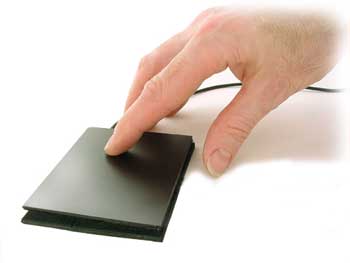
It’s a largish 3.8“ by 3“
Martin
Ideally I’d like both
What Himalaya and I re both trying to control a lot of the time is Camel Audio’s Alchemy softsynth, which offers this versatile set of performance controls:
A MIDI joystick would be perfect when in charge of the two XYpads, and a touchpad for smoothly morphing and darting about among the eight snapshots of the Remix Pad.
I have considered having a stab at a MIDI touchpad using this $60 component, but haven’t yet found the time:
www.ergonomictouchpad.com/xl_touchpad.php
It’s a largish 3.8“ by 3“
Martin
-
- Martin Walker
Moderator -
Posts: 22574 Joined: Wed Jan 13, 2010 8:44 am
Location: Cornwall, UK
Contact:
Re: Martin Walker's controller
I'll keep that in mind while I'm exploring online
Andy
Andy
There is a profound African saying, "A white man who cannot dance is a victimless crime, whereas a white man with a djembe drum ..."
Re: Martin Walker's controller
beginning to get some ideas guys...
I don't have Alchemy, but I've just had a read of the manual. And if a few things work out soon, I might be in a position to invest in a decent music PC and some more toys.... The X-Y pad is easy to assign to MIDI control, but the remix pad is mouse driven...
The MIDI joystick should be straightforward using something like the MIDUINO. Not exactly easy, but straightforward Get one of those heavy duty panel joysticks the MAME guys use for their vintage arcade game emulators.
Then I thought... you can buy replacements for the Nintendo DS lower touchscreen. Both the touch sensor and the LCD. The simple way is to use the touch sensor pad as a track pad, but it might be possible to use the LCD too and set it up as a second display under Windows. The resolution wouldn't be great, but it could work. However, if I could find a way to use the Windows Accessibility tools screen magnifier and direct it's output to the LCD as a second display, we could be cooking on gas. A friend of mine is working on a project for a customer where they want to have twin mouse input and it has to be bulletproof, needs to be approved by the Health and Safety Executive for railway signalling. I've seen his prototypes running, and there is certainly twin mouse code for Windows out there in the gaming community too.
So, in principle at least, it could be possible to have a box with a joystick and a touchscreen LCD display showing just the remix pad with it's own mouse. Now, I certainly don't have the skills to build it and write the software yet, and it'll take me months or years to get there. But I think I'll mention it to my friend Mark and see if he gets curious about seeing if he can write the code. And if anyone else is reading, feel free to give it a go too.
Andy
I don't have Alchemy, but I've just had a read of the manual. And if a few things work out soon, I might be in a position to invest in a decent music PC and some more toys.... The X-Y pad is easy to assign to MIDI control, but the remix pad is mouse driven...
The MIDI joystick should be straightforward using something like the MIDUINO. Not exactly easy, but straightforward
Get one of those heavy duty panel joysticks the MAME guys use for their vintage arcade game emulators.Then I thought... you can buy replacements for the Nintendo DS lower touchscreen. Both the touch sensor and the LCD. The simple way is to use the touch sensor pad as a track pad, but it might be possible to use the LCD too and set it up as a second display under Windows. The resolution wouldn't be great, but it could work. However, if I could find a way to use the Windows Accessibility tools screen magnifier and direct it's output to the LCD as a second display, we could be cooking on gas. A friend of mine is working on a project for a customer where they want to have twin mouse input and it has to be bulletproof, needs to be approved by the Health and Safety Executive for railway signalling. I've seen his prototypes running, and there is certainly twin mouse code for Windows out there in the gaming community too.
So, in principle at least, it could be possible to have a box with a joystick and a touchscreen LCD display showing just the remix pad with it's own mouse. Now, I certainly don't have the skills to build it and write the software yet, and it'll take me months or years to get there. But I think I'll mention it to my friend Mark and see if he gets curious about seeing if he can write the code. And if anyone else is reading, feel free to give it a go too.
Andy
There is a profound African saying, "A white man who cannot dance is a victimless crime, whereas a white man with a djembe drum ..."
Re: Martin Walker's controller
Like all the other ALchemy controls, you can assign MIDI controllers to the Remix Pad - if you right-click on it you get options to 'MIDI Learn X' and 'MIDI Learn Y. I've already controlled it using two sliders but it's not very intuitive
A larger touchpad like the one I mentioned ought to result in better fine control, as all the other controls in that performance area morph between the values assigned to them for each Remix pad as you slowly move the cursor around.
As for the touch screen idea - lateral thinking is always the best way to get low prices isn’t it? Specialist part = expensive, while mainstream part - cheap
I’m not sure how it would interface, but even Amazon stock these Nintendo replacement parts at just £5:
www.amazon.co.uk/Touch-Screen-Display-Nintendo-Lite/dp/B0010LXJYC

Martin
A larger touchpad like the one I mentioned ought to result in better fine control, as all the other controls in that performance area morph between the values assigned to them for each Remix pad as you slowly move the cursor around.
As for the touch screen idea - lateral thinking is always the best way to get low prices isn’t it? Specialist part = expensive, while mainstream part - cheap
I’m not sure how it would interface, but even Amazon stock these Nintendo replacement parts at just £5:
www.amazon.co.uk/Touch-Screen-Display-Nintendo-Lite/dp/B0010LXJYC
Martin
-
- Martin Walker
Moderator -
Posts: 22574 Joined: Wed Jan 13, 2010 8:44 am
Location: Cornwall, UK
Contact:
Re: Martin Walker's controller
Just found this kit for a 5.7-inch touch screen, complete with USB controller circuitry for £19.99:
www.virtualvillage.co.uk/57-touch-screen-kit-with-usb-for-windows-mac-linux-007900-093.html

Looks promising!
Martin
www.virtualvillage.co.uk/57-touch-screen-kit-with-usb-for-windows-mac-linux-007900-093.html
Looks promising!
Martin
-
- Martin Walker
Moderator -
Posts: 22574 Joined: Wed Jan 13, 2010 8:44 am
Location: Cornwall, UK
Contact:
Re: Martin Walker's controller
Now, a screen like that mated to a miduino would do the job really easily. Choose the 2 CC's you want the touchpad to transmit, merge with the Keyboard MIDI, and then map in Alchemy as normal.
Might be cheaper, easier, and more reliable to do it that way rather than write a driver to convert the USB output to MIDI.
Andy
Might be cheaper, easier, and more reliable to do it that way rather than write a driver to convert the USB output to MIDI.
Andy
There is a profound African saying, "A white man who cannot dance is a victimless crime, whereas a white man with a djembe drum ..."
Re: Martin Walker's controller
There's this touchpad to midi softwareas well, but unfortunately it's only for synaptic touchpads which mine isn't.
If you could get a synaptic based pad it might be worth it. I'd love it if the guy updated it.
If you could get a synaptic based pad it might be worth it. I'd love it if the guy updated it.
Re: Martin Walker's controller
Yep, I’ve been keeping my eye on that utility as well, but like you I don’t have a Synaptics pad. I’ts a shame the other manufacturers won’t give the relevant interfacing info to its developer so he can add more comprehensive support
The more upmarket Tablet 2 MIDI ( www.livelab.dk/tablet2midi.php ) works with plenty of graphics tablets, including models from Wacom, Trust, Aiptek, and Medion.
Martin
The more upmarket Tablet 2 MIDI ( www.livelab.dk/tablet2midi.php ) works with plenty of graphics tablets, including models from Wacom, Trust, Aiptek, and Medion.
Martin
-
- Martin Walker
Moderator -
Posts: 22574 Joined: Wed Jan 13, 2010 8:44 am
Location: Cornwall, UK
Contact:
Re: Martin Walker's controller
zenguitar wrote:beginning to get some ideas guys...
I don't have Alchemy, but I've just had a read of the manual. And if a few things work out soon, I might be in a position to invest in a decent music PC and some more toys.... The X-Y pad is easy to assign to MIDI control, but the remix pad is mouse driven...
Zen baby, make sure to add Martin's Alchemy libraries to that list. They are top draw!

Re: Martin Walker's controller
Why thank you kind sir 
Martin
Martin
-
- Martin Walker
Moderator -
Posts: 22574 Joined: Wed Jan 13, 2010 8:44 am
Location: Cornwall, UK
Contact:
Re: Martin Walker's controller
Just a thought, but if you have an Android or Apple touch screen phone, there are free apps around that you can use as an XY controller.
It's also easy to convert any HID to MIDI using the GlovePie application: trackballs, touch pads, graphics tablets etc all included.
It's also easy to convert any HID to MIDI using the GlovePie application: trackballs, touch pads, graphics tablets etc all included.

Re: Martin Walker's controller
I have a lot of fun controlling Alchemy remix pad from Mac laptop trackpad, with "drag-lock" mode engaged.
And now I have a Magic Trackpad in my studio, which is even betterer...
Clearly, this is different from a dedicated controller, in that the mouse pointer has to be over the remix pad.
And now I have a Magic Trackpad in my studio, which is even betterer...
Clearly, this is different from a dedicated controller, in that the mouse pointer has to be over the remix pad.

Re: Martin Walker's controller
chris... wrote:Clearly, this is different from a dedicated controller, in that the mouse pointer has to be over the remix pad.
Actually no - you can assign a pair of MIDI controllers to Remix Pad X and Y to control them without mousing at all
Martin
-
- Martin Walker
Moderator -
Posts: 22574 Joined: Wed Jan 13, 2010 8:44 am
Location: Cornwall, UK
Contact:
Re: Martin Walker's controller
Martin Walker wrote:Actually no - you can assign a pair of MIDI controllers to Remix Pad X and Y to control them without mousing at all
Yep - sorry if ambiguous. Your plan is better and doesn't involve mousing.
But my plan needs no extra hardware, and works nicely out+about with my laptoy
Re: Martin Walker's controller
Hi all!
I know this is now an ancient thread, but the content is still very useful and valid, and having just read through it again I can update it several important areas from my own subsequent experience.
1. I did end up buying a Korg Nanopad and loved it - X/Y pad was very responsive, and the drum pads were great for auditioning kit sounds. I still have it.
2. However, I still hankered after a joystick, so I subsequently ended up buying a Novation 25SL MkII, whose keyboard (both velocity-sensitive and with aftertouch) was wonderful, and the joystick extremely usable.
3. However, sadly, the 25SL MkII X/Y pad rarely gets used, because it takes so much pressure to get a MIDI signal to emerge from it, and a finger's width along the top edge of the pad doesn't do anything. I personally found the Korg Nanopad X/Y pad FAR more pleasurable to play with, which I found really surprising, as Novation have a really good reputation.
Ho hum!
Martin
I know this is now an ancient thread, but the content is still very useful and valid, and having just read through it again I can update it several important areas from my own subsequent experience.
1. I did end up buying a Korg Nanopad and loved it - X/Y pad was very responsive, and the drum pads were great for auditioning kit sounds. I still have it.
2. However, I still hankered after a joystick, so I subsequently ended up buying a Novation 25SL MkII, whose keyboard (both velocity-sensitive and with aftertouch) was wonderful, and the joystick extremely usable.
3. However, sadly, the 25SL MkII X/Y pad rarely gets used, because it takes so much pressure to get a MIDI signal to emerge from it, and a finger's width along the top edge of the pad doesn't do anything. I personally found the Korg Nanopad X/Y pad FAR more pleasurable to play with, which I found really surprising, as Novation have a really good reputation.
Ho hum!
Martin
-
- Martin Walker
Moderator -
Posts: 22574 Joined: Wed Jan 13, 2010 8:44 am
Location: Cornwall, UK
Contact: