I'd like to create my own sample library in my own studio. I only have a bit of experience with Kontakt. I don't know anything about scripting. I've created a few patches in Kontakt but I'd like to create patches with multiple mic positions. The problem is setting the start and end times on the wav files. Doing it exactly the same on multiple seems like it would be tedious. I'd be having with having separate patches for each mic position but they'd still have to be cut exactly the same.
I've seen some pictures from sampling companies where they have protools with many files cut the same. I'm wondering how they do it. I imagine that they don't have to do as much work as I would have to do while working in Kontakt because that would take decades with some libraries.
I've also heard of software that automatically cuts samples with multiple mics but I can't seem to find such software.
Could someone shed some light on how the sampling companies do their editing and how I can efficiently edit multiple mic positions?
Thanks!
Sampling
Sampling
-
- Gerhard Westphalen
Regular -
Posts: 226 Joined: Sun Mar 21, 2010 12:00 am
Location: Calgary, Canada
Contact:
Re: Sampling
http://www.chickensys.com/products2/constructor/index.html
http://www.chickensys.com/products2/kontaktassistant/index.html
these may be of interest to you.
Look up batch processing and strip silence, they may be of some help to you too.
http://www.chickensys.com/products2/kontaktassistant/index.html
these may be of interest to you.
Look up batch processing and strip silence, they may be of some help to you too.
-

- Richie Royale
Frequent Poster - Posts: 4551 Joined: Tue Sep 12, 2006 12:00 am Location: Bristol, England.
Re: Sampling
Sorry, I hate to break the news but the only way to do this properly is to roll your sleeves up and edit each sample individually, ideally in a proper sample editor, not Kontakt's lame attempt at one.
Yes - it's tedious and time consuming and intensive work but developing a sample library is no mean feat (trust me - I've been doing this for nearly 30 years).
There are batch processors that can take a bit of the tedium out of things but in my experience, they can be a bit of a dog's breakfast and totally screw things ... or not behave as you would expect requiring manual intervention (again, trust me!).
The fact is that developing a sample library is bloody hard work- hours, days, weeks - even months - of sometimes/often tedious work. And if you're considering Kontakt, you have have to factor in scripting if you intend to switch between or mix and match the mic positions.
I don't want to put a damper on your intentions - just be prepared for a serious chunk of work!
Yes - it's tedious and time consuming and intensive work but developing a sample library is no mean feat (trust me - I've been doing this for nearly 30 years).
There are batch processors that can take a bit of the tedium out of things but in my experience, they can be a bit of a dog's breakfast and totally screw things ... or not behave as you would expect requiring manual intervention (again, trust me!).
The fact is that developing a sample library is bloody hard work- hours, days, weeks - even months - of sometimes/often tedious work. And if you're considering Kontakt, you have have to factor in scripting if you intend to switch between or mix and match the mic positions.
I don't want to put a damper on your intentions - just be prepared for a serious chunk of work!
-

- hollowsun
Frequent Poster -
Posts: 2036 Joined: Thu Jan 20, 2005 12:00 am
Location: Cowbridge, South Wales
Contact:
Website / Music Lab Machines / Blog
Re: Sampling
There are only a few solo instruments and percussion that I'd like to do. I don't need any controls and like I said I'm fine with having mic positions on different patches so I thought that I could not do any scripting.
I'm not looking to do anything fancy. Just the basic stuff.
I'll look into the chicken systems products.
Is there something that just helps with multiple mic positions and just cutting at the same spots? Even if its inside Kontakt?
Are there any websites that I can see how companies like Eastwest, 8dio, and Spitfire edit their libraries?
I'm not looking to do anything fancy. Just the basic stuff.
I'll look into the chicken systems products.
Is there something that just helps with multiple mic positions and just cutting at the same spots? Even if its inside Kontakt?
Are there any websites that I can see how companies like Eastwest, 8dio, and Spitfire edit their libraries?
-
- Gerhard Westphalen
Regular -
Posts: 226 Joined: Sun Mar 21, 2010 12:00 am
Location: Calgary, Canada
Contact:
Re: Sampling
I don't know of any videos- check their websites? Hollowsun is right, but here is a selection of tools you would need:
http://www.samplerobot.com/
http://www.audiofile-engineering.com/triumph/
http://www.audiofile-engineering.com/samplemanager/
http://www.antarestech.com/products/infinity.shtml
Here's a review of the unfortunately unavailable Autosampler:
http://www.soundonsound.com/sos/feb05/a ... ampler.htm
http://www.samplerobot.com/
http://www.audiofile-engineering.com/triumph/
http://www.audiofile-engineering.com/samplemanager/
http://www.antarestech.com/products/infinity.shtml
Here's a review of the unfortunately unavailable Autosampler:
http://www.soundonsound.com/sos/feb05/a ... ampler.htm
-

- Tomás Mulcahy
Frequent Poster -
Posts: 3007 Joined: Wed Apr 25, 2001 12:00 am
Location: Cork, Ireland.
Contact:
Re: Sampling
If it's just a few samples and you wanna DIY you could use a DAW? several allow you to group edit multi-mic recordings and then batch-export the individual hits as separate wav files. That way you only need micro edit the the 'direct' mic and the other mics start points/phase will be retained relative to each other. Not particularly efficient for larger sessions though, personal use only... Otherwise see above advice!
Re: Sampling
Ok so the method I was using was to import the whole clip with everything into Kontakt and then cutting the particular section of that wav for each note within Kontakt.
I spoke to someone at Embertone who said that they cut all the note in a DAW and then just drop each file into Kontakt instead of cutting in Kontakt. I know that I can group edit in Cubase so problem solved in regard to cutting multiple mic positions.
Do anyone know if there's a way in Cubase to export the individually cut pieces of a wav to separate clips that I can drop into Kontakt? It seems tedious to have to place the start and end markers for each clip and then export. Is there a way that it just exports each cut file separately?
I spoke to someone at Embertone who said that they cut all the note in a DAW and then just drop each file into Kontakt instead of cutting in Kontakt. I know that I can group edit in Cubase so problem solved in regard to cutting multiple mic positions.
Do anyone know if there's a way in Cubase to export the individually cut pieces of a wav to separate clips that I can drop into Kontakt? It seems tedious to have to place the start and end markers for each clip and then export. Is there a way that it just exports each cut file separately?
-
- Gerhard Westphalen
Regular -
Posts: 226 Joined: Sun Mar 21, 2010 12:00 am
Location: Calgary, Canada
Contact:
Re: Sampling
hollowsun wrote:Sorry, I hate to break the news but the only way to do this properly is to roll your sleeves up and edit each sample individually, ideally in a proper sample editor, not Kontakt's lame attempt at one.
Well...
There is/was imo opinion only one tool that does this *properly*, and that's Redmatica's Keymap. It was absolutely brilliant - unfortunately, Apple bought Redmatica and killed all of it's products.
Keymap makes creating multisampled instruments about as painless as it can be - it has hundreds of tools, too many to list here. I'm holding onto my Keymap Pro license for as long as it runs, it's too useful. Doing it any other way is like ploughing fields manually with a spoon, rather than using a posh tractor...

..............................mu:zines | music magazine archive | difficultAudio | Legacy Logic Project Conversion
Re: Sampling
I found a steinberg forum post which I is so far the quickest method to cutting the samples. Basically you group edit and put in the hit points. Then you create regions from the hitpoints and bounce the regions so each region becomes a separate file. This seems to work for me. Not sure if there is an even quicker method.
-
- Gerhard Westphalen
Regular -
Posts: 226 Joined: Sun Mar 21, 2010 12:00 am
Location: Calgary, Canada
Contact:
Re: Sampling
Tomás Mulcahy wrote:here is a selection of tools you would need:
*snip*
http://www.antarestech.com/products/infinity.shtml
Mac OS9 only, sadly.
I'd kill for an OSX version. I kept an OS9 Mac going simply for that. Bloody brilliant looping tool...
For some things - could make a right hash of some material, however.
I met the chap who created Infinity. Lovely bloke but they are not updating it. So that's that for Infinity. When asked why ... "No call for it - not worth supporting". Seems that with the vast amounts of memory available today in s/w samplers, people aren't looping! But I iz Old sKooL! My preferred weapon of choice is DSP Quattro - damned fine sample editor/looper (Mac only though).
There was a PC application for looping (forget the name - Seamless Looper?) but (presumably for the same reasons as Infinity is no longer supported) is no longer available. It wasn't as clever as Infinity though - just did crossfade looping and often not very well.
-
- hollowsun
Frequent Poster -
Posts: 2036 Joined: Thu Jan 20, 2005 12:00 am
Location: Cowbridge, South Wales
Contact:
Website / Music Lab Machines / Blog
Re: Sampling
desmond wrote:There is/was imo opinion only one tool that does this *properly*, and that's Redmatica's Keymap. It was absolutely brilliant
I never got on with it. Yes, superficially it made it relatively painless but I found manual intervention was almost always required after the event to fix dodgy start times and lumpy loops. So better, I thought, to roll my own.
Oh sweet Mary, mother of our good Lord, I would LOVE some tool where I could click on some button and everything would be taken care of but I've not found anything - close ... but no cigar!
-
- hollowsun
Frequent Poster -
Posts: 2036 Joined: Thu Jan 20, 2005 12:00 am
Location: Cowbridge, South Wales
Contact:
Website / Music Lab Machines / Blog
Re: Sampling
I've found it simpler to do in PT. Just cut, delete unused from clip list, and export all clips. Then just drop into Kontakt. I'm not sure how to handle doing loops and syncing those between mic positions but not so important to me since I usually record long notes and don't loop samples.
-
- Gerhard Westphalen
Regular -
Posts: 226 Joined: Sun Mar 21, 2010 12:00 am
Location: Calgary, Canada
Contact:
Re: Sampling
hollowsun wrote:I kept an OS9 Mac going simply for that.
Me too. Well, the OS9 Mac under the bed in the spare room and I haven't booted it up in two years...
Is the looping in DSP Quattro good?
I really like Redmatica Autosampler, I used it for the Casio stuff. It's not really automatic because it takes a few runs of multisampling and testing to get the settings right for each patch, and there is always manual editing to do. But it definitely reduces the drudgery! The looping is quite basic if you're used to what Infinity can do. Just making longer samples works 80% of the time. One major PITA is it doesn't sample the release part of a sound. I had a few of those on the CZ. As you say, another issue is dodgy start times- but I'd say that was only 10% of the time. Because of all the manual editing I only made Kontakt versions, only way to ensure 100% perfection. But if it's not synths you're sampling, it's of little use. That said, I might try it on the piano some time.
-
- Tomás Mulcahy
Frequent Poster -
Posts: 3007 Joined: Wed Apr 25, 2001 12:00 am
Location: Cork, Ireland.
Contact:
Re: Sampling
hollowsun wrote:desmond wrote:There is/was imo opinion only one tool that does this *properly*, and that's Redmatica's Keymap. It was absolutely brilliant
I never got on with it. Yes, superficially it made it relatively painless but I found manual intervention was almost always required after the event to fix dodgy start times and lumpy loops. So better, I thought, to roll my own.
Yeah I know you feel that way, I think we chatted briefly about this before. It's not that it made everything automatic as such (although it had a lot of tools for this), it's that it had fantastic tools to take the drudgery out of things. For example, let's say you had a bunch of samples for your next multisampled instrument - you could drag em in, hit a button and have each sample pitch analysed and placed on the appropriate root key, automatically extended out the pitch range to the next note.
You could then select all the regions, trim the start points and end points instantly with one click, and then volume balance across all the zones.
Doing this sample by sample is incredibly tedious.
Seriously - my first multisampled instrument done with SoundForge and Kontakt took an evening to sort out the samples, loop, and map them for a handful of instruments. The exact same job I could do far better with Keymap in about 5 minutes... And once you get it, there is no going back to slow and painful...

It wasn't simple to start to use, it's incredibly deep, but once you start to get it my god it's fantastic. And don't forget, you have all those tools *in addition* to doing manual stuff in sample editors - so you can work however you want to - use the appropriate tool for the job. Sample editors are not multisampled-instrument creation tools.
I guess it's a bit like Photoshop vs Lightroom - Photoshop is the tool where you want to work deeply on one image, whereas Lightroom is the tool where you've done a photoshoot and need to ingest 1200 pictures and get down to the 150 processed best versions to present to the client.
..............................mu:zines | music magazine archive | difficultAudio | Legacy Logic Project Conversion
Re: Sampling
Tomás Mulcahy wrote:I really like Redmatica Autosampler, I used it for the Casio stuff.
Did you sample out the raw CZ waveforms, out of interest? I'm somewhat regretting selling my old CZ-101...
I thought someone would have made a CZ emulation soft synth by now, but alas...
Tomás Mulcahy wrote:The looping is quite basic if you're used to what Infinity can do. Just making longer samples works 80% of the time. One major PITA is it doesn't sample the release part of a sound. I had a few of those on the CZ. As you say, another issue is dodgy start times- but I'd say that was only 10% of the time. Because of all the manual editing I only made Kontakt versions, only way to ensure 100% perfection. But if it's not synths you're sampling, it's of little use. That said, I might try it on the piano some time.
Keymap Pro goes lot further in terms of looping. I've never seen anything more comprehensive...
Anyway, pointless seeing as Keymap is effectively dead unless you own it already. Sad... we'll see what Andrea has been up to in the next release of Logic, at least...
..............................mu:zines | music magazine archive | difficultAudio | Legacy Logic Project Conversion
Re: Sampling
Tomás Mulcahy wrote:Is the looping in DSP Quattro good?
Yes - pretty good. It's not Infinity but the crossfade loop is pretty good (depending on the source material). But I find it quite intuitive (but then I've been using it for a few years now so I guess I am used to it)
Tomás Mulcahy wrote:I really like Redmatica Autosampler, I used it for the Casio stuff. It's not really automatic because it takes a few runs of multisampling and testing to get the settings right for each patch, and there is always manual editing to do.
Yes - that's what I found ... and I got fed up up with it - too hit and miss - so I roll my own. I find it's the only way to get exactly what I want. Tedious? Yes but I don't trust batch processors.
-
- hollowsun
Frequent Poster -
Posts: 2036 Joined: Thu Jan 20, 2005 12:00 am
Location: Cowbridge, South Wales
Contact:
Website / Music Lab Machines / Blog
Re: Sampling
Cool must check out Quattro, and wean myself off Bias Peak.
-
- Tomás Mulcahy
Frequent Poster -
Posts: 3007 Joined: Wed Apr 25, 2001 12:00 am
Location: Cork, Ireland.
Contact:
Re: Sampling
Tomás Mulcahy wrote:Cool must check out Quattro, and wean myself off Bias Peak.
Well, Bias is no longer available so Quattro might be a good option. And Stefano (who authored it) is a truly lovely bloke and very open to suggestions, etc.. He does a $49 cross grade from Bias Peak so it's affordable. Even at full price of $99, it's unlikely to break the bank if you're serious about this stuff. One of the best spends I've made.
The fact is (it seems) is that people are generally not sampling (they rely on libraries) hence the demise of Infinity, Bias and so on. And if they are, they just record notes as long as possible, tweak the start point and that's that ... or are just sampling drum and percussion sounds. I don't base this on assumption but on having spoken with people and worked with people. I was once the first port of call for sample editing and looping with some developers but they just don't bother with that any more. Not that I am bothered from a financial point of view (I'm too damned busy with m own stuff) but it does bother me a little that those old skills aren't being observed - strikes me as a bit lazy and users end up with bloated library. But there ya go - things change.
DSP Quattro ... not to be confused with Suzi or Audi, of course!

-
- hollowsun
Frequent Poster -
Posts: 2036 Joined: Thu Jan 20, 2005 12:00 am
Location: Cowbridge, South Wales
Contact:
Website / Music Lab Machines / Blog
Re: Sampling
I always thought it was a shame that the boys at EMU never really got the Emulator X sorted. It was an amazing sampler. (Not just for sample library playback) and had a whole bunch of sampling tools built in. Amazing looping capability, and one of my favourite features SyntSwipe. Whereby you set a key range, intervals (chromatic, major key 3rds, 4ths 5ths etc) and number of velocity layers, sample length. told it what MIDI port/channel your synth was on, hooked the Audio out of the synth to the soundcard, and then hit start and go off and have tea. Sometime later you had multisamples appropriately named, ready mapped and ready for you to sort out loops etc.
Shame it was a processor hog, they never got 3rd parties interested and they never made it cross platform, because it created wonderful samples.
Shame it was a processor hog, they never got 3rd parties interested and they never made it cross platform, because it created wonderful samples.
Re: Sampling
hollowsun wrote:The fact is (it seems) is that people are generally not sampling (they rely on libraries) hence the demise of Infinity, Bias and so on. And if they are, they just record notes as long as possible, tweak the start point and that's that ... or are just sampling drum and percussion sounds. I don't base this on assumption but on having spoken with people and worked with people. I was once the first port of call for sample editing and looping with some developers but they just don't bother with that any more. Not that I am bothered from a financial point of view (I'm too damned busy with m own stuff) but it does bother me a little that those old skills aren't being observed - strikes me as a bit lazy and users end up with bloated library. But there ya go - things change.
People are no longer sampling? Aw shoot, maybe it's finally time to retire the old AWE and Maui then...
http://www.soundonsound.com/sos/1995_ar ... pling.html

Re: Sampling
They tried their best with Emulator X, except that I think it just took them too long to bring it to market. Ya Synthswipe was great, that's basically what Redmatica did as well.
Yes, I hope they do a smooth integration. Only problem for me is I'm dedicated to Kontakt not EXS24.
desmond wrote:Anyway, pointless seeing as Keymap is effectively dead unless you own it already. Sad... we'll see what Andrea has been up to in the next release of Logic, at least...
Yes, I hope they do a smooth integration. Only problem for me is I'm dedicated to Kontakt not EXS24.
-
- Tomás Mulcahy
Frequent Poster -
Posts: 3007 Joined: Wed Apr 25, 2001 12:00 am
Location: Cork, Ireland.
Contact:
Re: Sampling
Goddard wrote:People are no longer sampling?
Oh, they're still sampling but just drums (typically ... yawn!) and with GB of RAM, don't bother with looping instruments - they just record long notes! Editing start times can be done quite simply so not much call for an all-singing, all-looping wave editor.
Not just that but many people just use their samplers as a ROMpler these days, especially with the fancy GUIs they often come with.
It's going to be a bloody nuisance for developers if proper wave editors fall off the face of the planet at some point in the future because the sample editors built into the sampler (if any) often seem to be clunky afterthoughts - the "Oh sh!t - we'd better stick a sample editor in it" function!
-
- hollowsun
Frequent Poster -
Posts: 2036 Joined: Thu Jan 20, 2005 12:00 am
Location: Cowbridge, South Wales
Contact:
Website / Music Lab Machines / Blog
Re: Sampling
This is exactly it as is also I think that many don't even "sample" but you have to do the sampling in another program and the the looping/etc in another cos as you mentioned most of the time the facilities they provide on the "sampler" seem to be an after thought rather than anything useful.
One thing I always liked about hardware samplers was that (for me at least) when ever I brought one it never came with any sounds or libraries or disks... So I had to learn to make my own and by making your own you put a slight spin on things I think, not every one will have the same library/sounds as you etc but then isn't this the beauty of sampling in the first place?
And whilst those old samplers could be clunky everything was there in the box.
Saying that I'm not one bit opposed to good quality libraries and do use some myself but I think people have either got too lazy to bother creating anything them selves as "everything has been done so why bother" or the software samplers have got too complex and fiddly for the average musician
One thing I always liked about hardware samplers was that (for me at least) when ever I brought one it never came with any sounds or libraries or disks... So I had to learn to make my own and by making your own you put a slight spin on things I think, not every one will have the same library/sounds as you etc but then isn't this the beauty of sampling in the first place?
And whilst those old samplers could be clunky everything was there in the box.
Saying that I'm not one bit opposed to good quality libraries and do use some myself but I think people have either got too lazy to bother creating anything them selves as "everything has been done so why bother" or the software samplers have got too complex and fiddly for the average musician
-
- vinyl_junkie
Frequent Poster - Posts: 1579 Joined: Tue Jun 24, 2003 12:00 am Location: Kent, UK
Re: Sampling
I don't disagree with your point of view regarding hardware samplers - you could record, edit, program and play from one box.
However, things have moved on and there are many, many benefits to working with software samplers. It took me a while to get used to them but it didn't take long for me to adapt - after all, recording in one app, editing in another and then mapping the samples out and programming in another is not THAT much different working in the different RECORD, EDIT and PROGRAM modes/pages of, say, an Akai sampler. And the tools available in these apps are considerably more powerful and flexible.
If anything, they have become too easy. Granted, Kontakt can be a bitch but these days, with its scripting, developers can provide GUIs that hide the user from the more unpleasant side of things (although the more experienced user can get in there if they want). I released something recently ...
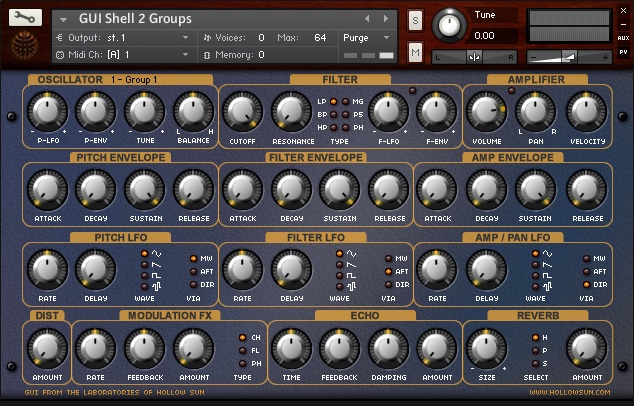
It presents the user with a natty GUI - all they have to do is lob their samples into it without having to get bogged down in Kontakt's intricacies.
You might claim that modern s/w samplers are complex and fiddly but you can't deny that the hardware samplers are damned fiddly too - I mean, assigning samples and setting key ranges with a data encoder can't compare with dragging and dropping I'm afraid.
No-one could have been a more ardent advocate for hardware samplers than me and my long association with Akai's is well known, having contributed to and/or designed several of them and done a ton of library for them but, as I say, times change, technology advances and things change. Not always for the better, of course, but in this case, I believe hardware samplers to be outdated (IMO). A bit odd for me - even hypocritical - to say given that I have a fairly large analogue modular here to my right but even so, may days of peering into ever fading LCDs are long gone!
But if it floats your boat and you achieve what you want to achieve, who am I to dispute it? You do as you choose and good luck to you.
However, things have moved on and there are many, many benefits to working with software samplers. It took me a while to get used to them but it didn't take long for me to adapt - after all, recording in one app, editing in another and then mapping the samples out and programming in another is not THAT much different working in the different RECORD, EDIT and PROGRAM modes/pages of, say, an Akai sampler. And the tools available in these apps are considerably more powerful and flexible.
vinyl_junkie wrote:or the software samplers have got too complex and fiddly for the average musician
If anything, they have become too easy. Granted, Kontakt can be a bitch but these days, with its scripting, developers can provide GUIs that hide the user from the more unpleasant side of things (although the more experienced user can get in there if they want). I released something recently ...
It presents the user with a natty GUI - all they have to do is lob their samples into it without having to get bogged down in Kontakt's intricacies.
You might claim that modern s/w samplers are complex and fiddly but you can't deny that the hardware samplers are damned fiddly too - I mean, assigning samples and setting key ranges with a data encoder can't compare with dragging and dropping I'm afraid.
No-one could have been a more ardent advocate for hardware samplers than me and my long association with Akai's is well known, having contributed to and/or designed several of them and done a ton of library for them but, as I say, times change, technology advances and things change. Not always for the better, of course, but in this case, I believe hardware samplers to be outdated (IMO). A bit odd for me - even hypocritical - to say given that I have a fairly large analogue modular here to my right but even so, may days of peering into ever fading LCDs are long gone!
But if it floats your boat and you achieve what you want to achieve, who am I to dispute it? You do as you choose and good luck to you.
-
- hollowsun
Frequent Poster -
Posts: 2036 Joined: Thu Jan 20, 2005 12:00 am
Location: Cowbridge, South Wales
Contact:
Website / Music Lab Machines / Blog
Re: Sampling
Does anyone know if there is a way to embed the sample loop points in cubase or pro tools that Kontakt can read?
-
- Gerhard Westphalen
Regular -
Posts: 226 Joined: Sun Mar 21, 2010 12:00 am
Location: Calgary, Canada
Contact: