Need some General Recording Help

Discuss hardware/software tools and techniques involved in capturing sound, in the studio, live or on location.
Post Reply

Need some General Recording Help

Post by awrontherise »

Hello to all, I am new to sound on sound and have come to learn a few things about the right way to record.

I have a cheapie Toshiba satellite with 4gigs ram and a half a terabyte running Windows 8 64 bit and Sonar X2 64 bit. I am recording me and two friends' three piece band. I currently am using all of the soundcards I have ever bought simultaneously. They are one edirol pcr 1 (very old) and two alesis multimix 4 usbs. This gives me 6 tracks I can record at once.

The way I have been recording is to use each soundcards left and right inputs to record to a single track. The tracks are as follows, Drums, Bass Drum, Bass Guitar, Electric Guitar, Vocal Mic 1, and Vocal Mic 2. We only do live recordings and afterwards there is enought isolation in the tracks that I am able to effectively adjust each tracks level in comparison to the others. There is still plenty of bleed through on many of the channels with only the bass being recorded directly. Everything else is recorded with microphones. Vocal mics run to one alesis multimix and then to the pa. The bass guitar runs direct into the hi impedance input on alesis multimix #2 and to the pa.

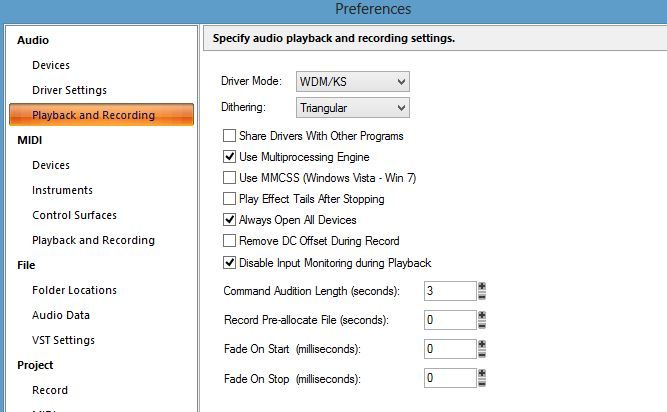
I am using wdm drivers with the settings shown below. After making some recordings last night, I have noticed a popping sound everywhere except for during the silents bits between songs. When I export the audio, the popping sound is gone.

Does anyone know why I cannot listen to the audio in sonar without getting this popping sound?

I think when I record next, I will set the buffer size as large as possible as I am not concerned with latency-- at least I don't think I should be because I am not recording to a previously recorded track. I don't know if that would take the popping sound away since when I listen in Sonar since the exported audio has no popping.

Can anyone help me out with this popping noise, I want to be able to edit without hearing it. Also any other suggestions on how to make my setup better? All the tracks are recorded at proper levels, meter barely hits yellow with no red led light ever clipping. Also I am not using any of the mixers hi or low pass filters so that I can eq it in post production.

That is a lot of info, if anyone is brave enough to read all of this, I would really appreciate your input on how to make any aspect of my recordings better. Here's a snapshot of audio preferences in Sonar.
Image
User avatar
awrontherise
New here
Posts: 6 Joined: Fri Oct 11, 2013 12:00 am

Re: Need some General Recording Help

Post by awrontherise »

Another thing I forgot to say is that I am having a problem with tracks being more to one side than the other even though they are panned right in the center. I think there must be a setting I have to change so that each track ends up right in the middle so I can adjust them from there.
User avatar
awrontherise
New here
Posts: 6 Joined: Fri Oct 11, 2013 12:00 am

Re: Need some General Recording Help

Post by BJG145 »

awrontherise wrote:I currently am using all of the soundcards I have ever bought simultaneously. They are one edirol pcr 1 (very old) and two alesis multimix 4 usbs.

That sounds pretty crazy. Can't say I approve. :x

awrontherise wrote:I am using wdm drivers with the settings shown below. After making some recordings last night, I have noticed a popping sound everywhere except for during the silents bits between songs. When I export the audio, the popping sound is gone.

Does anyone know why I cannot listen to the audio in sonar without getting this popping sound?

I think when I record next, I will set the buffer size as large as possible as I am not concerned with latency-- at least I don't think I should be because I am not recording to a previously recorded track. I don't know if that would take the popping sound away since when I listen in Sonar since the exported audio has no popping.

The fact that you can get an audio track without popping means that it apparently recorded OK. (?)

Changing the recording parameters will therefore make no difference.

I guess you could try increasing the latency for playback. I'm not quite sure what your playback device is?
User avatar
BJG145
Longtime Poster
Posts: 8081 Joined: Sat Aug 06, 2005 12:00 am Location: UK

Re: Need some General Recording Help

Post by awrontherise »

Yes, I know using all those soundcards together is pretty "ghetto". I am no audio professional by any stretch. Using the three soundcards together works for me so I can adjust each of the six tracks levels separately after recording, add compression, reverb to vocals etc. I have been playing music with the same guys for over ten years. We are just having fun playing and recording improv and original songs live so we can listen while we grill and drink beer.

The edirol pcr 1 is my recording timing master and playback timing master, though at the moment I am using my laptops on-board sound card, since I left the other soundcards at our "studio". The popping noise was still present when listening back through the edirol pcr 1 sound card.
User avatar
awrontherise
New here
Posts: 6 Joined: Fri Oct 11, 2013 12:00 am

Re: Need some General Recording Help

Post by Exalted Wombat »

You might consider picking up a Zoom R16 or R24. Use as a standalone multitrack recorder, or as a multichannel USB audio interface to your computer.

Or, if the pops don't appear in mixdown, carry on as you are :-) Unorthodox, but if it works...
Exalted Wombat
Longtime Poster
Posts: 5846 Joined: Sat Feb 06, 2010 12:00 am Location: London UK
You don't have to write songs. The world doesn't want you to write songs. It would probably prefer it if you didn't. So write songs if you want to. Otherwise, please don't bore us with beefing about it. Go fishing instead.

Re: Need some General Recording Help

Post by BJG145 »

You might make sure you're using the latest driver and try using ASIO instead of WDM, and/or increase the latency until it works.

http://www.roland.com/support/article/?q=downloads&p=PCR...

(But, buy a new interface, really. I'm amazed this setup works at all.)
User avatar
BJG145
Longtime Poster
Posts: 8081 Joined: Sat Aug 06, 2005 12:00 am Location: UK

Re: Need some General Recording Help

Post by awrontherise »

Yes I definitley would like a new interface, I have always wanted one with 8 separate inputs and 8 preamps and I think I will get one eventually (Since I have wanted one the price has gone down at least $500, it's been a while). My buddy has a mac and protools with a motu interface we can use if we wanted, but that stays at his house and would need to be set up every time. So I keep everything set up at the drummer's house with the instruments, amps, pa, and my frankenstein plywood board of mixers and sound cards mounted to the wall.

It works pretty well I think for what we're doing, but I have to export the audio to be able to hear it without the popping sound. So I will definitely keep doing it the way I am because I have too many other things to buy to think about getting a new interface. I just wish there was a way to remove the popping sound to make editing more bearable.

As for the ASIO, I had though about that route but then I found somewhere you couldn't use more than one soundcard at a time when using ASIO drivers. They may have changed that since that written, maybe?
User avatar
awrontherise
New here
Posts: 6 Joined: Fri Oct 11, 2013 12:00 am

Re: Need some General Recording Help

Post by awrontherise »

OK! switched to mme drivers and no more popping inside of sonar!!

Still I would like to know which plugins I should use on which tracks/ busses.
User avatar
awrontherise
New here
Posts: 6 Joined: Fri Oct 11, 2013 12:00 am

Re: Need some General Recording Help

Post by awrontherise »

The plugins I use are compressors for vocals, bass guitar, and drums. I put a limiter on the master track to bring things up. I put light reverb on the vocals as well. What else should I do? Since I don't use the hi pass Filters on the mixer, which tracks need a hi pass filter or low pass filter generally?
User avatar
awrontherise
New here
Posts: 6 Joined: Fri Oct 11, 2013 12:00 am

Re: Need some General Recording Help

Post by The Elf »

awrontherise wrote:which tracks need a hi pass filter or low pass filter generally?

High-pass - nearly everything. There's a lot of junk low-frequency energy that is eating your headroom, so the more you can remove the more headroom you will have.
Low-pass - some things, often amp-ed guitars, or other signals with prominent, fizzy distortion. This really is just down to taste, so listen to what the mix is telling you.

awrontherise wrote:The plugins I use are compressors for vocals, bass guitar, and drums. I put a limiter on the master track to bring things up. I put light reverb on the vocals as well. What else should I do?

Small question - huge, HUGE answer! There's nothing wrong with a simple approach if you like what you hear. Again, listen to what the mix is telling you and support the song's message above anything. SOS has done plenty of articles on different aspects of mixing, so dig in and see what you can learn.
User avatar
The Elf
Forum Aficionado
Posts: 21430 Joined: Tue Aug 14, 2001 12:00 am Location: Sheffield, UK
An Eagle for an Emperor, A Kestrel for a Knave.
Post Reply