Metering anomalities

For everything after the recording stage: hardware/software and how you use it.
Post Reply

Metering anomalities

Post by Aled Hughes »

Evening all,
In a recent thread, Hugh posted a link to Bob Katz's reasoning over his K-Metering. I had previously configured my Reaper master channel meter to K-20 and calibrated my monitoring gain accordingly, but I had drifted away from the practise somewhat, and after reading Katz's article as well as re-reading Hugh's excellent article on monitoring levels, I decided to re-visit my setup.

One thing I've noticed is that Voxengo's SPAN metering is seemingly reporting signals 3dB hotter than they are.

If you look at the screenshot, I have an instance of Reaper's pink noise generator which is registering around 0 on the master meter (0 being -20dBFS )*

It is also registering an RMS around -20dBFS on the T-Racks Metering plugin (top left), which is consistent with the Reaper meter. Voxengo SPAN (alo set to K-20), however, is reporting an RMS level around +3 (so around -17dBFS).

JS' Audio Statistics plugin is also consistent with Reaper and the T-Racks. Peak reading also differ, with SPAN seemingly registering lower peak levels than the other meters. I've tried swapping the plugins' order around just in case one was somehow adding gain, but it made no difference.

I hope this makes sense and that the screenshot is clear enough. What could be possibly going on?

Image

More questions to follow!

*as an aside, can anyone explain how/why the pink noise generator set at -6dB is generating noise that registers at -20dBFS with the master fader at unity?

Aled
Last edited by Aled Hughes on Tue Feb 14, 2017 9:25 pm, edited 2 times in total.
Aled Hughes
Frequent Poster
Posts: 2136 Joined: Tue Oct 24, 2006 12:00 am Location: Pwllheli, Cymru

Re: Metering anomalities

Post by Hugh Robjohns »

You can't easily compare meters with noise signals for a number of technical reasons and so I'm not too surprised you're getting some anomalies. You really need to make comparisons with steady sine wave tones.

H
Last edited by Hugh Robjohns on Tue Feb 14, 2017 10:21 pm, edited 1 time in total.
User avatar
Hugh Robjohns
Moderator
Posts: 43689 Joined: Fri Jul 25, 2003 12:00 am Location: Worcestershire, UK
Technical Editor, Sound On Sound...
(But generally posting my own personal views and not necessarily those of SOS, the company or the magazine!)
In my world, things get less strange when I read the manual... 

Re: Metering anomalities

Post by Aled Hughes »

Hugh Robjohns wrote:You can't easily compare meters with noise signals for a number of technical reasons and so I'm not too surprised you're getting some anomalies. You really need to make comparisons with steady sine wave tones.

H

Aha, thanks Hugh.
A 1kHz sine wave at -20dB (according to the generator) registers -20dBFS on SPAN, but Reaper's master fader reads -3dB (ie -23dBFS). Different pan law option doesn't rectify this, they only further lower the Reaper meter reading.

It's easy enough to apply +3dB on the meter's 'display gain' option to bring it in line, but it's rather disconcerting that no two meters are in agreement with both the noise and sine situations... in fact, with the sine wave the T-Racks meter doesn't seem to know what to think - it's is showing -20 RMS on the left channel and -23 on the right, but the peak readings for both channels are -20. A check with a 500Hz tone sees T-Racks registering -20 peak (both channels) and -23 RMS (both channels). SPAN has the same.

NEW OBSERVATION! With 1kHz tone again: It seems SPAN isn't consistent relative to different meter calibrations - on a dBFS meter there is a 3dB difference between peak and RMS reading. On the K-20 there is a 0.4dB difference. T-Racks is consistent with the 3dB difference, whilst Reaper's master fader shows no difference between peak and RMS levels.

Typing as I was fiddling around there... sorry if it's an incoherent mess!

Aled
Last edited by Aled Hughes on Tue Feb 14, 2017 11:01 pm, edited 2 times in total.
Aled Hughes
Frequent Poster
Posts: 2136 Joined: Tue Oct 24, 2006 12:00 am Location: Pwllheli, Cymru

Re: Metering anomalities

Post by Jim Lockhart »

The rms level of a sine wave is 3 dB lower than the peak level. Things get a bit confusing when one works with dBFS since A-D converter full scale refers to peak levels. A sine wave with a peak level -20 dBFS would have 20 dB of headroom, but would have an rms level of -23 dBFS. Some metering applications "add" 3 dB to the rms levels when stated as dBFS so that users won't think they have more headroom that they actually do. Other metering applications report rms levels in the mathematically correct way, while some (such as RME) give you the choice.
Jim Lockhart
Poster
Posts: 49 Joined: Tue Jun 03, 2003 12:00 am Location: Menlo Park, California
The Sound Physicist

Re: Metering anomalities

Post by Hugh Robjohns »

Ramirez wrote:A 1kHz sine wave at -20dB (according to the generator) registers -20dBFS on SPAN, but Reaper's master fader reads -3dB (ie -23dBFS).

Metering is a complicated topic, and different people do it in different ways -- and often without letting on what they are actually displaying!

As Jim has mentioned below, one of the most common sources of confusion/error is whether the metering is peak-reading or RMS. Peak reading meters can then be 'sample-peak' or True-Peak -- the latter taking into account inter-sample peaks that a sample-peak meter can miss -- often with errors of as much as 3-6dB.

RMS meters also come in several flavours, the most common being either a real RMS measurement or a fudged RMS value based on a peak-reading.... The RMS level of a sine wave is 3dB lower than the peak level -- which is where your discrepancy is coming from, I suspect... but that offset is different for different waveshapes. Consequently, when monitoring complex non-sinusoidal music programme (or noise), you often find differences in metered levels between true rms meters and quasi-rms meters that actually measure a peak value of some kind (usually sample peak) and then subtract 3dB!

Different pan law option doesn't rectify this, they only further lower the Reaper meter reading.

Of course. The pan law only affects the relative levels of the two channels as you pan things around. It will only have an effect if you meter the mono sum of a stereo source.

It's rather disconcerting that no two meters are in agreement with both the noise and sine situations...

They never will be -- especially with noise signals. Meters should align reliably with sine wave tones, but only if they perform the measurement int he same way (ie, peak/rms etc)!

...the T-Racks meter doesn't seem to know what to think - it's is showing -20 RMS on the left channel and -23 on the right, but the peak readings for both channels are -20. A check with a 500Hz tone sees T-Racks registering -20 peak (both channels) and -23 RMS (both channels). SPAN has the same.

This is often down to the software 'light' thresholds and the phase relationship between the tone signal and the sample rate, and a tiny shift in level or tone frequency may cause the display to jump to the next 'light'. As with your 500Hz test, the peak level should be 3dB higher than the rms level with a sine wave signal.

...whilst Reaper's master fader shows no difference between peak and RMS levels.

Eeek! :o

It's easy to get very distracted by metering anomalies like this... but in reality they really don't matter. The meters are only there as a reference guide for your ears when tracking and mixing, and a dB or two of error won't make any difference to anything. Just pick a meter you like, and stick with it for everything.

The only time metering becomes genuinely critical is when trying to control peak levels in a peak-normalised environment, and the only kind of meter that is of any use at all in that situation is a True-peak meter that takes into account inter-sample peaks.

H
User avatar
Hugh Robjohns
Moderator
Posts: 43689 Joined: Fri Jul 25, 2003 12:00 am Location: Worcestershire, UK
Technical Editor, Sound On Sound...
(But generally posting my own personal views and not necessarily those of SOS, the company or the magazine!)
In my world, things get less strange when I read the manual... 

Re: Metering anomalities

Post by Aled Hughes »

Jim and Hugh, thank you very much. ITs making more sense now

Hugh Robjohns wrote:
...whilst Reaper's master fader shows no difference between peak and RMS levels.

Eeek! :o

To clarify this, it seems that the Reaper meter's "display gain" applies an offset to the RMS reading *only*, bringing the peak and RMS inline. With no "display gain" applied there is indeed a 3dB difference in reading.

Hugh Robjohns wrote:It's easy to get very distracted by metering anomalies like this... but in reality they really don't matter. The meters are only there as a reference guide for your ears when tracking and mixing, and a dB or two of error won't make any difference to anything. Just pick a meter you like, and stick with it for everything.

Yes - it wasn't bugging me unduly. It's just that I like to have SPAN open on a secondary monitor all the time, and as such would be good if Reaper's meter and SPAN's showed the same readings - I could easily ignore SPAN's meter or apply an offset to Reaper's.

One other question I have - I have tried calibrating everything with my monitor level control (M-Patch 2) at 2 o'clock, as usually recommended. My monitors (AE22) only offer 3 stepped level settings. To achieve around 74dB SPL reading from each speaker at the listening position from -20dBFS band limited pink noise, with the AE22s at their least sensitive, requires around 23dB of (digital) attentuation on the interface DSP. Should I juggle the monitor control level and digital attentuation a bit (perhaps back the M-Patch to 12 o'clock and bring the digital level up +10dB or so), or will it make no practical difference? I know (think?) digital attentuation reduces bit depth... but losing 4bits or so of dynamic range is not really an issue on the output side is it?
Aled Hughes
Frequent Poster
Posts: 2136 Joined: Tue Oct 24, 2006 12:00 am Location: Pwllheli, Cymru

Re: Metering anomalities

Post by Hugh Robjohns »

Ramirez wrote:One other question I have - I have tried calibrating everything with my monitor level control (M-Patch 2) at 2 o'clock, as usually recommended.

:thumbup:

My monitors (AE22) only offer 3 stepped level settings. To achieve around 74dB SPL reading from each speaker at the listening position from -20dBFS band limited pink noise, with the AE22s at their least sensitive, requires around 23dB of (digital) attentuation on the interface DSP.

Hmmm.... not ideal as digital attenuation degrades the signal-noise performance of the D-A converters... ( but see below)

Should I juggle the monitor control level and digital attentuation a bit (perhaps back the M-Patch to 12 o'clock and bring the digital level up +10dB or so), or will it make no practical difference?

Yes, you could certainly do that, which would improve the signal-noise ratio of the D-A by 10dB -- but I wouldn't set a reference position on the monitor controller any lower than 12-o'clock, though, for fear of degraded stereo tracking.

If the interface has switchable output levels -- as RME converters do, for example -- then selecting a lower analogue output level would be a good idea. The other alternative is to build some balanced 20dB pads to reduce the signal level between the monitor control outputs and the speaker inputs.

I'd suggest soldering 1% metal film resistors into the XLR plugs and, because you're using a passive monitor controller, I'd suggest having the attenuation between the interface and monitor controller, rather than between the controller and speaker.

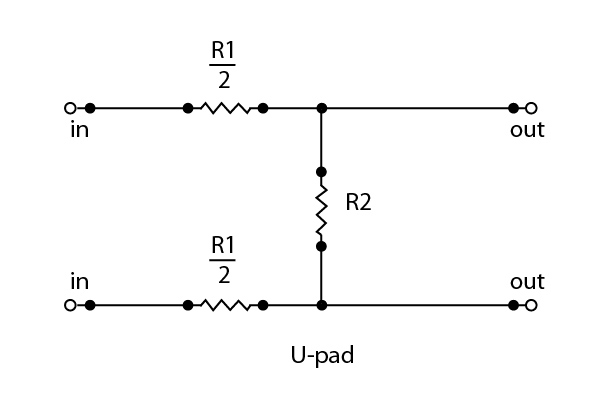
You need to build a U-pad which looks like this:
Image

The hot and cold signal wires connect on the left, while the XLR pins are on the right.

If placed between the interface and controller, I'd suggest connecting the hot and cold wires via 2k7 resistors (the two R1/2 resistors) to their respective pins (2 and 3), with a 620 Ohm resistor (R2) wired directly between pins 2/3.

It should look something like this: Image

A higher-impedance arrangement might be beneficial if you are forced for some reason to insert the pad between passive monitor controller and speaker, in which case I'd suggest using 4k7 resistors in the hot/cold feeds and 1k between pins 2/3

I know (think?) digital attentuation reduces bit depth... but losing 4bits or so of dynamic range is not really an issue on the output side is it?

You're not really losing bits -- they are all still there... it's just that the top ones won't be doing anything. Assuming the digital attenuation is properly dithered the end result is nothing worse than a reduced signal-noise ratio in the converter.
However, since a typical mid-market interface converter will have a dynamic range performance of 115dB or better, knocking 20dB off that still gives 95dB or better.

Your reference listing level allows 20dB headroom, so the converter noise floor will be 75dB (95-20) below your reference acoustic level... or around 0dBSPL, the threshold of hearing! So I really don't think you'll have anything to worry about!

If your reference level had been at the 83dBC international reference for large rooms, it might have been more of a practical issue, but even then I doubt it!

The plain fact is that the old 16 bit format of CDs was very well chosen as it is capable of vastly more dynamic range than the majority of people can ever accommodate in a domestic home setting, and it's still comfortably more than most project studios with stupidly loud monitoring can handle too!

So... bottom line... if the digital attenuation sounds okay, stick with it and don't worry. If you are concerned about low level distortion arising from imperfectly dithered processing (unlikely, but possible), then remove the digital attenuation and build some passive analogue attenuators instead.

Hope that helps...

H
User avatar
Hugh Robjohns
Moderator
Posts: 43689 Joined: Fri Jul 25, 2003 12:00 am Location: Worcestershire, UK
Technical Editor, Sound On Sound...
(But generally posting my own personal views and not necessarily those of SOS, the company or the magazine!)
In my world, things get less strange when I read the manual... 

Re: Metering anomalities

Post by Aled Hughes »

Hugh Robjohns wrote: If the interface has switchable output levels -- as RME converters do, for example -- then selecting a lower analogue output level would be a good idea. The other alternative is to build some balanced 20dB pads to reduce the signal level between the monitor control outputs and the speaker inputs.

Ah! Indeed it does - it's an old EMU 1212m PCI card, boasting 120dB ddynamic range. The outputs are switchable between +4dBu and -10dBV. The spec sheet states that these options are balanced and unbalanced respectively, but should it change anything other than the level? If not this should be ideal.

I haven't noticed any problems with the digital attenutation so far though.

Is this situation perhaps a suggestion that the AE22 are overpowered for my small (but quite well treated) room?!
Aled Hughes
Frequent Poster
Posts: 2136 Joined: Tue Oct 24, 2006 12:00 am Location: Pwllheli, Cymru

Re: Metering anomalities

Post by Hugh Robjohns »

Ramirez wrote: Ah! Indeed it does - it's an old EMU 1212m PCI card, boasting 120dB ddynamic range. The outputs are switchable between +4dBu and -10dBV. The spec sheet states that these options are balanced and unbalanced respectively, but should it change anything other than the level? If not this should be ideal.

Give the -10dBV mode a go and see. It will be roughly 12dB quieter which will certainly help.

Is this situation perhaps a suggestion that the AE22 are overpowered for my small (but quite well treated) room?!

Not over-powered, just over sensitive.

A lot of monitors are designed to work with nominal input signal levels which around -10 to --20dBu. Strange but true!

H
User avatar
Hugh Robjohns
Moderator
Posts: 43689 Joined: Fri Jul 25, 2003 12:00 am Location: Worcestershire, UK
Technical Editor, Sound On Sound...
(But generally posting my own personal views and not necessarily those of SOS, the company or the magazine!)
In my world, things get less strange when I read the manual... 

Re: Metering anomalities - you need to use AES 17 RMS levels

Post by Wonks »

I think the basic solution is a lot simpler than it sounds and is down to the k-metering standard requiring the AES-17 RMS value which makes the RMS value of a sine wave equal to it's peak value. As has been previously mentioned, the RMS value for a sine wave should normally be -3dB below the peak value. But for AES-17 and k-metering, 3dB is added to the RMS value so they both read the same.

This caught me out when I first used the MeterPlugs k-meter (the documentation for it does say this, but not in a particularly easy to understand way if you weren't aware of it, but obvious if you already knew).

I too was sure that it was all wrong when the RMS value for a square wave read higher than its peak value, but that's the reason why - because 3dB is added to the real RMS value.

I know that in Cubase 8.5, switching to the k-metering scale doesn't automatically switch in the AES17 RMS metering option, so you need to manually do this (The RMS sampling time is also far too long in Cubase 8.5 for the k-meter standard), so it's better to use a good 3rd party plug-in.

Not all plug-ins correctly use AES-17 RMS values when in a k-meter mode, so beware.
Last edited by Wonks on Wed Feb 15, 2017 6:41 pm, edited 1 time in total.
User avatar
Wonks
Jedi Poster
Posts: 19208 Joined: Thu May 29, 2003 12:00 am Location: Freethorpe, Norfolk, UK
Reliably fallible.

Re: Metering anomalities

Post by Aled Hughes »

Thank you Wonks, that certainly explains some of the things I had noticed. It would seem then that the purpose of Reaper's +3dB 'display gain' option on the master faderRMS reading is to bring the RMS and peak reading in line for the K-metering standard?

Aled
Aled Hughes
Frequent Poster
Posts: 2136 Joined: Tue Oct 24, 2006 12:00 am Location: Pwllheli, Cymru

Re: Metering anomalities - you need to use AES 17 RMS levels

Post by Hugh Robjohns »

Wonks wrote:I think the basic solution is a lot simpler than it sounds and is down to the k-metering standard requiring the AES-17 RMS value which makes the RMS value of a sine wave equal to it's peak value.

You are quite right to point out the 3dB offset employed by the Meterplugs K-Meter in rms mode -- I had quite forgotten all about it! However, the reasoning behind this oddity seems to me a little confused.

AES17 is all about measuring the technical performance of digital equipment, including any analogue inputs and outputs. In the context of the latter, is states that the analogue signal level in or out corresponding to the maximum positive quantising level in the digital system should be defined and referenced in terms of its RMS voltage. (AES17-1998 (r2004) Sections 5.4 and 6.3)

https://www.ak.tu-berlin.de/fileadmin/a ... /aes17.pdf

This makes perfect sense and is entirely to be expected, since in analogue systems signal alignment measurements have always been performed using the rms values of sine wave test signals, rather than absolute peak voltage measurements.

So it's not exactly that the "RMS value of a sine wave [is made] equal to it's peak value." but rather than the peak digital signal is represented in the analogue domain by the rms signal voltage. It's a subtle but important distinction.

As a practical example with some numbers, a digital device might be described as reaching its maximum quantising count (0dBFS) with an analogue input level of +18dBu (EBU alignment standard). We might read that +18dBu value on an analogue meter of some kind, and the rms signal voltage needed to produce that reading is 6.15 Vrms...

However, the actual peak voltage of the sine wave going in to that digital device is 3dB higher and measures +/- 8.7 Volts either side of the centre zero reference (or 17.4V pk-pk). In the analogue world, we don't really care, though, because we never measure signals in an operational context that way (although it is relevant when designing the equipment's power supplies!)

Perhaps the real source of this metering confusion -- and the problem Katz and Meterplugs have sought to avoid in the K-meter -- is that we're dealing with a digital meter monitoring signals entirely within the digital domain, while seeming to pretend it's monitoring analogue signal voltages...

Nevertheless I can understand why the Meterplugs rms mode has been scaled with this hidden +3dB offset. After all, as a stand-alone meter it would probably be even more confusing for most if the maximum level never exceeded -3dB! ;-)

Sadly, the inevitable result is that there will always be confusion when comparing different meter 'rms' scales in different systems.... as we have found! ;-) Perhaps the K-metering RMS mode would be better described as 'rms+3'...

But for AES-17 and k-metering, 3dB is added to the RMS value so they both read the same.

Not for AES17 -- that's something of a misrepresentation of what the standard is all about... but certainly for the K-meter the rms value display is deliberately fudged to read the same as a true-peak display, as Bob described in his original K-meter papers.

Bob Katz wrote:The peak and average scales are calibrated as per AES-17, so that peak and average sections are referenced to the same decibel value with a sine wave signal. In other words, +20 dB RMS with sine wave reads the same as +20 dB peak, and this parity will be true only with a sine wave. Analog voltage level is not specified in the K-system, only SPL and digital values.

http://www.digido.com/how-to-make-bette ... art-2.html

As I said much earlier....
Hugh Robjohns wrote:Metering is a complicated topic, and different people do it in different ways -- and often without letting on what they are actually displaying!

:lol:

H
Last edited by Hugh Robjohns on Thu Feb 16, 2017 1:55 pm, edited 5 times in total.
User avatar
Hugh Robjohns
Moderator
Posts: 43689 Joined: Fri Jul 25, 2003 12:00 am Location: Worcestershire, UK
Technical Editor, Sound On Sound...
(But generally posting my own personal views and not necessarily those of SOS, the company or the magazine!)
In my world, things get less strange when I read the manual... 

Re: Metering anomalities

Post by Drew Stephenson »

I've enjoyed this thread, it's reminded of something that i have to nudge myself on every now and then, and that's that I'm not looking at an actual, physical meter, I'm looking at a software representation.
It's very easy to lose track of that sometimes.
User avatar
Drew Stephenson
Apprentice Guru
Posts: 29713 Joined: Sun Jul 05, 2015 12:00 am Location: York
(The forumuser formerly known as Blinddrew)
Ignore the post count, I have no idea what I'm doing...
https://drewstephenson.bandcamp.com/

Re: Metering anomalities

Post by Wonks »

Ramirez wrote:Thank you Wonks, that certainly explains some of the things I had noticed. It would seem then that the purpose of Reaper's +3dB 'display gain' option on the master faderRMS reading is to bring the RMS and peak reading in line for the K-metering standard?

Aled

Yes, that would seem the point of it. Hugh's description of the reason why is obviously more detailed than my quick description, but for all practical purposes in a digital meter, the calculated RMS value is displayed as having a 3dB higher value than it actually has. The K-metering system is designed to get people looking at RMS levels rather than peak levels (though they are obviously important), so the aim is to get the RMS levels normally sitting at the k-meter's 0dB point. Of course the K-meter values could simply have been set at -15dBFS, -17dBFS and -23dBFS with no +3dB added to the RMS value as the K-metering scale is designed purely for digital metering systems (and you'd get exactly the same results), but I expect that to Bob Katz, coming pretty much from an all-analogue background, it made sense to parallel digitally what he'd do on an analogue system.

So it's important to understand just what any metering display is showing you, especially when using multiple meters e.g. DAW's own plus plug-ins or transferring between different systems (especially if you are remote collaborating) so you don't mix to varying loudness levels. If in doubt, run a quick test as a 997Hz sine wave on a k-meter should display the same RMS value as the peak value. If it doesn't, then find the software button that adds 3dB to the RMS so that it does, or mix so the general RMS level is around -3dB on the selected k-scale.
User avatar
Wonks
Jedi Poster
Posts: 19208 Joined: Thu May 29, 2003 12:00 am Location: Freethorpe, Norfolk, UK
Reliably fallible.

Re: Metering anomalities

Post by Hugh Robjohns »

Wonks wrote:...but for all practical purposes in a digital meter, the calculated RMS value is displayed as having a 3dB higher value than it actually has.

As far as I'm aware this is only for the K-meter, not 'digital meters' in general.

It's also worth bearing in mind that while the 3dB offset 'fudge factor' is accurate for the comparison of RMS and Peak sine wave signals, the argument quickly falls apart when working with typical musical signals which have very different crest factors.

So it's important to understand just what any metering display is showing you, especially when using multiple meters e.g. DAW's own plus plug-ins or transferring between different systems

Absolutely! Couldn't agree more!

However, pragmatically, absolute levels really don't matter much (within a few dB) when tracking (and usually for mixing) because there is headroom to take up any slack -- that's kinda the point of headroom. So just pick a meter you like and stick with the one scale throughout! That way you'll have consistent results, which is the most important thing.

I generally use the default meters on the DAW for tracking, and aim to keep things below -10dBFS. For most mixing duties I tend to use a K-20 meter, but if your material is meant to be more squashed then go for the K-14 or K-12 scales instead -- and align your monitors accordingly!

If mastering for a peak-normalised environment then use an oversampling meter, and ideally a True Peak meter from the BS1770 specifications.

If mastering or mixing for a loudness-normalised environment then use the Integrated scale on a BS1770 meter with an appropriate target loudness value.

H
User avatar
Hugh Robjohns
Moderator
Posts: 43689 Joined: Fri Jul 25, 2003 12:00 am Location: Worcestershire, UK
Technical Editor, Sound On Sound...
(But generally posting my own personal views and not necessarily those of SOS, the company or the magazine!)
In my world, things get less strange when I read the manual... 

Re: Metering anomalities

Post by Wonks »

There's certainly headroom aplenty within DAWs, but so many plug-ins model physical hardware that if you hit them with too hot a signal, you are always going to get the modelled distortion and harmonics that the hardware devices would give if you hit them with the equivalent analogue signal level.

Of course that may well be what you intended, but if you want to mimic the analogue way of working and generally run with more 'transparent' signal processing with plug-ins, and only drive them hard to achieve specific effects, then you need to develop a suitable way of working to achieve that, and the k-meter system is one way to do that - even if that wasn't its primary purpose.
User avatar
Wonks
Jedi Poster
Posts: 19208 Joined: Thu May 29, 2003 12:00 am Location: Freethorpe, Norfolk, UK
Reliably fallible.

Re: Metering anomalities

Post by Wonks »

I was interested to read today in the 3rd edition (2014) of Bob Katz's Mastering Audio book, that he describes the K-meter scale as no longer relevant and that he prefers to use the EBU loudness meters, focussing on RMS levels only with no peak level display, just a warning if the true peak level exceeds a given threshold.
User avatar
Wonks
Jedi Poster
Posts: 19208 Joined: Thu May 29, 2003 12:00 am Location: Freethorpe, Norfolk, UK
Reliably fallible.

Re: Metering anomalities

Post by Hugh Robjohns »

Wonks wrote:I was interested to read today in the 3rd edition (2014) of Bob Katz's Mastering Audio book, that he describes the K-meter scale as no longer relevant and that he prefers to use the EBU loudness meters, focussing on RMS levels only with no peak level display, just a warning if the true peak level exceeds a given threshold.

Katz is a strong proponent of loudness normalisation, so I'm not too surprised at that. And with loudness normalisation the target levels generally leave more than enough headroom that peak meters are not necessary. Standard BS1770 meters only have a warning light for when the true peak threshold is exceeded, with an optional true-peak numerical readout.

H
User avatar
Hugh Robjohns
Moderator
Posts: 43689 Joined: Fri Jul 25, 2003 12:00 am Location: Worcestershire, UK
Technical Editor, Sound On Sound...
(But generally posting my own personal views and not necessarily those of SOS, the company or the magazine!)
In my world, things get less strange when I read the manual... 
Post Reply