New Mac user, any tips gratefully received

For current or would-be users of Apple Mac computers, with answers to many FAQs.

Re: New Mac user, any tips gratefully received

Post by ConcertinaChap »

desmond wrote:I wish they'd do an external keyboard with backlit keys, like the laptops have... :protest:

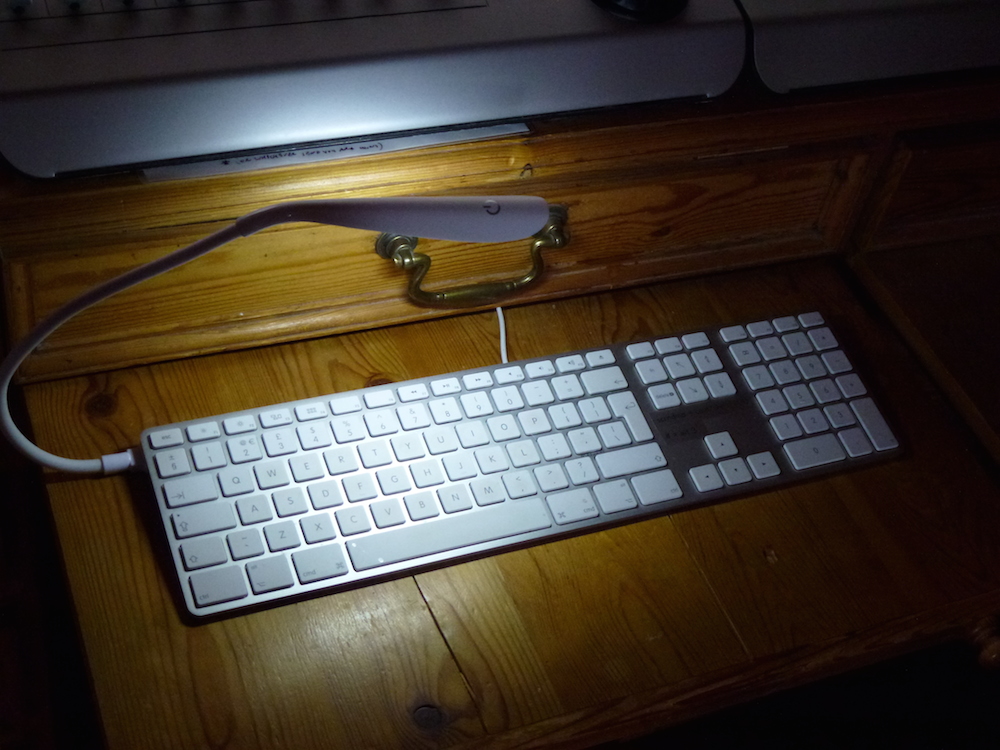
Do agree with that. For a while I contemplated getting the Editors Keys Logic keyboard which is illuminated but also rather expensive but then I came up with this:

Image

You can get plug in USB lamps like this at Amazon and elsewhere for just a few quid and they illuminate the keyboard beautifully when plugged into one of the USB sockets on the wired keyboard - another reason for preferring the wired to the bluetooth keyboard. In white they even look the part!

CC
Last edited by ConcertinaChap on Thu Apr 12, 2018 10:26 pm, edited 1 time in total.
User avatar
ConcertinaChap
Jedi Poster
Posts: 15235 Joined: Wed Jul 20, 2005 12:00 am Location: Bradford on Avon
Making music: Eagle Alley
Recording music: Mr Punch's Studio

Sir, more than kisses, letters mingle souls. - John Donne

Re: New Mac user, any tips gratefully received

Post by zenguitar »

Whilst I have been Windows for decades and have an Android phone I also have an iPad mini. My laptop, phone and tablet are all overdue an upgrade and I am looking at getting an iMac, iPhone 8 and iPad Pro. Hence a number of visits to the Apple store in recent months and asking questions.

It does appear that you can book yourself into familiarisation sessions to learn your way around a Mac. So don't be afraid to head for your local Apple store and ask for help/advice. There may well be free sessions available for you.

Andy :beamup:
User avatar
zenguitar
Moderator
Posts: 13295 Joined: Thu Dec 05, 2002 12:00 am Location: Devon
There is a profound African saying, "A white man who cannot dance is a victimless crime, whereas a white man with a djembe drum ..."

Re: New Mac user, any tips gratefully received

Post by redlester »

zenguitar wrote:Whilst I have been Windows for decades and have an Android phone I also have an iPad mini. My laptop, phone and tablet are all overdue an upgrade and I am looking at getting an iMac, iPhone 8 and iPad Pro. Hence a number of visits to the Apple store in recent months and asking questions.

It does appear that you can book yourself into familiarisation sessions to learn your way around a Mac. So don't be afraid to head for your local Apple store and ask for help/advice. There may well be free sessions available for you.

Andy :beamup:

Didn't know that, cheers. It might be dangerous though if I get to see an iMac Pro in action - no telling what might happen to the credit card! (And subsequently my marriage!) :headbang:
Last edited by redlester on Fri Apr 13, 2018 8:03 am, edited 1 time in total.
redlester
Regular
Posts: 234 Joined: Fri Dec 30, 2016 4:50 pm Location: East Midlands, UK

Re: New Mac user, any tips gratefully received

Post by job »

ConcertinaChap wrote:
job wrote:On mac the documents folder is kept nice and clean for your own stuff.

Oh how I wish that was true. Plenty of programs create folders in Documents...

Interesting, i've never experienced this on Mac, although i guess it's a program use case by the looks of it.

ConcertinaChap wrote:Sorry, this is off-topic but it is a sore point with me.

Yep, irks me too... one of the first things i do on a Win install is create a my documents folder inside the My documents folder :headbang:
job
Regular
Posts: 317 Joined: Wed Aug 03, 2016 3:12 pm
 

Re: New Mac user, any tips gratefully received

Post by Forum Admin »

You may or may not wish to use this facility, but I find it very good for quick access to things.

FILENAME EXTENSIONS -- in Finder prefs, under Advanced cog icon, I'd advise checking/ticking the top Show all filename extensions. This will ensure you see .aif, .wav, .txt, .pdf, etc etc at the end of your filenames.

MAKE ALIAS -- I tend to right-click on folders and files then Make Alias (shortcut) and move/copy the alias into every place where I might want quick access. You can make as many as you like and clicking any alias will get you to that place, el pronto [will this be the new macOS nickname for the eventual Mac Pro? tee-tee...]
Sidebar options.jpg
FINDER SIDEBAR -- I also drag folders (directories) into the lefthand Sidebar Favourites (sic) of the Finder window that appears when you open a new Finder window or click on the hard drive icon -- the latter only shows on your desktop if you choose it to in the Finder preferences [command key plus comma key]. Sidebar prefs can be set up in Finder prefs too -- see screenshot. I use the Sidebar shortcut, for instance, to take me straight to my Songs folder for Studio One DAW. You can add and remove such folders, easily at any time. Very useful.
Tags.jpg
TAGS -- I use these all the time, as a fast way of seeing, say, all current versions of software in my Applications folder. I created a tag called Latest Version and assigned it to green colour, and tag relevant files. (I tend not to remove the old version when updating software, until I know it's rock solid. Studio One allows this, some apps do not.) These tags show up in the Sidebar too if you want them there - see Sidebar prefs in Finder prefs.
Items added to Mac today search.jpg
CUSTOM SPOTLIGHT SEARCHES -- you can create your own Search 'bookmarks' and one I find useful is Show all items added to Mac today -- see screenshot. More advice on Spotlight here: https://support.apple.com/kb/PH25589
Last edited by Forum Admin on Fri Apr 13, 2018 11:20 am, edited 3 times in total.
User avatar
Forum Admin
Moderator
Posts: 4767 Joined: Mon Jul 21, 2003 11:00 pm Location: A studio deep in the fenlands of Cambridgeshire, UK
SOS FOR ARTISTS - our brand new ecosystem designed to support musicians/artists, producers, and collaborators at every stage of the music-making journey.

➡️ ➡️ 📖 Get your FREE (2nd Edition) RECORDING TECHNOLOGY eBook

🎙️ 🔊 🆘 PODCASTS - 200+ ear-grabbing episodes across 3 Channels - more podcasts released weekly. Search "Sound On Sound" on Apple, Amazon, Spotify.

Re: New Mac user, any tips gratefully received

Post by redlester »

Forum Admin wrote:You may or may not wish to use this facility, but I find it very good for quick access to things.

FILENAME EXTENSIONS -- in Finder prefs, under Advanced cog icon, I'd advise checking/ticking the top Show all filename extensions. This will ensure you see .aif, .wav, .txt, .pdf, etc etc at the end of your filenames.

MAKE ALIAS -- I tend to right-click on folders and files then Make Alias (shortcut) and move/copy the alias into every place where I might want quick access. You can make as many as you like and clicking any alias will get you to that place, el pronto [will this be the new macOS nickname for the eventual Mac Pro? tee-tee...]
Sidebar options.jpg
FINDER SIDEBAR -- I also drag folders (directories) into the lefthand Sidebar Favourites (sic) of the Finder window that appears when you open a new Finder window or click on the hard drive icon -- the latter only shows on your desktop if you choose it to in the Finder preferences [command key plus comma key]. Sidebar prefs can be set up in Finder prefs too -- see screenshot. I use the Sidebar shortcut, for instance, to take me straight to my Songs folder for Studio One DAW. You can add and remove such folders, easily at any time. Very useful.
Tags.jpg
TAGS -- I use these all the time, as a fast way of seeing, say, all current versions of software in my Applications folder. I created a tag called Latest Version and assigned it to green colour, and tag relevant files. (I tend not to remove the old version when updating software, until I know it's rock solid. Studio One allows this, some apps do not.) These tags show up in the Sidebar too if you want them there - see Sidebar prefs in Finder prefs.
Items added to Mac today search.jpg
CUSTOM SPOTLIGHT SEARCHES -- you can create your own Search 'bookmarks' and one I find useful is Show all items added to Mac today -- see screenshot. More advice on Spotlight here: https://support.apple.com/kb/PH25589

Top stuff, thanks! :clap:

I'm now investigating external drive options for a 2TB samples drive, and getting very bogged down. My connection options at the Mac end are;
Thunderbolt 1
Firewire 800
or USB 3.0.
Am ruling out SSD for the time being due to cost. Is 7200rpm that much of an issue for a sample drive? Because that rules out most (or all?) of the less expensive bus powered options.
Should I be looking at perhaps buying a TB3 enclosure and sticking a SATA HDD inside, and using an adapter to TB1 for the time being? Would I notice much difference against USB 3.0 for a sample drive?
Too many options!
redlester
Regular
Posts: 234 Joined: Fri Dec 30, 2016 4:50 pm Location: East Midlands, UK

Re: New Mac user, any tips gratefully received

Post by ConcertinaChap »

Suggestion: there's some good stuff in this thread. Might be worth making a sticky? Could be a home for any good tips that one comes across.

CC
User avatar
ConcertinaChap
Jedi Poster
Posts: 15235 Joined: Wed Jul 20, 2005 12:00 am Location: Bradford on Avon
Making music: Eagle Alley
Recording music: Mr Punch's Studio

Sir, more than kisses, letters mingle souls. - John Donne

Re: New Mac user, any tips gratefully received

Post by redlester »

redlester wrote: I'm now investigating external drive options for a 2TB samples drive, and getting very bogged down. My connection options at the Mac end are;
Thunderbolt 1
Firewire 800
or USB 3.0.
Am ruling out SSD for the time being due to cost. Is 7200rpm that much of an issue for a sample drive? Because that rules out most (or all?) of the less expensive bus powered options.
Should I be looking at perhaps buying a TB3 enclosure and sticking a SATA HDD inside, and using an adapter to TB1 for the time being? Would I notice much difference against USB 3.0 for a sample drive?
Too many options!

Quoting myself feels wrong, but I've had what feels a better idea.

The 2TB for the sample drive is for future-proofing. My current sample drive contains about 850GB. So I could, for now, get away with a 1TB or even 2x500GB which might make SSD an option. I assume SSD via USB 3.0 is much faster than HDD of any description/connector. I would probably have to put them on a USB hub, but assume that's OK if it's the powered type?
redlester
Regular
Posts: 234 Joined: Fri Dec 30, 2016 4:50 pm Location: East Midlands, UK

Re: New Mac user, any tips gratefully received

Post by zenguitar »

It's sticky now :)

Andy :beamup:
User avatar
zenguitar
Moderator
Posts: 13295 Joined: Thu Dec 05, 2002 12:00 am Location: Devon
There is a profound African saying, "A white man who cannot dance is a victimless crime, whereas a white man with a djembe drum ..."

Re: New Mac user, any tips gratefully received

Post by redlester »

Right, seriously...this is driving me round the bend now. On this little keyboard, which does not have a delete key, how do I delete files in Finder?

I can use Fn+Bksp to forward delete text, but this does not work for the above.

I'm trying to delete the files in my Downloads folder which are now redundant. I've done it by right-clicking and moving them to trash from the menu that comes up, but surely there must be a keyboard shortcut to delete files in Finder? I've Googled it and can only find advice applicable to keyboards with an actual delete key.
redlester
Regular
Posts: 234 Joined: Fri Dec 30, 2016 4:50 pm Location: East Midlands, UK

Re: New Mac user, any tips gratefully received

Post by muzines »

Command-backspace.
User avatar
muzines
Jedi Poster
Posts: 12332 Joined: Tue Jan 10, 2006 12:00 am
..............................mu:zines | music magazine archive | difficultAudio  | Legacy Logic Project Conversion

Re: New Mac user, any tips gratefully received

Post by ConcertinaChap »

And Desmond earns another digital pint!

CC
User avatar
ConcertinaChap
Jedi Poster
Posts: 15235 Joined: Wed Jul 20, 2005 12:00 am Location: Bradford on Avon
Making music: Eagle Alley
Recording music: Mr Punch's Studio

Sir, more than kisses, letters mingle souls. - John Donne

Re: New Mac user, any tips gratefully received

Post by muzines »

ConcertinaChap wrote:And Desmond earns another digital pint!

Thanks, but I never post and drive... ;)
User avatar
muzines
Jedi Poster
Posts: 12332 Joined: Tue Jan 10, 2006 12:00 am
..............................mu:zines | music magazine archive | difficultAudio  | Legacy Logic Project Conversion

Re: New Mac user, any tips gratefully received

Post by redlester »

desmond wrote:Command-backspace.

Thank you. From what I’ve read even with the bigger keyboard I would have to press command-delete to do the same?
redlester
Regular
Posts: 234 Joined: Fri Dec 30, 2016 4:50 pm Location: East Midlands, UK

Re: New Mac user, any tips gratefully received

Post by muzines »

redlester wrote:Thank you. From what I’ve read even with the bigger keyboard I would have to press command-delete to do the same?

No, it's always Command-Backspace to delete files in the Finder.
User avatar
muzines
Jedi Poster
Posts: 12332 Joined: Tue Jan 10, 2006 12:00 am
..............................mu:zines | music magazine archive | difficultAudio  | Legacy Logic Project Conversion

Re: New Mac user, any tips gratefully received

Post by redlester »

desmond wrote:
redlester wrote:Thank you. From what I’ve read even with the bigger keyboard I would have to press command-delete to do the same?

No, it's always Command-Backspace to delete files in the Finder.

Ok. I read wrong, or misunderstood.

For anyone reading this thread in future, if you are setting up network drives and adding them to login items to connect on start up each time, selecting “hide” next to the drive in the login options window does not prevent Finder from opening an instance for each drive at start up. If you search for solutions apparently there are ways around it using AppleScript and Automator, but I’ve left them as they are and I just close each Finder window after startup. It gives me a positive confirmation that the drives have been found and connected properly, so I don’t mind it too much. It would be a pain if you had a lot of drive connections though.
redlester
Regular
Posts: 234 Joined: Fri Dec 30, 2016 4:50 pm Location: East Midlands, UK

Re: New Mac user, any tips gratefully received

Post by redlester »

For anyone wishing to relocate their user folders (Documents, Downloads, etc) to a different drive - I have moved mine from the SSD to the 1TB HDD on my Mac mini - this guide took me through it perfectly and it worked without flaws:
http://www.idownloadblog.com/2017/01/25 ... her-drive/
redlester
Regular
Posts: 234 Joined: Fri Dec 30, 2016 4:50 pm Location: East Midlands, UK

Re: New Mac user, any tips gratefully received

Post by redlester »

job wrote:I think the main difference from a user perspective is the naming of things: Program Files > Application Folder. ProgramData > system library. Appdata > user library.

Related to the naming of things, my Mac has two drives installed, and I am assuming they have been given the default names:
Macintosh SSD (256GB)
Macintosh HD (1TB)
The one labelled SSD is obviously the system drive, for applications etc.

Another tip for future newbies to avoid confusion, many if not most of the videos and articles you will find showing tips on setting up the Mac are based on machines with only one drive installed. The more recent ones will therefore talk about doing things on the "Macintosh SSD" however the older ones will refer to it as "Macintosh HD" even when what they are actually referring to is the system drive. Obviously it depends on what your individual computer is fitted and set up with.

Am still coming to terms with not having drive letters!
redlester
Regular
Posts: 234 Joined: Fri Dec 30, 2016 4:50 pm Location: East Midlands, UK

Re: New Mac user, any tips gratefully received

Post by muzines »

redlester wrote:Am still coming to terms with not having drive letters!

8-):thumbup:
User avatar
muzines
Jedi Poster
Posts: 12332 Joined: Tue Jan 10, 2006 12:00 am
..............................mu:zines | music magazine archive | difficultAudio  | Legacy Logic Project Conversion

Re: New Mac user, any tips gratefully received

Post by redlester »

desmond wrote:8-):thumbup:

So I've been using it for one week, having only set up/got to know my way around the general settings and without installing any additional software yet (apart from Pages and Numbers, and the desktop element of an iOS password management app that I've been using for years) and I can report the following. Well, put it this way...

I've bought a 2 into 1 HDMI switch so I can run my PC and Mac right next to each other and switch between the two. Whenever I press the button to switch it over to PC, my heart sinks just a little! Am still assessing if that's simply because this is still a "new toy" or whatever...
redlester
Regular
Posts: 234 Joined: Fri Dec 30, 2016 4:50 pm Location: East Midlands, UK

Re: New Mac user, any tips gratefully received

Post by muzines »

redlester wrote:I've bought a 2 into 1 HDMI switch so I can run my PC and Mac right next to each other and switch between the two. Whenever I press the button to switch it over to PC, my heart sinks just a little! Am still assessing if that's simply because this is still a "new toy" or whatever...

Who knows, give it a few months when you've found out new ways to do the things you used to on the PC so you're not constantly coming up with new "Hmmm how do i..?? little problems, and to start to develop new habits and unlearn the old ones, and you'll have more of a handle on how you feel about it. :thumbup:
User avatar
muzines
Jedi Poster
Posts: 12332 Joined: Tue Jan 10, 2006 12:00 am
..............................mu:zines | music magazine archive | difficultAudio  | Legacy Logic Project Conversion

Re: New Mac user, any tips gratefully received

Post by Forum Admin »

redlester wrote:Am still coming to terms with not having drive letters!

There's nothing to stop you naming them C-drive, D-drive, E-drive etc if you really must. ;-)

I tend to call my drives by their function: TimeMachine TB Backup, TimeMachine USB2 Backup, BootCamp, SSD Music, SSD Samples, HD Projects and so on.

I've got friends who name them after their children -- chacun à son goût I guess.
Last edited by Forum Admin on Wed Apr 18, 2018 2:39 pm, edited 1 time in total.
User avatar
Forum Admin
Moderator
Posts: 4767 Joined: Mon Jul 21, 2003 11:00 pm Location: A studio deep in the fenlands of Cambridgeshire, UK
SOS FOR ARTISTS - our brand new ecosystem designed to support musicians/artists, producers, and collaborators at every stage of the music-making journey.

➡️ ➡️ 📖 Get your FREE (2nd Edition) RECORDING TECHNOLOGY eBook

🎙️ 🔊 🆘 PODCASTS - 200+ ear-grabbing episodes across 3 Channels - more podcasts released weekly. Search "Sound On Sound" on Apple, Amazon, Spotify.

Re: New Mac user, any tips gratefully received

Post by redlester »

Forum Admin wrote:
redlester wrote:Am still coming to terms with not having drive letters!

There's nothing to stop you naming them C-drive, D-drive, E-drive etc if you really must. ;-)

I tend to call my drives by their function: TimeMachine TB Backup, TimeMachine USB2 Backup, BootCamp, SSD Music, SSD Samples, HD Projects and so on.

I've got friends who name them after their children -- chacun à son goût I guess.

Ah I did wonder. So the drive name is simply a label and not vital to any paths within shortcuts/aliases etc.? Similar to Windows then. Although I've just been reading (while I should be working) how aliases are dynamic and update if the target file is moved.

I assume the drive's actual system level reference, i.e. C: etc. on PC, is hidden from the user on Mac, at least within the normal Finder view?
redlester
Regular
Posts: 234 Joined: Fri Dec 30, 2016 4:50 pm Location: East Midlands, UK

Re: New Mac user, any tips gratefully received

Post by muzines »

redlester wrote: the drive name is simply a label and not vital to any paths within shortcuts/aliases etc.? Similar to Windows then. Although I've just been reading (while I should be working) how aliases are dynamic and update if the target file is moved.

I assume the drive's actual system level reference, i.e. C: etc. on PC, is hidden from the user on Mac, at least within the normal Finder view?

No. Mac's underlying core is based on "proper" computers (ie Unix), not the 80s MS stuff.
There is no drive letter abstraction!

The path includes the drive it's on, eg
"/Applications" is the root of the system drive (whatever the drive itself is named), which the system already knows is coming from a particular drive.

"/Volumes/Macintosh HD/Applications" is the same place, only this time there is a direct drive reference to the path (which is where the drive is "mounted" in Mac-speak).

"/Volumes/myAudio/Samples/Sheep/Happy/" is a path that points to a folder on a drive named "myAudio".

So there are lot of ways to reference files on Unix systems, not even getting into aliases and symlinks and even more modern filsystem concepts...
Last edited by Forum Admin on Wed Apr 18, 2018 4:11 pm, edited 2 times in total.
User avatar
muzines
Jedi Poster
Posts: 12332 Joined: Tue Jan 10, 2006 12:00 am
..............................mu:zines | music magazine archive | difficultAudio  | Legacy Logic Project Conversion

Re: New Mac user, any tips gratefully received

Post by job »

Edit: guess not...

redlester wrote: I assume the drive's actual system level reference, i.e. C: etc. on PC, is hidden from the user on Mac, at least within the normal Finder view?

Probably? I wouldn't worry about things like that until you're fulled committed to the platform though.

For what it's worth, you can hide the drive letters on Windows as well if you want and can name them however you wish.
Last edited by job on Wed Apr 18, 2018 4:06 pm, edited 1 time in total.
job
Regular
Posts: 317 Joined: Wed Aug 03, 2016 3:12 pm
 
Post Reply