Hello
So I've just done a big switcheroo with my studio and have introduced lashings of noise into the proceedings, hurrah!
Before I go into detail (and I know the drill, eliminate everything, mix-n-match, do the hokey-cokey etc) I'm unclear on one thing.
I'm pretty sure its 'digital noise' because it boils down to whether I do or don't plug in my Yamaha MODX to my MacBook via USB (for audio and MIDI) but what I'm confused about (from my stumblings around the Internet) is, what's the relationship between hearing that digital noise and my 'grounding hygiene'. Is such noise only ever carried through poor grounding? So should I be looking to eliminate ground issues as well as the digital noise?
Thanks
Jim
Digital noise and ground loops
Digital noise and ground loops
Last edited by jellyjim on Tue Jul 23, 2019 2:29 pm, edited 1 time in total.

Original artwork and unique devices inspired by vintage technology http://www.thisisobsolete.com
Re: Digital noise and ground loops
Unwanted noises can get into systems in a variety of ways. The most common are either interference (RF or EM ), or directly through a poor earthing regime (which could mean a lack of earth, or multiple earths creating loops.)
In my experience, poor grounding arrangements cause more problems than anything else.
In your case, it would seem that the system was quiet and you've changed something that introduced noises... so it's just a case of figuring out what's changed!
But the general principle is to make sure everything is powered from a single mains wall outlet (or double socket! ) and -- if you need a lot of sockets -- to use a star connection arrangement of power boards rather than daisy-chain them.
Take a look at how each device is powered. Products with class-2 (double-insulated) connections to the mains are unlikely to be involved in ground loops since they have no mains ground connection. So focus first on the class-1 devices. If you get nasty noises when you connect to them, experiment with disconnecting the earth paths via the screens in their audio connections. You can do that either with isolating transformers (useful for experimenting) or by modifying the cables (cheaper).
Start with the simplest working system, and then add items to it, solving each noise problem as they arise.
And don't forget that some power supplies (particular line-lump types) can radiate interference in very specific directions, so experiment with moving and re-orientating power supplies.
H
In my experience, poor grounding arrangements cause more problems than anything else.
In your case, it would seem that the system was quiet and you've changed something that introduced noises... so it's just a case of figuring out what's changed!
But the general principle is to make sure everything is powered from a single mains wall outlet (or double socket! ) and -- if you need a lot of sockets -- to use a star connection arrangement of power boards rather than daisy-chain them.
Take a look at how each device is powered. Products with class-2 (double-insulated) connections to the mains are unlikely to be involved in ground loops since they have no mains ground connection. So focus first on the class-1 devices. If you get nasty noises when you connect to them, experiment with disconnecting the earth paths via the screens in their audio connections. You can do that either with isolating transformers (useful for experimenting) or by modifying the cables (cheaper).
Start with the simplest working system, and then add items to it, solving each noise problem as they arise.
And don't forget that some power supplies (particular line-lump types) can radiate interference in very specific directions, so experiment with moving and re-orientating power supplies.
H
-

- Hugh Robjohns
Moderator -
Posts: 43691 Joined: Fri Jul 25, 2003 12:00 am
Location: Worcestershire, UK
Contact:
Technical Editor, Sound On Sound...
(But generally posting my own personal views and not necessarily those of SOS, the company or the magazine!)
In my world, things get less strange when I read the manual...
(But generally posting my own personal views and not necessarily those of SOS, the company or the magazine!)
In my world, things get less strange when I read the manual...
Re: Digital noise and ground loops
Hugh Robjohns wrote:In your case, it would seem that the system was quiet and you've changed something that introduced noises... so it's just a case of figuring out what's changed!
I think it was always there I've just decided to start using MIDI over USB in my new setup, but I take your point.
But the general principle is to make sure everything is powered from a single mains wall outlet (or double socket! ) and -- if you need a lot of sockets -- to use a star connection arrangement of power boards rather than daisy-chain them.
Great, wasn't sure on that.
And don't forget that some power supplies (particular line-lump types) can radiate interference in very specific directions, so experiment with moving and re-orientating power supplies.
Interesting, definitely didn't know that.
Thanks Hugh, again!

Original artwork and unique devices inspired by vintage technology http://www.thisisobsolete.com
Re: Digital noise and ground loops
jellyjim wrote:Hello
So I've just done a big switcheroo with my studio and have introduced lashings of noise into the proceedings, hurrah!
Before I go into detail (and I know the drill, eliminate everything, mix-n-match, do the hokey-cokey etc) I'm unclear on one thing.
I'm pretty sure its 'digital noise' because it boils down to whether I do or don't plug in my Yamaha MODX to my MacBook via USB (for audio and MIDI) but what I'm confused about (from my stumblings around the Internet) is, what's the relationship between hearing that digital noise and my 'grounding hygiene'. Is such noise only ever carried through poor grounding? So should I be looking to eliminate ground issues as well as the digital noise?
Hi Jim,
EDIT: I see Hugh has beaten me by 7 minutes while I was writing this, but hopefully something I've added will also help

Nowadays, a USB connection is often the culprit in 'completing the loop'.
As for your grounding hygiene, the best approach tends to be to adopt star-based connections from a single ground point, to minimise the chances of a loop being formed
what you're attempting to do is track down the gear items that 'form' the loop, so you then have a couple of choices to make to break that loop and lose the digital hash. Since yours currently seems to be closed by that USB connection, it's possible to buy USB isolators, but this solution doesn't always work, especially if the USB gear you're plugging in needs any power via that connection.
Here's a relevant FAQ I wrote some time ago:
https://www.soundonsound.com/sound-advi ... ning-sound
In my experience you can normally instead find an audio path where a ground connection can be snipped through to break the loop (best at the destination end of the cable, since this will be connected low impedance output circuitry).
Sometimes it's even a digital audio cable that cause the problem. See this FAQ of mine:
https://www.soundonsound.com/sound-advi ... ound-loops
Martin
Last edited by Martin Walker on Tue Jul 23, 2019 2:52 pm, edited 3 times in total.
-

- Martin Walker
Moderator -
Posts: 22574 Joined: Wed Jan 13, 2010 8:44 am
Location: Cornwall, UK
Contact:
Re: Digital noise and ground loops
Thanks Martin
Is there a USB isolator you'd recommend?
Is the Audioquest 'Jitterbug' an isolator?
Is there a USB isolator you'd recommend?
Is the Audioquest 'Jitterbug' an isolator?
Original artwork and unique devices inspired by vintage technology http://www.thisisobsolete.com
Re: Digital noise and ground loops
I've come across this one in travels:
https://electronics-shop.dk/isolated_se ... rrency=EUR)
one thing to watch out for is that various cheap USB isolators only accomodate the ancient USB 1 speeds, so for a modern USB audio interface to make sure that the isolator supports the USB 2.0 spec to ensure that your interface streaming isn't compromised. The one above is USB 2.0.
However, as both Hugh and I have mentioned, it's generally easier and cheaper to snip the ground from the destination end of an audio cable to beak the loop. Remember though that then you'll need that USB cable permanently plugged in, or less you could end up with something not earthed at all, and loud hums breaking out
Martin
https://electronics-shop.dk/isolated_se ... rrency=EUR)
one thing to watch out for is that various cheap USB isolators only accomodate the ancient USB 1 speeds, so for a modern USB audio interface to make sure that the isolator supports the USB 2.0 spec to ensure that your interface streaming isn't compromised. The one above is USB 2.0.
However, as both Hugh and I have mentioned, it's generally easier and cheaper to snip the ground from the destination end of an audio cable to beak the loop. Remember though that then you'll need that USB cable permanently plugged in, or less you could end up with something not earthed at all, and loud hums breaking out
Martin
-
- Martin Walker
Moderator -
Posts: 22574 Joined: Wed Jan 13, 2010 8:44 am
Location: Cornwall, UK
Contact:
Re: Digital noise and ground loops
jellyjim wrote:Is the Audioquest 'Jitterbug' an isolator?
Hi-fi mags claim this beastie is wonderful, but engineering circles tend to regard it as bunkum, or at best a placebo effect
It's not an isolator that aims to remove digital hash due to ground loops, but instead claims to reduce jitter in the USB signal - here's what's inside:
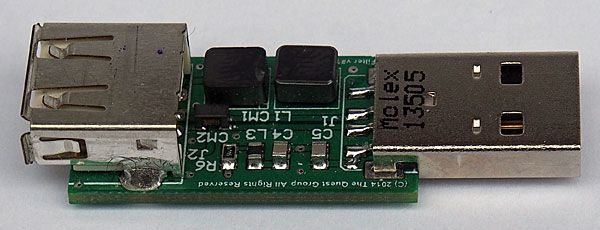
AudioQuest says "the JitterBug conditions both the 5V voltage connection and the biphase data connections, restricting the connection's radio-frequency bandwidth to that appropriate for USB 2.0's maximum specified data rate of 480Mbits/s. As a result, there are said to be improvements in signal/noise ratio and reductions in jitter and parasitic resonances."
Your mileage will probably vary

Martin
Last edited by Martin Walker on Tue Jul 23, 2019 3:10 pm, edited 4 times in total.
-
- Martin Walker
Moderator -
Posts: 22574 Joined: Wed Jan 13, 2010 8:44 am
Location: Cornwall, UK
Contact:
Re: Digital noise and ground loops
Parasitic Resonances
Isn't that an early Nine Inch Nails album?
Last edited by jellyjim on Tue Jul 23, 2019 3:07 pm, edited 1 time in total.
Original artwork and unique devices inspired by vintage technology http://www.thisisobsolete.com
Re: Digital noise and ground loops
-
- Martin Walker
Moderator -
Posts: 22574 Joined: Wed Jan 13, 2010 8:44 am
Location: Cornwall, UK
Contact:
Re: Digital noise and ground loops
//
OK here's the full scoop then and I'm plain out of ideas so ... anyone?!
Minimal setup
Mains wall plug to 4 way extension
On that, MODX PSU, Apollo Twin PSU, MacBook PSU
Apollo connected directly via Thunderbolt (cable from Apple store)
MODX connected directly via USB (cable that came with Elektron RYTM)
Shure headphones connected to Apollo headphone jack
Mono jack leads (Roland branded) from MODX L/R output direct to Apollo Twin inputs (set to line)
Problem
Excessive noise (low-ish background hum and pulsing higher pitched whine/drone) even at normal listening levels
Remove MODX USB cable, completely disappears
Turn off MODX, completely disappears
Unplug Thunderbolt, completely disappears (Apollo can run standalone)
Makes no difference
Laptop battery vs. mains
Console software running vs. not running
Laptop on vs. laptop off (but weirdly disappears during boot up sequence)
Swapped out and made no difference
Jack leads
Mains extension cable
USB cable
Headphones
Laptop itself (MacBook Pro)
Laptop PSU
Tried and made no difference
Stereo jack cable (balanced?)
Various combinations of jack and XLR cables through an active DI with ground lift
Mono jack lead with ground connection cut
USB cable with ferrite lump (though it's an old cable and I can only assume it's a ferrite thingy)
Other USB port (louder, is beside Thunderbolt socket, true for both laptops)
Passive USB hub
Powered USB hub
Distance, position, order of PSUs
Moving PSUs near/far/around one another
Different wall socket (though I had to daisy chain two extension cables to reach)
Notes
The Apollo isn’t bus-powered so can run standaline
Noise isn’t present at MODX’s headphone out
Noise still present when MODX volume at 0
Noise begins even before USB fully inserted
Apollo has no earth pin on PSU
MODX has no earth pin on PSU
Tried other instruments, an Analog RYTM and an OB-6 both connected exactly same way as MODX, no issues at all
Can’t try
Different audio interface
Different Thunderbolt cable
Alternate power supplies for MODX or Apollo
Power socket on a different ring circuit
Now I remember why I 'left the box'!
OK here's the full scoop then and I'm plain out of ideas so ... anyone?!
Minimal setup
Mains wall plug to 4 way extension
On that, MODX PSU, Apollo Twin PSU, MacBook PSU
Apollo connected directly via Thunderbolt (cable from Apple store)
MODX connected directly via USB (cable that came with Elektron RYTM)
Shure headphones connected to Apollo headphone jack
Mono jack leads (Roland branded) from MODX L/R output direct to Apollo Twin inputs (set to line)
Problem
Excessive noise (low-ish background hum and pulsing higher pitched whine/drone) even at normal listening levels
Remove MODX USB cable, completely disappears
Turn off MODX, completely disappears
Unplug Thunderbolt, completely disappears (Apollo can run standalone)
Makes no difference
Laptop battery vs. mains
Console software running vs. not running
Laptop on vs. laptop off (but weirdly disappears during boot up sequence)
Swapped out and made no difference
Jack leads
Mains extension cable
USB cable
Headphones
Laptop itself (MacBook Pro)
Laptop PSU
Tried and made no difference
Stereo jack cable (balanced?)
Various combinations of jack and XLR cables through an active DI with ground lift
Mono jack lead with ground connection cut
USB cable with ferrite lump (though it's an old cable and I can only assume it's a ferrite thingy)
Other USB port (louder, is beside Thunderbolt socket, true for both laptops)
Passive USB hub
Powered USB hub
Distance, position, order of PSUs
Moving PSUs near/far/around one another
Different wall socket (though I had to daisy chain two extension cables to reach)
Notes
The Apollo isn’t bus-powered so can run standaline
Noise isn’t present at MODX’s headphone out
Noise still present when MODX volume at 0
Noise begins even before USB fully inserted
Apollo has no earth pin on PSU
MODX has no earth pin on PSU
Tried other instruments, an Analog RYTM and an OB-6 both connected exactly same way as MODX, no issues at all
Can’t try
Different audio interface
Different Thunderbolt cable
Alternate power supplies for MODX or Apollo
Power socket on a different ring circuit
Now I remember why I 'left the box'!
Original artwork and unique devices inspired by vintage technology http://www.thisisobsolete.com
Re: Digital noise and ground loops
You could try taking a Stanley knife to a USB cable and removing 10mm of screen. I have done this for laptop/AI hum (when on charge) but it made do difference at all. YMMV!
Costs you nothing to try and the cable is still perfectly usable.
When chasing more complex hum loop problems it is worth making up a couple of XLR-XLR and TRS-TRS "stubs" to break screens as they allow a switch swap out to test each run. You could also incorporate a ~1nF RF capacitor.
Dave.
Costs you nothing to try and the cable is still perfectly usable.
When chasing more complex hum loop problems it is worth making up a couple of XLR-XLR and TRS-TRS "stubs" to break screens as they allow a switch swap out to test each run. You could also incorporate a ~1nF RF capacitor.
Dave.
Re: Digital noise and ground loops
ef37a wrote:You could try taking a Stanley knife to a USB cable and removing 10mm of screen. I have done this for laptop/AI hum (when on charge) but it made do difference at all. YMMV! .
Assuming you meant strip everything bar the 4 wires with PVC on 'em, then nope didn't help
Sad face
But thanks
Original artwork and unique devices inspired by vintage technology http://www.thisisobsolete.com
Re: Digital noise and ground loops
Is it possible you've got no ground in your system at all? Are all the power supplies type 2?
-

- Drew Stephenson
Apprentice Guru -
Posts: 29715 Joined: Sun Jul 05, 2015 12:00 am
Location: York
Contact:
(The forumuser formerly known as Blinddrew)
Ignore the post count, I have no idea what I'm doing...
https://drewstephenson.bandcamp.com/
Ignore the post count, I have no idea what I'm doing...
https://drewstephenson.bandcamp.com/
Re: Digital noise and ground loops
blinddrew wrote:Is it possible you've got no ground in your system at all? Are all the power supplies type 2?
Hi
What does type 2 mean?
Original artwork and unique devices inspired by vintage technology http://www.thisisobsolete.com
Re: Digital noise and ground loops
Ooh ..
MODX PSU, no ground pin (it's just plastic)
Apollo PSU, no ground pin (it's just plastic)
MacBook PSU, ground pin connects to nothing
...
MODX PSU, no ground pin (it's just plastic)
Apollo PSU, no ground pin (it's just plastic)
MacBook PSU, ground pin connects to nothing
...
Original artwork and unique devices inspired by vintage technology http://www.thisisobsolete.com
Re: Digital noise and ground loops
Sorry, it means that the device isn't grounded (either uses a fig-8 lead or a wallwart / linelump that doesn't have one). It's common for laptops, AIs and a lot of other audio kit.
EDIT - oh yes, and 'parasitic resonances' is definitely going to be the name of my next band.
EDIT - oh yes, and 'parasitic resonances' is definitely going to be the name of my next band.
Last edited by Drew Stephenson on Tue Jul 23, 2019 10:02 pm, edited 1 time in total.
-
- Drew Stephenson
Apprentice Guru -
Posts: 29715 Joined: Sun Jul 05, 2015 12:00 am
Location: York
Contact:
(The forumuser formerly known as Blinddrew)
Ignore the post count, I have no idea what I'm doing...
https://drewstephenson.bandcamp.com/
Ignore the post count, I have no idea what I'm doing...
https://drewstephenson.bandcamp.com/
Re: Digital noise and ground loops
blinddrew wrote:Sorry, it means that the device isn't grounded (either uses a fig-8 lead or a wallwart / linelump that doesn't have one). It's common for laptops, AIs and a lot of other audio kit.
Yup! See above
So make somthing like an 'earth strap' and connect to ... ?
Original artwork and unique devices inspired by vintage technology http://www.thisisobsolete.com
Re: Digital noise and ground loops
Or plug something in that has a definite solid earth and then make a connection to it. So if you've got a device kicking around with an IEC socket, plug that in and then make a connection to it.
I made one of these: https://www.soundonsound.com/reviews/gr ... ction-plug because it was a problem I had when doing some location recording.
I made one of these: https://www.soundonsound.com/reviews/gr ... ction-plug because it was a problem I had when doing some location recording.
-
- Drew Stephenson
Apprentice Guru -
Posts: 29715 Joined: Sun Jul 05, 2015 12:00 am
Location: York
Contact:
(The forumuser formerly known as Blinddrew)
Ignore the post count, I have no idea what I'm doing...
https://drewstephenson.bandcamp.com/
Ignore the post count, I have no idea what I'm doing...
https://drewstephenson.bandcamp.com/
Re: Digital noise and ground loops
I haven't had a chance to go through the list in details, but it does seem likely that the problem is an absent ground reference, rather than a loop.
A quick and easy test is to get a standard guitar lead, and touch the tip at one end to the metal screw securing a mains wall socket. At the other ends touch the tip to the earthy contact of any audio socket on any of the hardware. That will provide a reasonable ground to the whole system, and that may well cure the noises. If it does, we can work out a more permanent solution.
A quick and easy test is to get a standard guitar lead, and touch the tip at one end to the metal screw securing a mains wall socket. At the other ends touch the tip to the earthy contact of any audio socket on any of the hardware. That will provide a reasonable ground to the whole system, and that may well cure the noises. If it does, we can work out a more permanent solution.
-
- Hugh Robjohns
Moderator -
Posts: 43691 Joined: Fri Jul 25, 2003 12:00 am
Location: Worcestershire, UK
Contact:
Technical Editor, Sound On Sound...
(But generally posting my own personal views and not necessarily those of SOS, the company or the magazine!)
In my world, things get less strange when I read the manual...
(But generally posting my own personal views and not necessarily those of SOS, the company or the magazine!)
In my world, things get less strange when I read the manual...
Re: Digital noise and ground loops
I'll try that but the noise is only there on the audio output (as monitored through the Apollo) when the USB is plugged into the laptop (where the Apollo is also plugged in via Thunderbolt)
It's not there if I monitor the MODX through my desk
But other instruments with USB connections to the laptop can be monitored through the Apollo without noise (I've tried an Analog RYTM that has a figure of 8 to a brick and an OB-6 that has a 3 pin IEC )
So ... the MODX has no digital ground but otherwise is grounded?!
It's not there if I monitor the MODX through my desk
But other instruments with USB connections to the laptop can be monitored through the Apollo without noise (I've tried an Analog RYTM that has a figure of 8 to a brick and an OB-6 that has a 3 pin IEC )
So ... the MODX has no digital ground but otherwise is grounded?!
Original artwork and unique devices inspired by vintage technology http://www.thisisobsolete.com
Re: Digital noise and ground loops
Or some kind of loop within the MacBook? The noise is there even with the MacBook powered down and unconnected to the PSU!
Original artwork and unique devices inspired by vintage technology http://www.thisisobsolete.com
Re: Digital noise and ground loops
I would definitely try plugging in something with a decent ground connection (check the resistance is close to 0 ohms with a meter if possible). Even when a laptop seems to be grounded, there may be a higher impedance to ground than we would like which will cause noise. Even when the computer is switched off, certain circuits like the real time clock and its associated power supply will still be active.
-

- James Perrett
Moderator -
Posts: 16988 Joined: Mon Sep 10, 2001 12:00 am
Location: The wilds of Hampshire
Contact:
JRP Music - Audio Mastering and Restoration. JRP Music Facebook Page
Re: Digital noise and ground loops
James Perrett wrote:I would definitely try plugging in something with a decent ground connection (check the resistance is close to 0 ohms with a meter if possible). Even when a laptop seems to be grounded, there may be a higher impedance to ground than we would like which will cause noise. Even when the computer is switched off, certain circuits like the real time clock and its associated power supply will still be active.
I plugged in the OB-6 which has a 3 pin IEC connector. Left the MODX plugged into the left Apollo input and then plugged the OB-6 into the right input. Noise on the MODX channel (left). No noise OB-6 channel (right). If the OB-6 is grounded, and surely the Apollo has a common internal ground, then that should have eliminated it, no?
Original artwork and unique devices inspired by vintage technology http://www.thisisobsolete.com
Re: Digital noise and ground loops
Having looked through the thread again, I'm just wondering whether the MODX takes power for its USB interface from the USB connection which means that the current in the USB cable will cause the ground of the MODX to be different to the ground of the Apollo.
Does the Apollo have a balanced line input? If so, it might be worth trying a pseudo balanced cable between the MODX and the Apollo.
Does the Apollo have a balanced line input? If so, it might be worth trying a pseudo balanced cable between the MODX and the Apollo.
-
- James Perrett
Moderator -
Posts: 16988 Joined: Mon Sep 10, 2001 12:00 am
Location: The wilds of Hampshire
Contact:
JRP Music - Audio Mastering and Restoration. JRP Music Facebook Page
Re: Digital noise and ground loops
James Perrett wrote:Having looked through the thread again, I'm just wondering whether the MODX takes power for its USB interface from the USB connection which means that the current in the USB cable will cause the ground of the MODX to be different to the ground of the Apollo.
Does the Apollo have a balanced line input? If so, it might be worth trying a pseudo balanced cable between the MODX and the Apollo.
It does have a balanced input and the MODX isn't balanced. I wasn't exactly sure what you meant by a pseudo balanced cable so I Googled and jerry-rigged #14 on the list half way down this page. It didn't help.
Original artwork and unique devices inspired by vintage technology http://www.thisisobsolete.com