Good software compressor for tracking?

Discuss hardware/software tools and techniques involved in capturing sound, in the studio, live or on location.

Re: Good software compressor for tracking?

Post by Arpangel »

Sam Spoons wrote:24 bit good, 96kHz maybe. Many on here seem to prefer 44.1 for audio only and 48 if working with video. Doubling sample rates mostly doesn't add anything useful.

I agree, I've never used anything other than 16/44.1 its always been more than good enough for our music. I'm just going to have to reduce levels, and see what happens.
User avatar
Arpangel
Forum Aficionado
Posts: 21952 Joined: Sat Jul 12, 2003 12:00 am
"I will not say: do not weep; for not all tears are an evil" Gandalf - J.R.R. Tolkien.

Re: Good software compressor for tracking?

Post by Wonks »

Go 24 bit and you'll be fine. You can record at a lower level and still have plenty of room above the electronics noise floor.

I think Hugh once said that around 80kHz was probably the best sample rate to improve very small timing artefacts that the brain is able to discern and affects sound quality slightly, but not have too many other artefacts created by using too high a sample rate. So 88.2kHz is probably the best easily available rate to record at. But I can't remember whether you also had to play back at the same rate to keep the benefits. I assume so.
User avatar
Wonks
Jedi Poster
Posts: 19208 Joined: Thu May 29, 2003 12:00 am Location: Freethorpe, Norfolk, UK
Reliably fallible.

Re: Good software compressor for tracking?

Post by The Elf »

44.1/24-bit is the way to go.
User avatar
The Elf
Forum Aficionado
Posts: 21437 Joined: Tue Aug 14, 2001 12:00 am Location: Sheffield, UK
An Eagle for an Emperor, A Kestrel for a Knave.

Re: Good software compressor for tracking?

Post by James Perrett »

Wonks wrote: I think Hugh once said that around 80kHz was probably the best sample rate to improve very small timing artefacts that the brain is able to discern and affects sound quality slightly, but not have too many other artefacts created by using too high a sample rate.

I've seen the figure of 60kHz mentioned by a few people as being sufficient to move filtering artefacts out of the audible spectrum. The timing argument is a red herring as timing is not directly affected by the sample rate. The page at https://science-of-sound.net/2016/02/ti ... tal-audio/ seems to give a good explanation.
Last edited by James Perrett on Sat Sep 07, 2019 1:02 am, edited 1 time in total.
User avatar
James Perrett
Moderator
Posts: 16991 Joined: Mon Sep 10, 2001 12:00 am Location: The wilds of Hampshire
JRP Music - Audio Mastering and Restoration. JRP Music Facebook Page

Re: Good software compressor for tracking?

Post by Arpangel »

Bob Bickerton wrote:
Wonks wrote:
Bob Bickerton wrote:But a compressor after the converters will not prevent clipping as has been said.

Bob

But we've already moved on to hardware compressors as software ones won't work. Why are you referring back to software compressors?

Because Arp's response to Elf was ambiguous?

Bob

On a digital mixer, is it possible to place effects anywhere? Like, before the main gain stage? A compressor for instance?
User avatar
Arpangel
Forum Aficionado
Posts: 21952 Joined: Sat Jul 12, 2003 12:00 am
"I will not say: do not weep; for not all tears are an evil" Gandalf - J.R.R. Tolkien.

Re: Good software compressor for tracking?

Post by Wonks »

The input gain stage is there to set the level going into the A/D converter. Until the signal has been through the A/D converter, you can't add any digital effects at all.

The input gain stage may be pure analogue with its own pot, or digitally controlled analogue electronics, but at that point the signal is still analogue. There may be insert points so you can add outboard compressors/limiters, but these too will be in the analogue domain.

So, no.
User avatar
Wonks
Jedi Poster
Posts: 19208 Joined: Thu May 29, 2003 12:00 am Location: Freethorpe, Norfolk, UK
Reliably fallible.

Re: Good software compressor for tracking?

Post by Arpangel »

Wonks wrote:The input gain stage is there to set the level going into the A/D converter. Until the signal has been through the A/D converter, you can't add any digital effects at all.

The input gain stage may be pure analogue with its own pot, or digitally controlled analogue electronics, but at that point the signal is still analogue. There may be insert points so you can add outboard compressors/limiters, but these too will be in the analogue domain.

So, no.

Thanks Wonks, the way to go is definitely -24 I think!
I worked with my friend Mike Skeet for years, on music of all types, and I didn't see him use a compressor once when recording. I'm using his mic pre, which had toms of headroom, it's just my Motu that keeps overloading, back to keeping the levels down again.,
Last edited by Arpangel on Sat Sep 07, 2019 8:26 am, edited 1 time in total.
User avatar
Arpangel
Forum Aficionado
Posts: 21952 Joined: Sat Jul 12, 2003 12:00 am
"I will not say: do not weep; for not all tears are an evil" Gandalf - J.R.R. Tolkien.

Re: Good software compressor for tracking?

Post by Wonks »

It's a good move and costs nothing except 50% more file storage space.
User avatar
Wonks
Jedi Poster
Posts: 19208 Joined: Thu May 29, 2003 12:00 am Location: Freethorpe, Norfolk, UK
Reliably fallible.

Re: Good software compressor for tracking?

Post by Hugh Robjohns »

Arpangel wrote:On a digital mixer, is it possible to place effects anywhere? Like, before the main gain stage? A compressor for instance?

Nope. The gains stage has to be in the analogue domain, obviously, while a digital compressor in a digital mixer has to be in the digital domain, after the A-D converter. It therefore won't help if your gain staging is inappropriate such that you're clipping the converter.

But we've had this discussion before in your original recording a piano/marimba thread: you just need to record with more headroom. As the Elf says, it really is that simple!

I'd definitely switch to 24 bits if you're currently using 16 -- that will allow you the required additional headroom without compromising the system noise floor. Switching to 96k (or 88.2) sampling won't make any difference to your clipping problems, but you might perceive it as capturing the percussive transients better.

From your descriptions, I'd set up with around 20dB headroom. Just record a noisy part of the rehearsal, play it back, check the level, and tweak the preamp gain accordingly for peaks to reach around -20dBFS. When you record your actual performances you'll probably find the peaks are 10dB higher, but that's fine...

H
User avatar
Hugh Robjohns
Moderator
Posts: 43693 Joined: Fri Jul 25, 2003 12:00 am Location: Worcestershire, UK
Technical Editor, Sound On Sound...
(But generally posting my own personal views and not necessarily those of SOS, the company or the magazine!)
In my world, things get less strange when I read the manual... 

Re: Good software compressor for tracking?

Post by CS70 »

Hugh Robjohns wrote:When you record your actual performances you'll probably find the peaks are 10dB higher

This seems to be an immutable laws of the universe - Thou Shall Play The Performance Way Louder Than The Soundcheck

Must be etched in some stone given to a beardy type somewhere.
User avatar
CS70
Longtime Poster
Posts: 7799 Joined: Mon Nov 26, 2012 12:00 am Location: Oslo, Norway
Silver Spoon - Check out our latest video and the FB page

Re: Good software compressor for tracking?

Post by Drew Stephenson »

CS70 wrote:
Hugh Robjohns wrote:When you record your actual performances you'll probably find the peaks are 10dB higher

This seems to be an immutable laws of the universe - Thou Shall Play The Performance Way Louder Than The Soundcheck

Must be etched in some stone given to a beardy type somewhere.

It's currently under the shelf in Hugh's shed! ;)
User avatar
Drew Stephenson
Apprentice Guru
Posts: 29719 Joined: Sun Jul 05, 2015 12:00 am Location: York
(The forumuser formerly known as Blinddrew)
Ignore the post count, I have no idea what I'm doing...
https://drewstephenson.bandcamp.com/

Re: Good software compressor for tracking?

Post by Arpangel »

Hugh Robjohns wrote:
Arpangel wrote:On a digital mixer, is it possible to place effects anywhere? Like, before the main gain stage? A compressor for instance?

Nope. The gains stage has to be in the analogue domain, obviously, while a digital compressor in a digital mixer has to be in the digital domain, after the A-D converter. It therefore won't help if your gain staging is inappropriate such that you're clipping the converter.

But we've had this discussion before in your original recording a piano/marimba thread: you just need to record with more headroom. As the Elf says, it really is that simple!

I'd definitely switch to 24 bits if you're currently using 16 -- that will allow you the required additional headroom without compromising the system noise floor. Switching to 96k (or 88.2) sampling won't make any difference to your clipping problems, but you might perceive it as capturing the percussive transients better.

From your descriptions, I'd set up with around 20dB headroom. Just record a noisy part of the rehearsal, play it back, check the level, and tweak the preamp gain accordingly for peaks to reach around -20dBFS. When you record your actual performances you'll probably find the peaks are 10dB higher, but that's fine...

H

I know Hugh, it's definitely a level "thang" :)
I don't know why, but I always have to have those meters showing a healthy level, I've just got to get used to seeing them in the weeds! It just makes feel really insecure!!
User avatar
Arpangel
Forum Aficionado
Posts: 21952 Joined: Sat Jul 12, 2003 12:00 am
"I will not say: do not weep; for not all tears are an evil" Gandalf - J.R.R. Tolkien.

Re: Good software compressor for tracking?

Post by Hugh Robjohns »

Arpangel wrote:I don't know why, but I always have to have those meters showing a healthy level, I've just got to get used to seeing them in the weeds! It just makes feel really insecure!!

You're too old school! :-)

Get yourself an analogue meter -- an old PPM or VU meter display.

Analogue engineers were sensible people and so analogue meters don't show the headroom margin, meaning you can have apparently 'healthy' levels, and even 'push into the red' without fear of actually overloading anything!

Alternatively, a K-meter plugin on the DAW, or reconfigure the colours of the DAW's own meters so that it switches from green to orange at -20dBFS and orange to red at -12dBFS. That will encourage sensible headroom margins and provide confidence that all is as it should be when tracking!

H
User avatar
Hugh Robjohns
Moderator
Posts: 43693 Joined: Fri Jul 25, 2003 12:00 am Location: Worcestershire, UK
Technical Editor, Sound On Sound...
(But generally posting my own personal views and not necessarily those of SOS, the company or the magazine!)
In my world, things get less strange when I read the manual... 

Re: Good software compressor for tracking?

Post by CS70 »

Arpangel wrote:I don't know why, but I always have to have those meters showing a healthy level, I've just got to get used to seeing them in the weeds! It just makes feel really insecure!!

Yeah it's one of the main challenges of moving from analog to digital recording.

Not helped by the fact that most DAWs try to emulate analog visually, so they give you misleading images - like minuscule waveforms and meters that turn yellow just before 0dBFS and stay very very low when you average at -18dBFS.

It is really only a matter of zooming in.

If DAWs' waveform default zoom were set to show a few less decibels (instead of the full dynamic range) and DAWs' default meters had a sensible reference level for a 24bits dynamic range, (showing yellow starting at say -12dbFS, and zooming in so that -18dbFS looks healthy, nobody would overcook levels inadvertently.

In some DAWs you can change the defaults and there are replacement meters which help, but it's little use when most people open the DAW and go (including me at the beginning)..
Last edited by CS70 on Mon Sep 09, 2019 10:18 am, edited 4 times in total.
User avatar
CS70
Longtime Poster
Posts: 7799 Joined: Mon Nov 26, 2012 12:00 am Location: Oslo, Norway
Silver Spoon - Check out our latest video and the FB page

Re: Good software compressor for tracking?

Post by Arpangel »

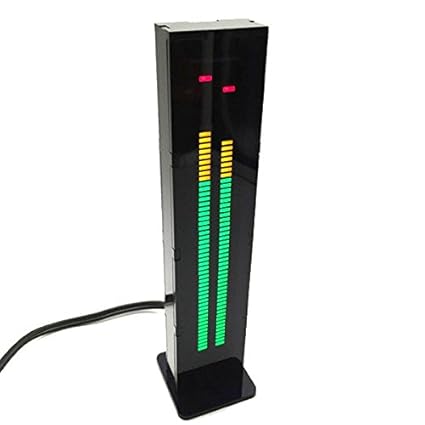
Hugh, I've been looking for ages for a big hardware meter to sit on top of my gear, so I can see it from anywhere in the room! but no luck. I can't configure my meters in Reaper to go anywhere near large enough.
Maybe a software meter?
Last edited by Arpangel on Mon Sep 09, 2019 10:42 am, edited 1 time in total.
User avatar
Arpangel
Forum Aficionado
Posts: 21952 Joined: Sat Jul 12, 2003 12:00 am
"I will not say: do not weep; for not all tears are an evil" Gandalf - J.R.R. Tolkien.

Re: Good software compressor for tracking?

Post by Hugh Robjohns »

There's a cheap and cheerful DIY kit here: Image

https://www.amazon.co.uk/SODIAL-Channel-Digital-Spectrum-Display/dp/B07FSZGK6Q

But if you want something a bit more serious, there are plenty of second-hand twin PPMs around. Try BB List: https://www.bblist.co.uk/search.php?keyword=PPM

Here's a nice one for £90. Image

https://www.bblist.co.uk/item.php?item=47686
User avatar
Hugh Robjohns
Moderator
Posts: 43693 Joined: Fri Jul 25, 2003 12:00 am Location: Worcestershire, UK
Technical Editor, Sound On Sound...
(But generally posting my own personal views and not necessarily those of SOS, the company or the magazine!)
In my world, things get less strange when I read the manual... 

Re: Good software compressor for tracking?

Post by Arpangel »

Hugh Robjohns wrote:There's a cheap and cheerful DIY kit here: Image

https://www.amazon.co.uk/SODIAL-Channel-Digital-Spectrum-Display/dp/B07FSZGK6Q

But if you want something a bit more serious, there are plenty of second-hand twin PPMs around. Try BB List: https://www.bblist.co.uk/search.php?keyword=PPM

Here's a nice one for £90. Image

https://www.bblist.co.uk/item.php?item=47686

Thanks Hugh, that led one looks good.
User avatar
Arpangel
Forum Aficionado
Posts: 21952 Joined: Sat Jul 12, 2003 12:00 am
"I will not say: do not weep; for not all tears are an evil" Gandalf - J.R.R. Tolkien.

Re: Good software compressor for tracking?

Post by ManFromGlass »

Yeah Hugh!
That digital one looks very cool. :bouncy:
Thanks!

Blinky lights always impress producers!
(and me!)
User avatar
ManFromGlass
Longtime Poster
Posts: 7862 Joined: Sun Jul 24, 2011 12:00 am Location: O Canada

Re: Good software compressor for tracking?

Post by The Elf »

Arpangel wrote:I don't know why, but I always have to have those meters showing a healthy level, I've just got to get used to seeing them in the weeds!

Better still - get used to the idea that those daisies don't need to be the size of sunflowers! :lol:
Last edited by The Elf on Mon Sep 09, 2019 2:47 pm, edited 1 time in total.
User avatar
The Elf
Forum Aficionado
Posts: 21437 Joined: Tue Aug 14, 2001 12:00 am Location: Sheffield, UK
An Eagle for an Emperor, A Kestrel for a Knave.

Re: Good software compressor for tracking?

Post by James Perrett »

CS70 wrote: If DAWs' waveform default zoom were set to show a few less decibels (instead of the full dynamic range) and DAWs' default meters had a sensible reference level for a 24bits dynamic range, (showing yellow starting at say -12dbFS, and zooming in so that -18dbFS looks healthy, nobody would overcook levels inadvertently.

I've set up Reaper to show a non linear waveform scale which really helps - but the option is buried deep in the menus and it took me years to discover it.
User avatar
James Perrett
Moderator
Posts: 16991 Joined: Mon Sep 10, 2001 12:00 am Location: The wilds of Hampshire
JRP Music - Audio Mastering and Restoration. JRP Music Facebook Page

Re: Good software compressor for tracking?

Post by CS70 »

James Perrett wrote:
CS70 wrote: If DAWs' waveform default zoom were set to show a few less decibels (instead of the full dynamic range) and DAWs' default meters had a sensible reference level for a 24bits dynamic range, (showing yellow starting at say -12dbFS, and zooming in so that -18dbFS looks healthy, nobody would overcook levels inadvertently.

I've set up Reaper to show a non linear waveform scale which really helps - but the option is buried deep in the menus and it took me years to discover it.

Plus one for Reaper!

The combination of full scale waveform displays trying to show 144 (logarithmic) decibels of dynamic range in one and a half centimeters of (linear) screen space, and full scale meters getting in the yellow only very near the top, is insane.

It makes the unaware engineer think that his half-scale signal, which is absolutely pristine with respect to anything that was possible on tape, actually sucks.. so he cranks up the gain :D And one display reinforces the other. And it's just the damn GUI!

It's one of my fave rants. :)

Most people looks at me with a funny face when I try to explain. Thank god for SOS forum :D
Last edited by CS70 on Mon Sep 09, 2019 11:07 pm, edited 7 times in total.
User avatar
CS70
Longtime Poster
Posts: 7799 Joined: Mon Nov 26, 2012 12:00 am Location: Oslo, Norway
Silver Spoon - Check out our latest video and the FB page

Re: Good software compressor for tracking?

Post by MOF »

It makes the unaware engineer think that his half-scale signal, which is absolutely pristine with respect to anything that was possible on tape, actually sucks.. so he cranks up the gain :D And one display reinforces the other. And it's just the damn GUI!

It sort of reminds me of one of my former colleagues telling me about the time he went into a video edit suite (analogue era) and telling the editor that the audio levels looked a bit low, the response was an increase in the speaker levels. :D
Last edited by MOF on Mon Sep 09, 2019 11:36 pm, edited 2 times in total.
MOF
Frequent Poster
Posts: 2578 Joined: Thu Mar 06, 2003 12:00 am Location: United Kingdom

Re: Good software compressor for tracking?

Post by Tim Gillett »

Arpangel wrote: I don't know why, but I always have to have those meters showing a healthy level, I've just got to get used to seeing them in the weeds! It just makes feel really insecure!!

Many meters don't show what's going on down "in the weeds", but some such as in mastering programmes can show pretty much everything.

In the old days of pro field recording with analog tape, typically Nagras, the meter couldn't display the lower levels but recordists could hear them through headphones, and specifically how much extra noise the tape added.
We can do the same today. We can toggle between source and "tape" (converter output). Maybe few people do it these days because often the converter is so quiet that it's not an issue. But if you're at all worried about what might be going on down "in the weeds" I'd encourage you to simply listen.
Last edited by Tim Gillett on Tue Sep 10, 2019 4:28 am, edited 2 times in total.
Tim Gillett
Frequent Poster
Posts: 2707 Joined: Wed Jan 30, 2013 12:00 am Location: Perth, Western Australia

Re: Good software compressor for tracking?

Post by Arpangel »

I'm going to have to get one of those meters Hugh suggested, it seems like the perfect solution, I've already got a big meter on my mic preamp, it's got a built in led matrix called "The Box" but it's only useful for phase and stereo spread, useless for level metering.
BB list is good, but I like to deal directly with a seller, all seems a bit complex to me.
Last edited by Arpangel on Tue Sep 10, 2019 7:09 am, edited 1 time in total.
User avatar
Arpangel
Forum Aficionado
Posts: 21952 Joined: Sat Jul 12, 2003 12:00 am
"I will not say: do not weep; for not all tears are an evil" Gandalf - J.R.R. Tolkien.

Re: Good software compressor for tracking?

Post by Tim Gillett »

You may already have a suitable one. My first digital recording/editing program was Wavelab 4, bought in 2003 and still use it today. It has a great stereo meter which can display the levels down to the theoretical limits. I suspect many other such programs have similarly informative meters built in.
Last edited by Tim Gillett on Tue Sep 10, 2019 7:48 am, edited 1 time in total.
Tim Gillett
Frequent Poster
Posts: 2707 Joined: Wed Jan 30, 2013 12:00 am Location: Perth, Western Australia
Post Reply