Still trying to work out the best way to do this, I can’t use the volume envelope for this as it’s too fiddly, I need something that just reduces the peaks in an item, to allow me to raise the overall level.
I do this normally by going through and reducing the peaks with the volume envelope, but it takes ages, just wondering if there’s a quicker easier solution?
Using Reaper to smooth out peaks?


Re: Using Reaper to smooth out peaks?
ore_terra wrote:A compressor (limiter)?
I was thinking of manually lowering the levels of peaks, if you can imagine the Reaper volume envelope, but being able to place it above the 0 dB point on the item, that’s what I need.
"I will not say: do not weep; for not all tears are an evil" Gandalf - J.R.R. Tolkien.
Re: Using Reaper to smooth out peaks?
If you're just looking at cutting the peaks of sharp transients have a look at the GClip plugin.
As recommended by The Elf and Zukan.
As recommended by The Elf and Zukan.
-

- Drew Stephenson
Apprentice Guru -
Posts: 29707 Joined: Sun Jul 05, 2015 12:00 am
Location: York
Contact:
(The forumuser formerly known as Blinddrew)
Ignore the post count, I have no idea what I'm doing...
https://drewstephenson.bandcamp.com/
Ignore the post count, I have no idea what I'm doing...
https://drewstephenson.bandcamp.com/
Re: Using Reaper to smooth out peaks?
blinddrew wrote:If you're just looking at cutting the peaks of sharp transients have a look at the GClip plugin.
As recommended by The Elf and Zukan.
I’ll do that, I’m talking about the odd heavy handed note, not big sections.
PS, just looked, it’s for Windows only, I’m on Mac.
Last edited by Arpangel on Thu Apr 02, 2020 11:40 am, edited 1 time in total.
"I will not say: do not weep; for not all tears are an evil" Gandalf - J.R.R. Tolkien.
Re: Using Reaper to smooth out peaks?
It's a task that limiters were designed for... and these days with look-ahead limiter plugins it's easier and more transparent than ever.
Having said that, if it's just a few troublesome peaks I just do some manual editing. Snip, snip, section level change -4dB (or whatever), next.... it takes mere seconds.
Having said that, if it's just a few troublesome peaks I just do some manual editing. Snip, snip, section level change -4dB (or whatever), next.... it takes mere seconds.
-

- Hugh Robjohns
Moderator -
Posts: 43683 Joined: Fri Jul 25, 2003 12:00 am
Location: Worcestershire, UK
Contact:
Technical Editor, Sound On Sound...
(But generally posting my own personal views and not necessarily those of SOS, the company or the magazine!)
In my world, things get less strange when I read the manual...
(But generally posting my own personal views and not necessarily those of SOS, the company or the magazine!)
In my world, things get less strange when I read the manual...
Re: Using Reaper to smooth out peaks?
Hugh Robjohns wrote:It's a task that limiters were designed for... and these days with look-ahead limiter plugins it's easier and more transparent than ever.
Having said that, if it's just a few troublesome peaks I just do some manual editing. Snip, snip, section level change -4dB (or whatever), next.... it takes mere seconds.
Yes, I’ve tried that, cutting the offending note out, reducing its level, then "glueing" it back together, but I’m having trouble making a smooth volume transition between the edited note and the rest of the track, I’ve changed the shape of the envelope points in Reaper to "smooth in, smooth out" and it makes it a little better, but it’s still noticeable.
Last edited by Arpangel on Thu Apr 02, 2020 4:49 pm, edited 1 time in total.
"I will not say: do not weep; for not all tears are an evil" Gandalf - J.R.R. Tolkien.
Re: Using Reaper to smooth out peaks?
Arpangel wrote:Yes, I’ve tried that, cutting the offending note out, reducing its level, then "glueing" it back together, but I’m having trouble making a smooth volume transition between the edited note and the rest of the track...
Then either you're doing it wrong, or you need a better DAW.
I don't take anything 'out'. I literally create an edit point fractionally before and after the offending transient, typically with a 10ms cross-fade for each one (replicating a quarter-inch tape edit). I then select the isolated segment or clip and reduce its level by 4dB or so, as necessary. And that's it. It's extraordinarily rare that I or anyone can hear the edits or any obvious volume transition.
All I'm doing is what a look-ahead limiter does, but with a degree of more intelligent application...
H
Last edited by Hugh Robjohns on Thu Apr 02, 2020 8:13 pm, edited 1 time in total.
-
- Hugh Robjohns
Moderator -
Posts: 43683 Joined: Fri Jul 25, 2003 12:00 am
Location: Worcestershire, UK
Contact:
Technical Editor, Sound On Sound...
(But generally posting my own personal views and not necessarily those of SOS, the company or the magazine!)
In my world, things get less strange when I read the manual...
(But generally posting my own personal views and not necessarily those of SOS, the company or the magazine!)
In my world, things get less strange when I read the manual...
Re: Using Reaper to smooth out peaks?
Hugh Robjohns wrote:Arpangel wrote:Yes, I’ve tried that, cutting the offending note out, reducing its level, then "glueing" it back together, but I’m having trouble making a smooth volume transition between the edited note and the rest of the track...
Then either you're doing it wrong, or you need a better DAW.
I don't take anything 'out'. I literally create an edit point fractionally before and after the offending transient, typically with a 10ms cross-fade for each one (replicating a quarter-inch tape edit). I then select the isolated segment or clip and reduce its level by 4dB or so, as necessary. And that's it. It's extraordinarily rare that I or anyone can hear the edits or any obvious volume transition.
All I'm doing is what a look-ahead limiter does, but with a degree of more intelligent application...
H
Yup! I was doing the very same this afternoon to deal with over-obtrusive mouth-clicks on some spoken-word I'd been sent...
Last edited by Hugh Robjohns on Thu Apr 02, 2020 8:12 pm, edited 1 time in total.
-
- Mike Stranks
Jedi Poster - Posts: 10589 Joined: Fri Jan 03, 2003 12:00 am
Re: Using Reaper to smooth out peaks?
It can take a bit of time but I’ve found nothing as effective and I’ve looked.
Hugh - 10ms is the length of a tape crossfade? 30 ips? I find that interesting because in the DAW my crossfade length of choice is around 9 ms because it just feels right. Interesting.
Hugh - 10ms is the length of a tape crossfade? 30 ips? I find that interesting because in the DAW my crossfade length of choice is around 9 ms because it just feels right. Interesting.
-

- ManFromGlass
Longtime Poster - Posts: 7858 Joined: Sun Jul 24, 2011 12:00 am Location: O Canada
Re: Using Reaper to smooth out peaks?
To make the maths easy - if the edit is slanted so that it has a length of 0.15" (equivalent to an angle of 59 degrees) it will take 10ms to pass the head at 15 ips. Of course, that's for the full tape width so, as each channel takes up about a third of the tape width, the cross fade is around 3.3ms for each channel.
-

- James Perrett
Moderator -
Posts: 16983 Joined: Mon Sep 10, 2001 12:00 am
Location: The wilds of Hampshire
Contact:
JRP Music - Audio Mastering and Restoration. JRP Music Facebook Page
Re: Using Reaper to smooth out peaks?
Hugh Robjohns wrote:Arpangel wrote:Yes, I’ve tried that, cutting the offending note out, reducing its level, then "glueing" it back together, but I’m having trouble making a smooth volume transition between the edited note and the rest of the track...
Then either you're doing it wrong, or you need a better DAW.
I don't take anything 'out'. I literally create an edit point fractionally before and after the offending transient, typically with a 10ms cross-fade for each one (replicating a quarter-inch tape edit). I then select the isolated segment or clip and reduce its level by 4dB or so, as necessary. And that's it. It's extraordinarily rare that I or anyone can hear the edits or any obvious volume transition.
All I'm doing is what a look-ahead limiter does, but with a degree of more intelligent application...
H
What don you mean by an "edit point"? And you say you isolate the segment?
Sounds like what I do, I cut either side of the offending note, reduce its level, then splice it back together again making a smooth transition.
I’m thinking that Reaper is a bit of a blunt instrument when it comes to note for note editing, I never had this trouble when I was using Sequoia years ago, it just sort of did it and sounded much better with less effort.
Last edited by Arpangel on Fri Apr 03, 2020 6:14 am, edited 1 time in total.
"I will not say: do not weep; for not all tears are an evil" Gandalf - J.R.R. Tolkien.
Re: Using Reaper to smooth out peaks?
Arpangel wrote:Hugh Robjohns wrote:Arpangel wrote:Yes, I’ve tried that, cutting the offending note out, reducing its level, then "glueing" it back together, but I’m having trouble making a smooth volume transition between the edited note and the rest of the track...
Then either you're doing it wrong, or you need a better DAW.
I don't take anything 'out'. I literally create an edit point fractionally before and after the offending transient, typically with a 10ms cross-fade for each one (replicating a quarter-inch tape edit). I then select the isolated segment or clip and reduce its level by 4dB or so, as necessary. And that's it. It's extraordinarily rare that I or anyone can hear the edits or any obvious volume transition.
All I'm doing is what a look-ahead limiter does, but with a degree of more intelligent application...
H
What don you mean by an "edit point"? And you say you isolate the segment?
Sounds like what I do, I cut either side of the offending note, reduce its level, then splice it back together again making a smooth transition.
I’m thinking that Reaper is a bit of a blunt instrument when it comes to note for note editing, I never had this trouble when I was using Sequoia years ago, it just sort of did it and sounded much better with less effort.
I do this kind of thing in Reaper all the time with absolutely no problems.
-
- Aled Hughes
Frequent Poster -
Posts: 2135 Joined: Tue Oct 24, 2006 12:00 am
Location: Pwllheli, Cymru
Contact:
Re: Using Reaper to smooth out peaks?
Ramirez wrote:Arpangel wrote:Hugh Robjohns wrote:Arpangel wrote:Yes, I’ve tried that, cutting the offending note out, reducing its level, then "glueing" it back together, but I’m having trouble making a smooth volume transition between the edited note and the rest of the track...
Then either you're doing it wrong, or you need a better DAW.
I don't take anything 'out'. I literally create an edit point fractionally before and after the offending transient, typically with a 10ms cross-fade for each one (replicating a quarter-inch tape edit). I then select the isolated segment or clip and reduce its level by 4dB or so, as necessary. And that's it. It's extraordinarily rare that I or anyone can hear the edits or any obvious volume transition.
All I'm doing is what a look-ahead limiter does, but with a degree of more intelligent application...
H
What don you mean by an "edit point"? And you say you isolate the segment?
Sounds like what I do, I cut either side of the offending note, reduce its level, then splice it back together again making a smooth transition.
I’m thinking that Reaper is a bit of a blunt instrument when it comes to note for note editing, I never had this trouble when I was using Sequoia years ago, it just sort of did it and sounded much better with less effort.
I do this kind of thing in Reaper all the time with absolutely no problems.
Looks like I’m not very good at this then, like everything else, you’ve got to like doing it to make a good job of it, and a I hate editing.
"I will not say: do not weep; for not all tears are an evil" Gandalf - J.R.R. Tolkien.
Re: Using Reaper to smooth out peaks?
Arpangel wrote:Hugh Robjohns wrote:It's a task that limiters were designed for... and these days with look-ahead limiter plugins it's easier and more transparent than ever.
Having said that, if it's just a few troublesome peaks I just do some manual editing. Snip, snip, section level change -4dB (or whatever), next.... it takes mere seconds.
Yes, I’ve tried that, cutting the offending note out, reducing its level, then "glueing" it back together, but I’m having trouble making a smooth volume transition between the edited note and the rest of the track, I’ve changed the shape of the envelope points in Reaper to "smooth in, smooth out" and it makes it a little better, but it’s still noticeable.
That's usually what crossfades are for. The more the difference, the longer the crossfade must be - but usually we're talking 5-10ms, really really large ones are 50ms.
In the end it should be looking like this
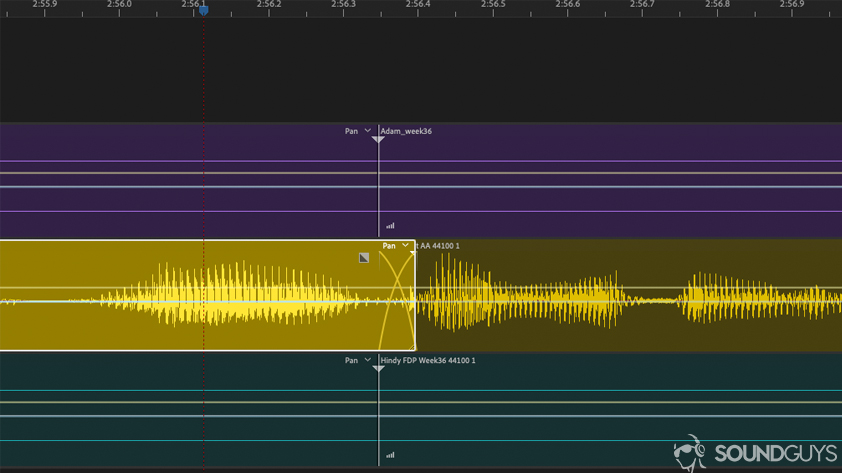
(random image from the internet but gets you the idea). The guys in the image use a "slow" crossfade but there's really no need, a "linear" one is just fine (where the fade trajectory are straight lines instead of bowed as in the pic)

Silver Spoon - Check out our latest video and the FB page
Re: Using Reaper to smooth out peaks?
Arpangel wrote:
Looks like I’m not very good at this then, like everything else, you’ve got to like doing it to make a good job of it, and a I hate editing.
I don't know Reaper, but it seems like you're possibly using the wrong 'edit' command. In my editor when I 'delete' it just removes it and automatically realigns the audio. Of course, if you get it wrong you simply 'undo' and try again.
In this case I'd highlight the offending peak - often just a few milliseconds - then reduce the level on the highlighted portion, 'commit' (or whatever 'do it term you prefer) and then go on my way.
Just guessing so apologies, but are you possibly using a 'copy and paste' technique?
As for editing, I get enormous satisfaction from taking rough, fluff-ridden, snuffle-heavy audio and making it into something where 'you can't hear the join'. But then I have been doing it for over 45 years and the relief not to be rocking tape and cutting the stuff is huge!

-
- Mike Stranks
Jedi Poster - Posts: 10589 Joined: Fri Jan 03, 2003 12:00 am
Re: Using Reaper to smooth out peaks?
ManFromGlass wrote:Hugh - 10ms is the length of a tape crossfade? 30 ips? I find that interesting because in the DAW my crossfade length of choice is around 9 ms because it just feels right. Interesting.
On quarter-inch tape (6.35mm), a 45-degree razor cut would cover a quarter-inch of tape. And at 15 ips (381mm/s) the time taken to replay a 1/4-inch of tape is 16ms (6.35/381).
However, assuming we're talking about a stereo half-track machine, that razor cut only has to cover less than half the width of the tape (roughly around a third, allowing for the guard bands, actually) for each track, so the cross-fade into the new material actually lasts around 6ms.
Obviously, at 30ips the crossfade duration would be half that. And if a steeper 30-degree razor cut was employed it would be about 3-4ms at 15 ips ...and half that again at 30ips.
Also worth noting -- purely for interest -- that when editing analogue tape one channel normally crossfades slightly (4-8ms) before the other (depending which way up the edit block is!) -- unless you get sophisticated and cut fishtail edits with brass scissors!
H
Last edited by Hugh Robjohns on Fri Apr 03, 2020 10:16 am, edited 1 time in total.
-
- Hugh Robjohns
Moderator -
Posts: 43683 Joined: Fri Jul 25, 2003 12:00 am
Location: Worcestershire, UK
Contact:
Technical Editor, Sound On Sound...
(But generally posting my own personal views and not necessarily those of SOS, the company or the magazine!)
In my world, things get less strange when I read the manual...
(But generally posting my own personal views and not necessarily those of SOS, the company or the magazine!)
In my world, things get less strange when I read the manual...
Re: Using Reaper to smooth out peaks?
I use Reaper all the time to edit narration and also music and I have never had a problem. I have it set up so when I overlap the two sections it automatically makes a cross fade and I don't even measure how long the fade is as long as it works seamlessly. I can even cut and replace a word and a tiny sound with no problems. I think Reaper is a really good DAW.
Last edited by Ariosto on Fri Apr 03, 2020 4:29 pm, edited 1 time in total.
Re: Using Reaper to smooth out peaks?
Thanks for all your help folks, but I find editing a real pain, that’s why I never wanted to become a sound engineer.
I’m going to try recording as much as I can in Midi, that way Incan easily reduce the velocity of one note, and that would do it. But that won't work with acoustic piano!
I’m going to try recording as much as I can in Midi, that way Incan easily reduce the velocity of one note, and that would do it. But that won't work with acoustic piano!
"I will not say: do not weep; for not all tears are an evil" Gandalf - J.R.R. Tolkien.
Re: Using Reaper to smooth out peaks?
Ok - a quick guide to editing a single note in Reaper...
First make sure that you have set Reaper up to apply short crossfades between regions.
Select the note you want by clicking dragging the mouse across the timeline at the top or in some empty space above or below the track.
Highlight the region to be edited by clicking in it and then hit Shift+S to split the region before and after the note.
Go to the top of the region containing the note and drag it down to reduce the volume.
And that's it!
It takes much longer to read than to actually do it.
First make sure that you have set Reaper up to apply short crossfades between regions.
Select the note you want by clicking dragging the mouse across the timeline at the top or in some empty space above or below the track.
Highlight the region to be edited by clicking in it and then hit Shift+S to split the region before and after the note.
Go to the top of the region containing the note and drag it down to reduce the volume.
And that's it!
It takes much longer to read than to actually do it.
-
- James Perrett
Moderator -
Posts: 16983 Joined: Mon Sep 10, 2001 12:00 am
Location: The wilds of Hampshire
Contact:
JRP Music - Audio Mastering and Restoration. JRP Music Facebook Page
Re: Using Reaper to smooth out peaks?
James Perrett wrote:Ok - a quick guide to editing a single note in Reaper...
First make sure that you have set Reaper up to apply short crossfades between regions.
Select the note you want by clicking dragging the mouse across the timeline at the top or in some empty space above or below the track.
Highlight the region to be edited by clicking in it and then hit Shift+S to split the region before and after the note.
Go to the top of the region containing the note and drag it down to reduce the volume.
And that's it!
It takes much longer to read than to actually do it.
Thanks James, but that’s exactly what I’ve been doing, but I "glue" the spilt item back together after the edit, more practice I think.
Last edited by Arpangel on Sat Apr 04, 2020 8:20 am, edited 1 time in total.
"I will not say: do not weep; for not all tears are an evil" Gandalf - J.R.R. Tolkien.
Re: Using Reaper to smooth out peaks?
Just a thought chaps...
Could someone perhaps do a short vid (not pics) of real-time screen-shots showing how they do this in Reaper?
Pictures and words and all that...
Could someone perhaps do a short vid (not pics) of real-time screen-shots showing how they do this in Reaper?
Pictures and words and all that...
-
- Mike Stranks
Jedi Poster - Posts: 10589 Joined: Fri Jan 03, 2003 12:00 am
Re: Using Reaper to smooth out peaks?
Mike Stranks wrote:Just a thought chaps...
Could someone perhaps do a short vid (not pics) of real-time screen-shots showing how they do this in Reaper?
Pictures and words and all that...
https://www.youtube.com/watch?v=1hETaycChzE
"I will not say: do not weep; for not all tears are an evil" Gandalf - J.R.R. Tolkien.
Re: Using Reaper to smooth out peaks?
I believe when you split in reaper there will be fade-in, but fade-out.
Crossfading, if the automatic option is on requires dragging or extending the track.
Gluing just 'bounces' the item as it was.
So to create crossfades: it seems like you just need to zoom in and drag the end and start points of this section.
They would actually only change length of volume fade since the audio would be identical.
Other way is easier. Just use volume envelopes. Make four points and pull down.
Crossfading, if the automatic option is on requires dragging or extending the track.
Gluing just 'bounces' the item as it was.
So to create crossfades: it seems like you just need to zoom in and drag the end and start points of this section.
They would actually only change length of volume fade since the audio would be identical.
Other way is easier. Just use volume envelopes. Make four points and pull down.
-
- permanent_daylight
Regular - Posts: 143 Joined: Sun Jun 25, 2006 12:00 am
Re: Using Reaper to smooth out peaks?
Before I posted my instructions I checked and my copy of Reaper automatically does a crossfade on split points without the need to manually create a crossfade. Now I'm not sure whether that's something I've changed or a default but, if it isn't a default, it would be sensible to make it a default setting in your default template.
-
- James Perrett
Moderator -
Posts: 16983 Joined: Mon Sep 10, 2001 12:00 am
Location: The wilds of Hampshire
Contact:
JRP Music - Audio Mastering and Restoration. JRP Music Facebook Page