Hi everyone,
Because of the covid19 pandemic I am forced to record in two rooms in my house.
I will be recording guitar in room 1 (with the audio computerand audio interface in it) and my friend will control my computer in room 2 from a laptop on headphones.
But... what is the best way/programma to access my audio computer from room 2? I've tried teamviewer, but it doesn't send audio.
There must be a light and free way to do this?
I'm running windows 10 on the audio pc and laptop (no pro).
remote control over windows 10 for recording
remote control over windows 10 for recording
-
- Guitarking
Regular - Posts: 299 Joined: Sat Jan 09, 2010 12:00 am
Re: remote control over windows 10 for recording
Do you need to run the audio between the two machines? Or could you run something like Zoom to handle the communication and coordination and then just run audio lines between the rooms? If you have a small mixer in room two it could take the zoom input and a headphone input from the audio computer so there'd be no need for your collaborator worry about swapping headphones or anything like that.
-

- Drew Stephenson
Apprentice Guru -
Posts: 29722 Joined: Sun Jul 05, 2015 12:00 am
Location: York
Contact:
(The forumuser formerly known as Blinddrew)
Ignore the post count, I have no idea what I'm doing...
https://drewstephenson.bandcamp.com/
Ignore the post count, I have no idea what I'm doing...
https://drewstephenson.bandcamp.com/
Re: remote control over windows 10 for recording
It depends on what you mean by "control"
If you have a laptop and wifi, Remote Desktop Connection is easy to set up a very good tool in most circumstances.
If you have a laptop and wifi, Remote Desktop Connection is easy to set up a very good tool in most circumstances.

Silver Spoon - Check out our latest video and the FB page
Re: remote control over windows 10 for recording
I've used Remote Desktop extensively and it works well - even when using an Android tablet as the remote unit. However, I've never used it to transmit audio and I'd probably suggest running cables directly to your audio interface rather than trying to use audio over Wifi as you are likely to run into latency issues.
Remote Desktop is built into Windows although you may have to enable it in your settings.
Remote Desktop is built into Windows although you may have to enable it in your settings.
Last edited by James Perrett on Wed Feb 03, 2021 11:32 pm, edited 1 time in total.
-

- James Perrett
Moderator -
Posts: 16993 Joined: Mon Sep 10, 2001 12:00 am
Location: The wilds of Hampshire
Contact:
JRP Music - Audio Mastering and Restoration. JRP Music Facebook Page
Re: remote control over windows 10 for recording
I use Iperius Remote. https://www.iperiusremote.com/
It is free for your kind of home use. And it is very easy to set up and use for remote access anywhere, and with any number of people. It doesn't have the audio limitation of TeamCenter.
It is free for your kind of home use. And it is very easy to set up and use for remote access anywhere, and with any number of people. It doesn't have the audio limitation of TeamCenter.
-

- DC-Choppah
Frequent Poster -
Posts: 2054 Joined: Fri Jul 20, 2012 12:00 am
Location: MD, USA
Contact:
Re: remote control over windows 10 for recording
Thanks everyone.
I prefer no cables because of sound isolation in the studio.
The person in room 2 needs to control your daw and listen to whats being recorded. He wont be recording, hes just the remote engineer so to speak.
Latency is not a problem.
I prefer no cables because of sound isolation in the studio.
The person in room 2 needs to control your daw and listen to whats being recorded. He wont be recording, hes just the remote engineer so to speak.
Latency is not a problem.
Last edited by Guitarking on Thu Feb 04, 2021 6:49 am, edited 1 time in total.
-
- Guitarking
Regular - Posts: 299 Joined: Sat Jan 09, 2010 12:00 am
Re: remote control over windows 10 for recording
Guitarking wrote:Thanks everyone.
I prefer no cables because of sound isolation in the studio.
The person in room 2 needs to control your daw and listen to whats being recorded. He wont be recording, hes just the remote engineer so to speak.
Latency is not a problem.
There's two issues:
- The key one is whether or not both people need to access the DAW at the same time or not. If not, Remote Desktop simply makes you use your local screen and keyboard while operating the remote computer. If yes, out of the box you could check a sharing mechanism in the DAW such as Quick Assistant - it should allow both people to at least "see" the screen.
- If you use ASIO, you may have an issue due to the fact that ASIO bypasses Windows audio so Remote Desktop won't "see" any audio at all. If possible and your interface works well with it, you could try and switch to WASAPI.
Otherwise, it depends a bit on your interface. For example with RME, using the loopback device you can set up things so that the ASIO audio is routed back into WDM and therefore will show up (with latency) at the remote location - it's not super-straightforward but doable.
With interfaces without that capability, it starts to get complicated. An option is to look at Dante and similar networked audio. On the cheap, if you have many channels, you can try to route outputs back to inputs and see if you can use these inputs in WDM/WASAPI (but you've gotta be careful on the DAW routing for example).
There's also stuff like Odeus - which has an interesting story, as the original developer passed away and the website and tool disappeared, but his family made it back available https://give.academy/posts/2018/03/02/AsioLinkPro/ I did try long time ago and it did work, but it wasn't a minute.
Hope someone comes with more suggestions.
Silver Spoon - Check out our latest video and the FB page
Re: remote control over windows 10 for recording
I'd say it's definitely much easier if you can work out a way of getting wires between the two rooms. Even a single Cat5 with a couple of boxes would allow 4 channels of audio and would almost certainly fit under the closed doors. The a small mixer and Remote Desktop and Robert is your relative of choice.
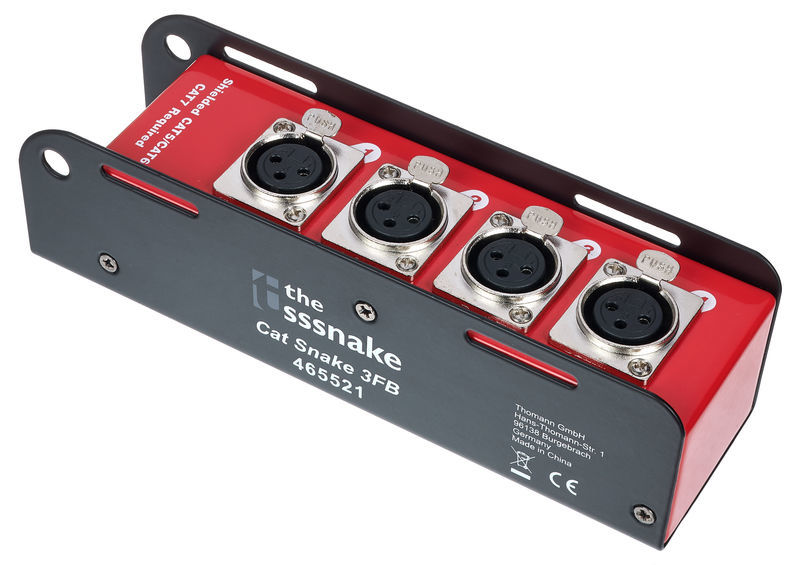
https://www.thomann.de/gb/the_sssnake_cat_snake_3fb.htm
https://www.thomann.de/gb/the_sssnake_cat_snake_3fb.htm
-

- Sam Spoons
Forum Aficionado - Posts: 22916 Joined: Thu Jan 23, 2003 12:00 am Location: Manchester UK
Still mourning the loss of my 'Jedi Poster" status 
People often mistake me for a grown-up because of my age.
People often mistake me for a grown-up because of my age.
Re: remote control over windows 10 for recording
Totally concur with Sam - I wrote the above under the assumption that you really didn't want to have cables. But if you can, that's how it's done
Silver Spoon - Check out our latest video and the FB page
Re: remote control over windows 10 for recording
Guitarking wrote:Thanks everyone.
I prefer no cables because of sound isolation in the studio.
The person in room 2 needs to control your daw and listen to whats being recorded. He wont be recording, hes just the remote engineer so to speak.
Latency is not a problem.
Looks like you can do it all with Remote Desktop provided you are using a DAW that can use the standard Windows drivers (or something to divert the audio from the DAW to the default Windows output). Reaper would certainly let you do this.
-
- James Perrett
Moderator -
Posts: 16993 Joined: Mon Sep 10, 2001 12:00 am
Location: The wilds of Hampshire
Contact:
JRP Music - Audio Mastering and Restoration. JRP Music Facebook Page
Re: remote control over windows 10 for recording
Just another thought, what about a wireless IEM rig to get the audio back to the engineer?
-
- Sam Spoons
Forum Aficionado - Posts: 22916 Joined: Thu Jan 23, 2003 12:00 am Location: Manchester UK
Still mourning the loss of my 'Jedi Poster" status
People often mistake me for a grown-up because of my age.
People often mistake me for a grown-up because of my age.
Re: remote control over windows 10 for recording
Hi everyone,
I ended up doing this:
- used Teamviewer so my friend could take over my computer. Worked flawlessly.
- used a plugin called Listento by Audiomovers on the mixbuss of Reaper to stream high quality audio to my friends computer.
Worked pretty well. There were some clicks audible, especially when my friend moved his (or better: my ) mouse. But these clicks were not recorded.
Videocall via Teamviewer was heavy on the computer and since my wifi is not very good in my studio, we didn't end up using Skype on the phone/tablet, but just my friend typing in wordpad instead. But with a better wifi, skype would have worked great!
Not sure whether this is the best way, but we got a track (acoustic guitars) done in about 1/2 a day with my friend on the other side of town... How cool is that?!
Thanks!
I ended up doing this:
- used Teamviewer so my friend could take over my computer. Worked flawlessly.
- used a plugin called Listento by Audiomovers on the mixbuss of Reaper to stream high quality audio to my friends computer.
Worked pretty well. There were some clicks audible, especially when my friend moved his (or better: my
) mouse. But these clicks were not recorded.Videocall via Teamviewer was heavy on the computer and since my wifi is not very good in my studio, we didn't end up using Skype on the phone/tablet, but just my friend typing in wordpad instead. But with a better wifi, skype would have worked great!
Not sure whether this is the best way, but we got a track (acoustic guitars) done in about 1/2 a day with my friend on the other side of town... How cool is that?!
Thanks!
Last edited by Guitarking on Wed Feb 10, 2021 12:55 pm, edited 2 times in total.
-
- Guitarking
Regular - Posts: 299 Joined: Sat Jan 09, 2010 12:00 am