Hey there,
I have tested my Steinberg UR242. Unfortunately I am having issues with either the two inputs in the front or back of the unit. The signals in both cases leak into the signal of the other.
If I for example record a guitar and a bass in the front inputs , the guitar signal ends up being recorded on the bass signal and the other way around.
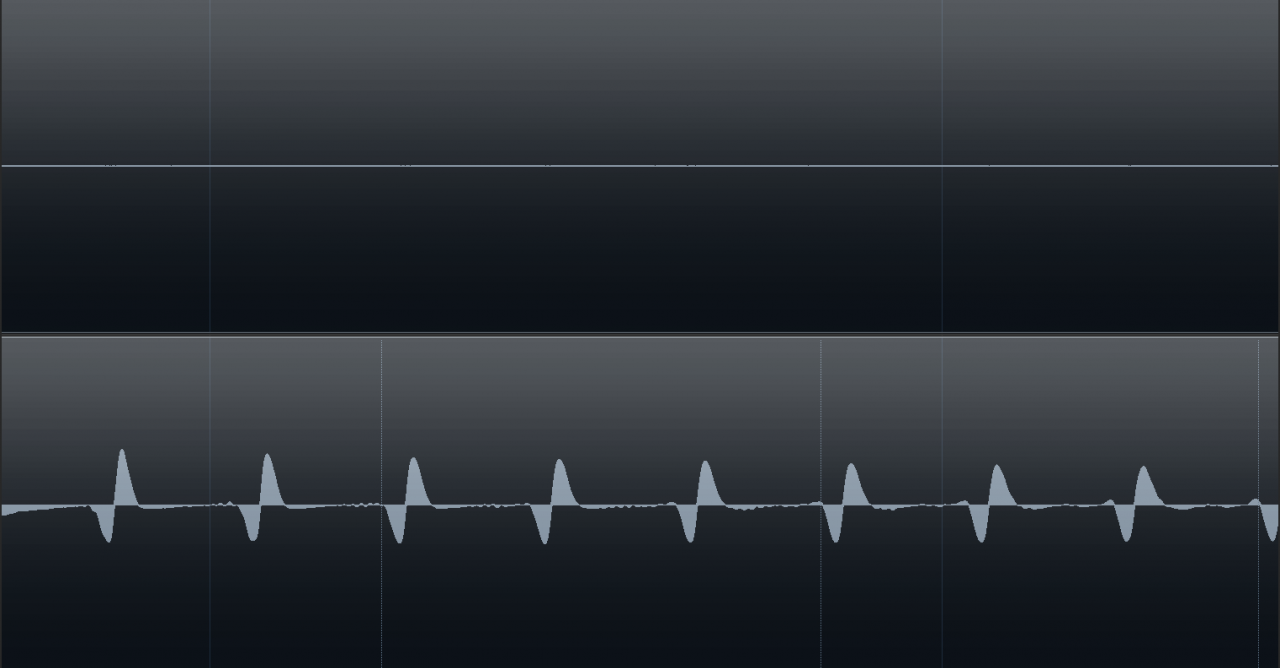
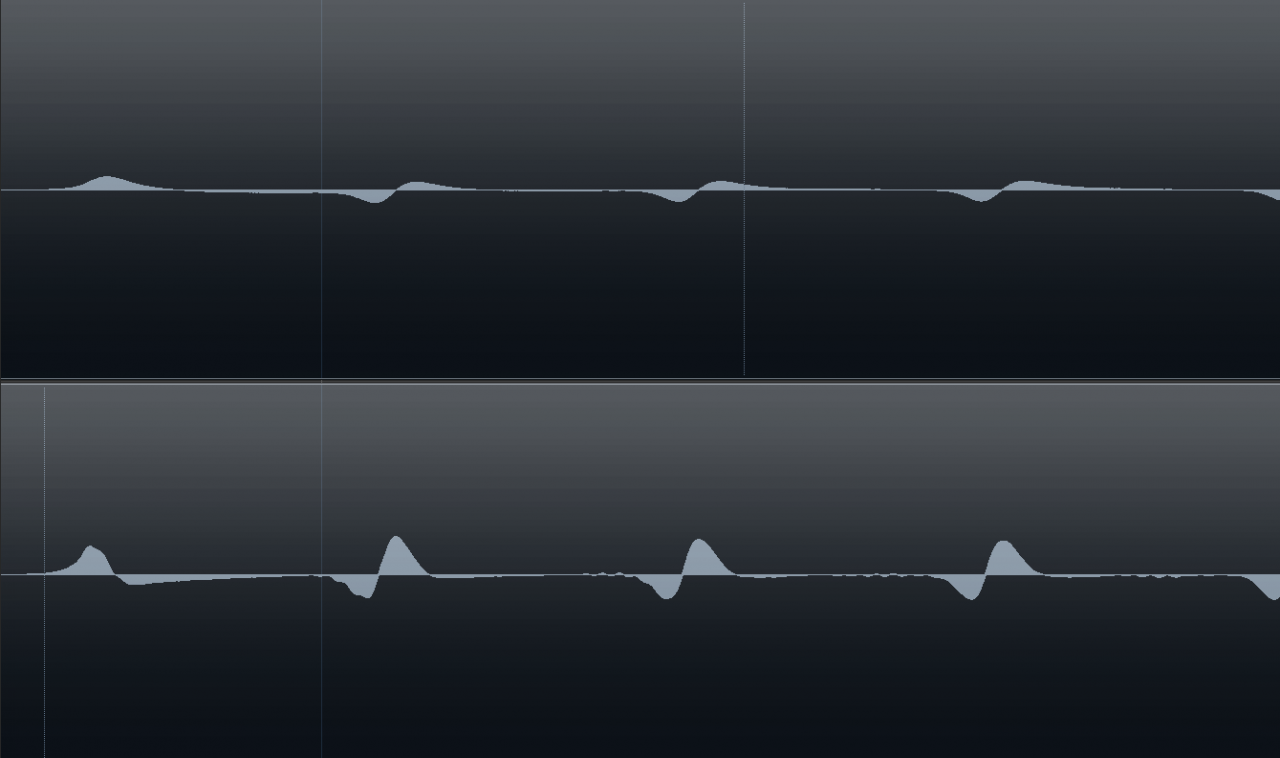
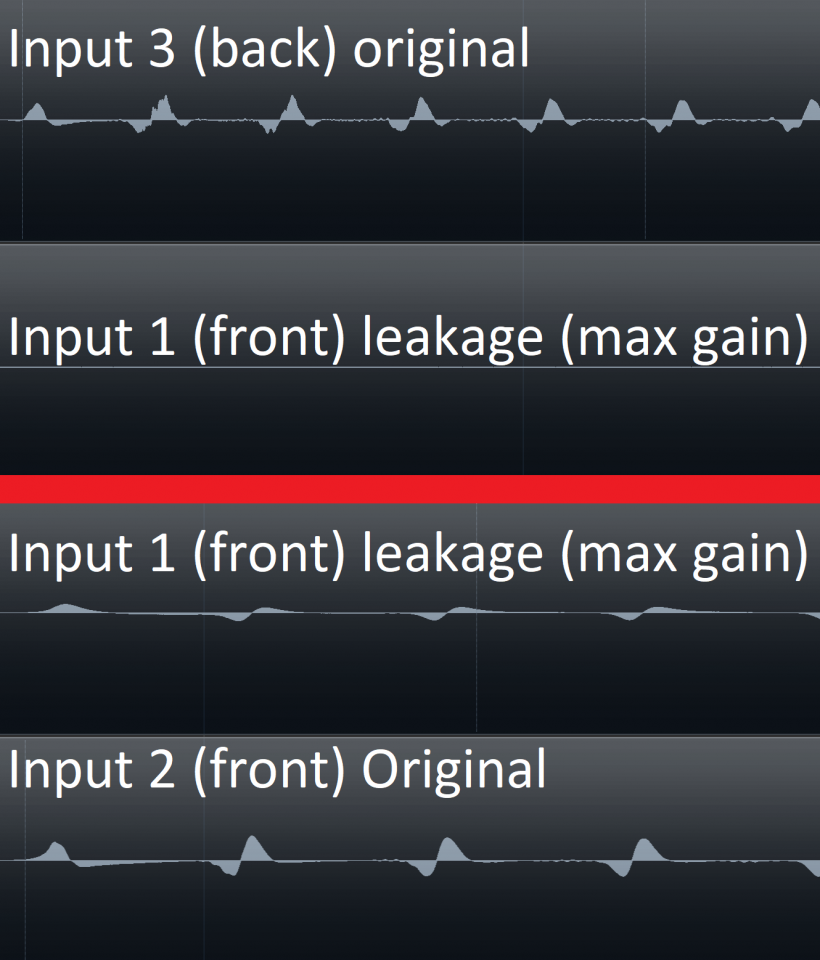
This leaking signal has a phase that is the first differential of the original signal. If the phase of the original signal is positiv the phase of the leakage is rising and falling when the original is negative. The result is a bassy signal that is recorded on another track/instrument.
Therefore I am looking for a replacement with the following criteria:
-at least 4 separate(!) inputs
-Monitor outputs (stereo)
-Headphone output
-direct monitoring
I am thankful for any advice!
SEARCHING: audio interface with 4 separate channels
SEARCHING: audio interface with 4 separate channels
Last edited by Forum Admin on Thu May 27, 2021 12:34 pm, edited 3 times in total.
-

- cremedonut
Poster - Posts: 34 Joined: Mon Apr 05, 2021 4:05 pm
Learn the sweet magic of a cheerful face.
Re: SEARCHING: audio interface with 4 separate channels
It sounds like you just need to adjust the Steinberg DSP mixer settings for the device.
Looking at the manual, (Page 8) it would appear that the default settings for the mixer are for each channel to be centre panned, so that each input goes to both the left and right USB output.
If you haven’t opened up the DSP mix panel, then do so, and set the panning to fully left for inputs 1 and 3 and fully right for inputs 2 and 4.
Also check that none of the polarity invert software switches are set.
I’m pretty sure that it’s just a software issue with the DSP mixer, and not a faulty unit.
Also, make sure you are using the latest software and drivers for the unit.
All this is available from the Steinberg website.
The DSP mixer will be sitting in between the hardware and the USB output, so you need to set it up to start with, even if you don’t use it again.
Looking at the manual, (Page 8) it would appear that the default settings for the mixer are for each channel to be centre panned, so that each input goes to both the left and right USB output.
If you haven’t opened up the DSP mix panel, then do so, and set the panning to fully left for inputs 1 and 3 and fully right for inputs 2 and 4.
Also check that none of the polarity invert software switches are set.
I’m pretty sure that it’s just a software issue with the DSP mixer, and not a faulty unit.
Also, make sure you are using the latest software and drivers for the unit.
All this is available from the Steinberg website.
The DSP mixer will be sitting in between the hardware and the USB output, so you need to set it up to start with, even if you don’t use it again.
Last edited by Wonks on Wed May 26, 2021 8:17 am, edited 1 time in total.

Reliably fallible.
Re: SEARCHING: audio interface with 4 separate channels
Thanks for your reply. Im going to go through the steps you have mentioned and will report as soon as I'm done. My impression is that it has something to do with the grounding of this product, although I cannot confirm this.
Last edited by cremedonut on Wed May 26, 2021 9:59 am, edited 2 times in total.
-
- cremedonut
Poster - Posts: 34 Joined: Mon Apr 05, 2021 4:05 pm
Learn the sweet magic of a cheerful face.
Re: SEARCHING: audio interface with 4 separate channels
The DSP mixer is not available using the cubase software, since it is designed for 3rd party daws only, as far as I know. I'm using cubase.
The original signal is under -12db and the leakage under -24db

The original signal is under -12db and the leakage under -24db
Last edited by cremedonut on Wed May 26, 2021 10:28 am, edited 3 times in total.
-
- cremedonut
Poster - Posts: 34 Joined: Mon Apr 05, 2021 4:05 pm
Learn the sweet magic of a cheerful face.
Re: SEARCHING: audio interface with 4 separate channels
You can't access it whilst Cubase is running, so try running dspMixFx, make any panning adjustments and then close it before opening Cubase.
The pan control isn't mentioned at all in the Cubase control section of the manual (Pg 13 of the manual onwards) https://www.bhphotovideo.com/lit_files/375157.pdf so I have no idea how that would be controlled from within Cubase, so I'd try running the dspMixFx program first and see if the balance control is set centrally. It should only take a few seconds.
The block schematic definitely shows a balance control in the software, so it needs to be set from somewhere. I'm surprised that it's not mentioned in the Cubase integration section and there doesn't appear to be any balance control on the input channel strip (at least in the manual). Maybe Cubase forces an appropriate hard pan behind the scenes, but maybe it doesn't.
The pan control isn't mentioned at all in the Cubase control section of the manual (Pg 13 of the manual onwards) https://www.bhphotovideo.com/lit_files/375157.pdf so I have no idea how that would be controlled from within Cubase, so I'd try running the dspMixFx program first and see if the balance control is set centrally. It should only take a few seconds.
The block schematic definitely shows a balance control in the software, so it needs to be set from somewhere. I'm surprised that it's not mentioned in the Cubase integration section and there doesn't appear to be any balance control on the input channel strip (at least in the manual). Maybe Cubase forces an appropriate hard pan behind the scenes, but maybe it doesn't.
Reliably fallible.
Re: SEARCHING: audio interface with 4 separate channels
I have closed cubase, started dspMixFix, did the panning but it didn't change a thing unfortunately.
Here both signals blown up:

Here both signals blown up:
Last edited by cremedonut on Wed May 26, 2021 10:44 am, edited 1 time in total.
-
- cremedonut
Poster - Posts: 34 Joined: Mon Apr 05, 2021 4:05 pm
Learn the sweet magic of a cheerful face.
Re: SEARCHING: audio interface with 4 separate channels
It looks like the leakage is slightly before the main track signal by a few milliseconds. To me, that seems unlikely to be a hardware issue as the signals should have their peaks in the same place. It does look like some form of software routing problem to me.
Have you got any of the DSP effects enabled when recording (you said you were recording guitar so maybe you had an amp sim enabled)? If so, if you turn them all off, do you get the same issue?
Have you got any of the DSP effects enabled when recording (you said you were recording guitar so maybe you had an amp sim enabled)? If so, if you turn them all off, do you get the same issue?
Reliably fallible.
Re: SEARCHING: audio interface with 4 separate channels
The DSP is bypassed. Here are the settings:

I'm sorry I did a little mistake. The images I have provided did have the inputs with different gain settings. Here is how it looks with the same gain settings (1. leakage; 2. original):
Here with the gain of the leakage channel cranked(1. leakage; 2. original):
Here the combination of the two front inputs as well as one front and one of the back inputs:
I'm sorry I did a little mistake. The images I have provided did have the inputs with different gain settings. Here is how it looks with the same gain settings (1. leakage; 2. original):
Here with the gain of the leakage channel cranked(1. leakage; 2. original):
Here the combination of the two front inputs as well as one front and one of the back inputs:
Last edited by cremedonut on Wed May 26, 2021 11:50 am, edited 2 times in total.
-
- cremedonut
Poster - Posts: 34 Joined: Mon Apr 05, 2021 4:05 pm
Learn the sweet magic of a cheerful face.
Re: SEARCHING: audio interface with 4 separate channels
cremedonut wrote:The DSP is bypassed. Here are the settings:
I'm sorry I did a little mistake. The images I have provided did have the inputs with different gain settings. Here is how it looks with the same gain settings (1. leakage; 2. original):
Here with the gain of the leakage channel cranked(1. leakage; 2. original):
Here the combination of the two front inputs as well as one front and one of the back inputs:
Hi, if you set the knobs of the channels at their maximum gain, for sure you'll hear some noise....set the input gains to minimum, and then raise them till you get an acceptable gain level, not more of 70, 80% of their capacity.
Check the routing of the tracks you are recording....create 2 mono audio tracks the input of the 1 track is the channel 1 and the second track the channel 2 of the interface, that's all.
There are only 2 preamps in this unit, search in the user manual what's the meaning of the back inputs, I guess are intended to add an external mixer...not to record. Try to use only the front inputs to record.
there is only 1 high impedance input in the 2 front channels than if you record a bass and an electric guitar at once, it's not the ideal interface
follow the instructions pages 22-24 and the troubleshoot section...do you have the loopback function activated??
https://www.bhphotovideo.com/lit_files/375157.pdf
in the same price range the Steinberg UR44c has 4 inputs or a similar Focusrite 3d generation
Last edited by worshiptuned on Wed May 26, 2021 7:58 pm, edited 3 times in total.
-
- worshiptuned
Regular -
Posts: 138 Joined: Mon Feb 08, 2021 3:36 pm
Contact:
Re: SEARCHING: audio interface with 4 separate channels
Thanks for your reply! The issue apears using both front inputs (or both back inputs). I going to go through your points tomorrow.
-
- cremedonut
Poster - Posts: 34 Joined: Mon Apr 05, 2021 4:05 pm
Learn the sweet magic of a cheerful face.
Re: SEARCHING: audio interface with 4 separate channels
worshiptuned wrote: Hi, if you set the knobs of the channels at their maximum gain, for sure you'll hear some noise....set the input gains to minimum, and then raise them till you get an acceptable gain level, not more of 70, 80% of their capacity.
You are correct. Raising the gain level does raise the noisefloor. What I am dealing with here, however, is bleed of one Signal into another input. This does occur at 0% of the gain potiometer with the PAD option engaged.
worshiptuned wrote:Check the routing of the tracks you are recording....create 2 mono audio tracks the input of the 1 track is the channel 1 and the second track the channel 2 of the interface, that's all.

worshiptuned wrote:There are only 2 preamps in this unit, search in the user manual what's the meaning of the back inputs, I guess are intended to add an external mixer...not to record. Try to use only the front inputs to record.
"[LINE INPUT 3/4] jacks For connecting to digital instrument or a mixer. These jacks can be connected to phone-type (balanced/unbalanced). You can select the input signal level of the [LINE INPUT 3/4] jacks between +4 dBu and -10 dBV. Select +4 dBu when connecting a professional audio device, and select -10 dBV when connecting a consumer device. The default initial setting is -10 dBu. To select the input signal level, use the "Setup Window"(page 11) in the section "dspMixFx UR242" or the "Settings Window" (page 16) in the "Dedicated Windows for Cubase Series."
worshiptuned wrote:there is only 1 high impedance input in the 2 front channels than if you record a bass and an electric guitar at once, it's not the ideal interface
That is true. In practical setups I'm always using some sort of device in front of these inputs that takes care of that. In the screenshots above I am pluging a guitar straight into the first input without Hi-Z engaged and the volume knob of the guitar turned all the way down. On the second input I am pluging in a preamp that is connected to a bass. The signal that I use to demonstrate the issue is the open E string of the bass played through an external preamp.
worshiptuned wrote:follow the instructions pages 22-24 and the troubleshoot section...do you have the loopback function activated??
https://www.bhphotovideo.com/lit_files/375157.pdf
I did, but unfortunately it didn't change the issue.
worshiptuned wrote:in the same price range the Steinberg UR44c has 4 inputs or a similar Focusrite 3d generation
Okay. On my UR242 I am observing this problem only while using the two front or the two back inputs. Using one back and one front input the issue does not occur.
Last edited by cremedonut on Thu May 27, 2021 8:29 am, edited 1 time in total.
-
- cremedonut
Poster - Posts: 34 Joined: Mon Apr 05, 2021 4:05 pm
Learn the sweet magic of a cheerful face.
Re: SEARCHING: audio interface with 4 separate channels
Here the same issue with dspmixfx in reaper:

Last edited by cremedonut on Fri May 28, 2021 7:53 pm, edited 2 times in total.
-
- cremedonut
Poster - Posts: 34 Joined: Mon Apr 05, 2021 4:05 pm
Learn the sweet magic of a cheerful face.
Re: SEARCHING: audio interface with 4 separate channels
manwilde wrote:Sorry if this is a dumb question, I don´t know that software, but on dspmixfx... what are "INS FX", "CRUNCH" and "CH STRIP" doing?.
If I'm not mistaken, INS FX=Insert Effects (direct monitoring). CHRUNCH is a ampsim and CH STRIP is a channel strip. These are the effects of the DSP integrated within the audio interface, they can be applied to the direct monitoring signal without adding noticable latency. It also has a reverb effect. I personally dont use them.
-
- cremedonut
Poster - Posts: 34 Joined: Mon Apr 05, 2021 4:05 pm
Learn the sweet magic of a cheerful face.
Re: SEARCHING: audio interface with 4 separate channels
I'm afraid I didn't pose my question clearly enough, my bad. I know what those things "are", but was asking about what they were "doing": are they turned on, are they affecting the sound or gain structure of the incoming audio?.
Re: SEARCHING: audio interface with 4 separate channels
You say the bass has a preamp? I'm just wondering if this could (partly at least) be a ground loop issue, as that preamp will have a power supply so there could be two ground paths present.
Can you try just plugging both the bass and the guitar directly in, with no external pres or effects, just to see if the same thing happens?
Also, there may be a small amount of crosstalk between channels. With the screenshots so far, it's hard to see the actual level of the noise on the other channel as there is no reference scale on the Y-axis to see how loud the cross-channel signal is. If it's way down at 80dB below the main signal level, it's probably not worth worrying about.
Can you try just plugging both the bass and the guitar directly in, with no external pres or effects, just to see if the same thing happens?
Also, there may be a small amount of crosstalk between channels. With the screenshots so far, it's hard to see the actual level of the noise on the other channel as there is no reference scale on the Y-axis to see how loud the cross-channel signal is. If it's way down at 80dB below the main signal level, it's probably not worth worrying about.
Reliably fallible.
Re: SEARCHING: audio interface with 4 separate channels
Thanks for your replies! Yes, the Hi-Z option is turned off with the guitar directly connected. I'm going to test this setup without the external preamp. I would be very interested to hear more about this ground loop hypothesis, since I was considering that as well. Any more thoughts on that?
Both of the signals are about 48db apart.
With the bass plugged straight into input2 the issue does still occur. Curiously the gain knob on input2 does not have an impact on the bleed into input1.
I do have a peak at 50hz (an issue im struggling with for a while now including harmonics. For further information: https://www.soundonsound.com/forum/view ... 03#p755603) in input2 with only the bass connected. Maybe the bleed is connected to a grounding issue?

Both of the signals are about 48db apart.
With the bass plugged straight into input2 the issue does still occur. Curiously the gain knob on input2 does not have an impact on the bleed into input1.
I do have a peak at 50hz (an issue im struggling with for a while now including harmonics. For further information: https://www.soundonsound.com/forum/view ... 03#p755603) in input2 with only the bass connected. Maybe the bleed is connected to a grounding issue?
Last edited by cremedonut on Sun May 30, 2021 6:52 pm, edited 7 times in total.
-
- cremedonut
Poster - Posts: 34 Joined: Mon Apr 05, 2021 4:05 pm
Learn the sweet magic of a cheerful face.
Re: SEARCHING: audio interface with 4 separate channels
manwilde wrote:Unless your instruments have active pickups, I don't know how you manage to get a proper signal into the soundcard without engaging the Hi-Z or using a DI box...
Correct, recording a passive guitar with those settings would not result in a proper guitar signal. Since this setup is not meant for recording guitar, it doesn't matter. I also did this bleed-test with a 6.3mm to 3.5mm jack adapter with the same results.
Last edited by cremedonut on Sun May 30, 2021 7:37 pm, edited 1 time in total.
-
- cremedonut
Poster - Posts: 34 Joined: Mon Apr 05, 2021 4:05 pm
Learn the sweet magic of a cheerful face.
Re: SEARCHING: audio interface with 4 separate channels
If nothing is plugged in then there is no crossfeed. As soon as I put anything in the input, the crossfeed shows up. I guess there is a switch in the input. I can test the guitar with the Hi-Z option on with a source of choice in the 2nd input, if that is of interest?
-
- cremedonut
Poster - Posts: 34 Joined: Mon Apr 05, 2021 4:05 pm
Learn the sweet magic of a cheerful face.
Re: SEARCHING: audio interface with 4 separate channels
I did a fresh install of reaper and the ur242 drivers on a differnt PC and the issue can be observed here as well. Is the unit defective or is the crosstalk of the ur242 at 46db?
-
- cremedonut
Poster - Posts: 34 Joined: Mon Apr 05, 2021 4:05 pm
Re: SEARCHING: audio interface with 4 separate channels
It all seems really weird, maybe the unit is defective. But anyway it would be good to test with proper gain staging (i.e. guitar with Hi-Z on and nothing on channel two, then add a line level input on channel two with and without the guitar on channel one) to make sure, IMHO.
Re: SEARCHING: audio interface with 4 separate channels
manwilde wrote:it would be good to test with proper gain staging (i.e. guitar with Hi-Z on and nothing on channel two, then add a line level input on channel two with and without the guitar on channel one)
Yes, you are onto something. I have plugged in a bass in input1 hi-z engaged and a overdrive pedal in input2 and the bleed is gone. As soon as the hi-z button is disengaged it appears again. With input2 disconnected there is no bleed with or without hi-z engaged.
-
- cremedonut
Poster - Posts: 34 Joined: Mon Apr 05, 2021 4:05 pm