I installed W10 on my desktop and all went well: the PC powers up and I have access to the desktop, Firefox etc. without signing in to my Microsoft account.
Then I did the same for my laptop, and it all went...not so well.
Basically, I cannot use the laptop for anything at all unless I connect to my W10 account : if I don't do it, the laptop is blocked and all I can do is stare at the pretty landscape photo.
Does anyone know how to get rid of this? It's extremely annoying, to say the least, especially when I'm travelling and may not have internet access, but DO want to use Word, for example.
How do I get rid of the crippling W10 internet connection feature?
Re: How do I get rid of the crippling W10 internet connection feature?
On my computer I have to sign in using my Microsoft ID and password but I don't need to be connected to the Internet to sign in successfully.
-

- James Perrett
Moderator -
Posts: 16991 Joined: Mon Sep 10, 2001 12:00 am
Location: The wilds of Hampshire
Contact:
JRP Music - Audio Mastering and Restoration. JRP Music Facebook Page
Re: How do I get rid of the crippling W10 internet connection feature?
I think Windows 10 requires a user windows account but it shouldn't stop you using it when you're not connected to the net. It should just be part of the initial set up routine.
[EDIT, James beat me to it.]
[EDIT, James beat me to it.]
-

- Drew Stephenson
Apprentice Guru -
Posts: 29719 Joined: Sun Jul 05, 2015 12:00 am
Location: York
Contact:
(The forumuser formerly known as Blinddrew)
Ignore the post count, I have no idea what I'm doing...
https://drewstephenson.bandcamp.com/
Ignore the post count, I have no idea what I'm doing...
https://drewstephenson.bandcamp.com/
Re: How do I get rid of the crippling W10 internet connection feature?
Maybe it's different for laptops: are either of you using laptops with W10?
On my laptop it says "it seems you are not connected to the internet. Please connect blah blah and try logging in again."
If I don't connect then the laptop is blocked.
My W10 PC doesn't bother me with any of that: no login, and no password.
On my laptop it says "it seems you are not connected to the internet. Please connect blah blah and try logging in again."
If I don't connect then the laptop is blocked.
My W10 PC doesn't bother me with any of that: no login, and no password.
Re: How do I get rid of the crippling W10 internet connection feature?
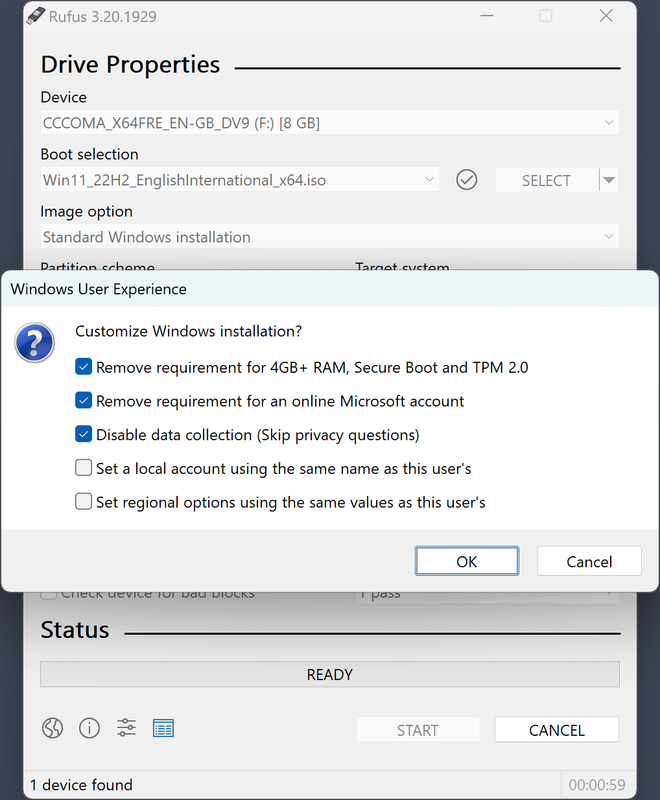
I've installed Windows (for other people) a couple of times recently. I downloaded the .iso file from Microsoft, and used Rufus to put the .iso onto a USB stick.
Rufus has the option to create a local account, and some other options that make Windows slightly less horrible, which may be what you're looking for. When you boot up after creating a local account it will ask you to create a password, asking for the old and new passwords. The old password is blank.
Rufus has the option to create a local account, and some other options that make Windows slightly less horrible, which may be what you're looking for. When you boot up after creating a local account it will ask you to create a password, asking for the old and new passwords. The old password is blank.
It ain't what you don't know. It's what you know that ain't so.
Re: How do I get rid of the crippling W10 internet connection feature?
You can create a local offline account. See here
https://support.microsoft.com/en-us/win ... 915af2a34d
https://support.microsoft.com/en-us/win ... 915af2a34d
Re: How do I get rid of the crippling W10 internet connection feature?
Yep, my laptop is on W10 and will play happily without the internet.
My W10 PC doesn't bother me with any of that: no login, and no password.
Interesting, my main PC definitely requires a login with a microsoft account.
-
- Drew Stephenson
Apprentice Guru -
Posts: 29719 Joined: Sun Jul 05, 2015 12:00 am
Location: York
Contact:
(The forumuser formerly known as Blinddrew)
Ignore the post count, I have no idea what I'm doing...
https://drewstephenson.bandcamp.com/
Ignore the post count, I have no idea what I'm doing...
https://drewstephenson.bandcamp.com/
Re: How do I get rid of the crippling W10 internet connection feature?
ajay_m wrote: ↑Mon Aug 21, 2023 1:23 pm You can create a local offline account. See here
https://support.microsoft.com/en-us/win ... 915af2a34d
That's interesting, but it would have to override or at least modify the "internet connect" dialogue I get at power up. I might give it a try.
Re: How do I get rid of the crippling W10 internet connection feature?
Drew Stephenson wrote: ↑Mon Aug 21, 2023 1:38 pm
Yep, my laptop is on W10 and will play happily without the internet.My W10 PC doesn't bother me with any of that: no login, and no password.
Interesting, my main PC definitely requires a login with a microsoft account.
Interesting, that's the opposite of my scenario.

I'm wondering if it's an option I accidentally ticked when I did the W10 install on the laptop.
So, from Power-up, my PC asks for nowt, and simply shows me my desktop. I hit the Firefox icon and again, no password or whatnot, it just opens.
Re: How do I get rid of the crippling W10 internet connection feature?
Aha! Now we're getting to the dark and evil plot that is undermining Western...
Thing is, if I can't get rid of it, I'll have to reinstall W10 to make the laptop "useable", and try and ferret out that Dark Materials pattern during the Reinstall.
Re: How do I get rid of the crippling W10 internet connection feature?
The easiest way I've heard of is to install W10 with no network connection.
-
- Philbo King
Regular - Posts: 383 Joined: Thu Oct 11, 2018 10:07 pm
It ain't what you don't know. It's what you know that ain't so.
Re: How do I get rid of the crippling W10 internet connection feature?
Neither Windows 10 or 11 require Microsoft accounts to work; they both run perfectly well with local accounts. Desktop or laptop does not matter. If you need to install from scratch, Rufus is a fast and simple way to do it, but by no means required.
On any system you could also create a new local account and switch to that if you prefer.
On any system you could also create a new local account and switch to that if you prefer.
Re: How do I get rid of the crippling W10 internet connection feature?
I've used Hasleo. I found it quite neat and tidy.
https://www.hasleo.com/
Haven't yet Rufus & Chaka Khan. Might give it a spin.
https://www.hasleo.com/
Haven't yet Rufus & Chaka Khan. Might give it a spin.
-
- tea for two
Frequent Poster - Posts: 4009 Joined: Sun Mar 24, 2002 12:00 am
Re: How do I get rid of the crippling W10 internet connection feature?
When I installed Win 11 recently I used this trick: when prompted to log in to your Microsoft account use email no@thank.you with any password and it breaks you out of the loop allowing you to run offline from then on.

When I have nothing to say my lips are sealed.
Re: How do I get rid of the crippling W10 internet connection feature?
Welly welly welly, I didn't even get the chance to try any of these workarounds, as this morning's "Red" W10 update has completely stuffed the laptop.
I now can't even get past the "landscape photo": whatever key I press, the screen goes black, and after 30s or so, we're back to a lovely temple in Katmandon't. I've tried Esc, I've tried CTRL ALT DEL, I've tried the Windows key and they all do the same thing (see above).
It looks I might have to do a W10 reinstall after all.
Any ideas?
I now can't even get past the "landscape photo": whatever key I press, the screen goes black, and after 30s or so, we're back to a lovely temple in Katmandon't. I've tried Esc, I've tried CTRL ALT DEL, I've tried the Windows key and they all do the same thing (see above).
It looks I might have to do a W10 reinstall after all.
Any ideas?
Re: How do I get rid of the crippling W10 internet connection feature?
Ah yes... I recently had that problem after a win10 update where I told it to update and shutdown. Seems it didn't complete something and when I started the next day it went through the pretty picture but just hung on a black screen after entering my password.
I had to get into safe mode, then do a recovery back to before the update. When it was all running normally again I ran the update a second time with a restart when requested and then it worked properly. Not had any trouble since.
I had to get into safe mode, then do a recovery back to before the update. When it was all running normally again I ran the update a second time with a restart when requested and then it worked properly. Not had any trouble since.
-

- Hugh Robjohns
Moderator -
Posts: 43693 Joined: Fri Jul 25, 2003 12:00 am
Location: Worcestershire, UK
Contact:
Technical Editor, Sound On Sound...
(But generally posting my own personal views and not necessarily those of SOS, the company or the magazine!)
In my world, things get less strange when I read the manual...
(But generally posting my own personal views and not necessarily those of SOS, the company or the magazine!)
In my world, things get less strange when I read the manual...
Re: How do I get rid of the crippling W10 internet connection feature?
FrankF wrote: ↑Tue Aug 22, 2023 2:36 pm Welly welly welly, I didn't even get the chance to try any of these workarounds, as this morning's "Red" W10 update has completely stuffed the laptop.
I now can't even get past the "landscape photo": whatever key I press, the screen goes black, and after 30s or so, we're back to a lovely temple in Katmandon't. I've tried Esc, I've tried CTRL ALT DEL, I've tried the Windows key and they all do the same thing (see above).
It looks I might have to do a W10 reinstall after all.
Any ideas?
There is Hirens Boot disk which will get you going and there is a boot up key combination which should give you a 'safe boot' option. That said if you are happy to do a new install that might be the best option, though before I went to that trouble I would ensure your system disk (c: drive) is in perfect condition.
Some time after I swapped HDD for an SSD I started getting pernickety performance and the odd "No boot drive found" and whatever. I re-installed I ran all manner of fixes and ended up re-formatting but the problems came back. So hard to track down as the problems were intermitent. It turned out the SSD was a duffer. I tried all manner of disk repairs, it was futile, I got a new SSD and (crossed fingers) the problems went away.
Once you have done a re-install and got a reliable set-up, up and running, do a drive image, make that the first job, and as you add more aplications and/or updates, do incremental images until you get to the point you'd bet the house on the reliability of your computer then you can maybe back-off with the imaging, except at the point where profound changes are made.
I seem to think almost all laptops have a recovery partition - does your laptop not have one of these?
Re: How do I get rid of the crippling W10 internet connection feature?
Thanks Hugh and One World. I couldn't get it into Safe Mode, so in the end I opted for brute force and ignorance and ripped out the plug and the battery, then powered it up again, and guess what? The computer said "oui". 
I'm guessing the update worked, as it seems to be back to normal. I've also only seen "orange" updates before, so maybe the Red one was so important that it upset my little old Acer's innate sense of modesty (c. 2011).
The battery is knackered these days: it lasts about 40 mins on full charge, and the PSU started to crackle recently, so I'm not sure if it's on its way out. I put some Deoxit on the PSU's pins just in case, so we shall see. If I get another year out of the thing then that will be more than fine. I put in a new SSD and that seems OK. But this is all by the by, as I'm pretty sure the update was the problem.
Now, back to the MS account problem!
I'm guessing the update worked, as it seems to be back to normal. I've also only seen "orange" updates before, so maybe the Red one was so important that it upset my little old Acer's innate sense of modesty (c. 2011).
The battery is knackered these days: it lasts about 40 mins on full charge, and the PSU started to crackle recently, so I'm not sure if it's on its way out. I put some Deoxit on the PSU's pins just in case, so we shall see. If I get another year out of the thing then that will be more than fine. I put in a new SSD and that seems OK. But this is all by the by, as I'm pretty sure the update was the problem.
Now, back to the MS account problem!
Re: How do I get rid of the crippling W10 internet connection feature?
FrankF wrote: ↑Tue Aug 22, 2023 6:21 pm Thanks Hugh and One World. I couldn't get it into Safe Mode, so in the end I opted for brute force and ignorance and ripped out the plug and the battery, then powered it up again, and guess what? The computer said "oui".
I'm guessing the update worked, as it seems to be back to normal. I've also only seen "orange" updates before, so maybe the Red one was so important that it upset my little old Acer's innate sense of modesty (c. 2011).
The battery is knackered these days: it lasts about 40 mins on full charge, and the PSU started to crackle recently, so I'm not sure if it's on its way out. I put some Deoxit on the PSU's pins just in case, so we shall see. If I get another year out of the thing then that will be more than fine. I put in a new SSD and that seems OK. But this is all by the by, as I'm pretty sure the update was the problem.
Now, back to the MS account problem!
You can create a user account with admin privileges and make it a local account. One of the reasons Microsoft pushes uses an online account is that it easier to get you logged in again if ever you forget your password plus there are other features. But there is the option of a local account, plenty of instructions on the internet.
Given the battery can’t hold its own and the power supply is wheezing it might that the laptop is asking you for a well deserved retirement? That said if it is a perfectly serviceable item, might as well get a replacement power supply and eke a few more years out of it.
Re: How do I get rid of the crippling W10 internet connection feature?
When I first got this W10 Lenovo T510 I had to setup Windows and I did find the task more stressful than either XP or W7. Yes I had to have a Ms account (seemed to me) and one of the problems was that I could not enter my actual birth date so had to settle for someday in Dec '46! I have never needed that information since but I had better find and check it I suppose?
No, I don't need internet to boot the laptop in fact for a long time it would start up perfectly fine, I could run a DAW say but then find I had no internet. That was almost always fixed by finding the BT router btm right and connecting.
I have rarely needed Safe Mode in ten and must look up how you do it. One sure way I discovered was to remove the battery whilst not on charger power.
All in all I am quite happy with ten but still prefer seven. I doubt I shall ever need W11 but IF I do I shall buy a new laptop...well, another refurb most likely!
Dave.
No, I don't need internet to boot the laptop in fact for a long time it would start up perfectly fine, I could run a DAW say but then find I had no internet. That was almost always fixed by finding the BT router btm right and connecting.
I have rarely needed Safe Mode in ten and must look up how you do it. One sure way I discovered was to remove the battery whilst not on charger power.
All in all I am quite happy with ten but still prefer seven. I doubt I shall ever need W11 but IF I do I shall buy a new laptop...well, another refurb most likely!
Dave.
Re: How do I get rid of the crippling W10 internet connection feature?
ef37a wrote: ↑Wed Aug 23, 2023 10:44 am When I first got this W10 Lenovo T510 I had to setup Windows and I did find the task more stressful than either XP or W7. Yes I had to have a Ms account (seemed to me) and one of the problems was that I could not enter my actual birth date so had to settle for someday in Dec '46! I have never needed that information since but I had better find and check it I suppose?
No, I don't need internet to boot the laptop in fact for a long time it would start up perfectly fine, I could run a DAW say but then find I had no internet. That was almost always fixed by finding the BT router btm right and connecting.
I have rarely needed Safe Mode in ten and must look up how you do it. One sure way I discovered was to remove the battery whilst not on charger power.
All in all I am quite happy with ten but still prefer seven. I doubt I shall ever need W11 but IF I do I shall buy a new laptop...well, another refurb most likely!
Dave.
For my dogsbody PC I use an ancient old thing, goodness knows where it came from, I inherited it along the way somewhere. I had tried to install Win11 but Win11 says it's too old, well it's the graphics card it complains about and unless Bill Gates is going to buy a new graphics card I am going to soldier on with Win10. And my current card allows me to get 4k resolution anyway. I can watch BBC iPlayer, YouTube etc with perfectly clear results.
What surprises me is despite my dogsbody PC being the computer equivalent of an octogenarian, it doesn't need a zimmer frame or incontinence pads and zips along like it's as fit as a flea. I have used Win11 and don't see anything about it that Win10 can't do.
If there was an F1 version of Win11 - eg engine, wheels, brakes and nothing more, then I might be persuaded
At risk of repeating myself, I can recommend Hiren's Boot CD (or the USB version)
Win AeroTweaker and.or PC Optimizer do a great job of stripping out a lot of Windows clutter and bric-a-brac. Both these apps have 'portable' versions so they don't need 'installing' as such
Re: How do I get rid of the crippling W10 internet connection feature?
" and unless Bill Gates is going to buy a new graphics card I am going to soldier on with Win10. "
Have you asked him? As my feeble-minded village-idiot neighbour used to say, "Don't ask, don't get!", and then he would cackle like a mad old hobgoblin. He was, in fact, a mad old hobgoblin.
He spent a lot of time on the Ducking Stool, it has to be said.
Have you asked him? As my feeble-minded village-idiot neighbour used to say, "Don't ask, don't get!", and then he would cackle like a mad old hobgoblin. He was, in fact, a mad old hobgoblin.
He spent a lot of time on the Ducking Stool, it has to be said.
Re: How do I get rid of the crippling W10 internet connection feature?
Thanks for all the suggestions, peeps, I finally got round to doing it, and it seems to work fine.
Looks like this 12 year old laptop will see out another year, Gates willing...
Looks like this 12 year old laptop will see out another year, Gates willing...