DIY MIDI Hardware Control Surface Question
DIY MIDI Hardware Control Surface Question
Hey Everyone! Me and some friends, are in the early stages of designing and building a control surface to work with the major, DAWS and most likely going to use MCU (Mackie Control Universal ) Or Mackie Control. We most likely are leaning towards MCU with its combined abilities. We are all from different backgrounds which, means we have to learn a lot of information about this, more specifically what MIDI data is needed to control specific parameters within the DAW I've backwards mapped it so far that to control the volume you hit (for example) G#6 plays at 127 velocities, THe pitch wheel controls where the volume is (Between 0-127) then G#6 is released I was wondering if anyone has any thoughts on this and/or any information on where I can find more information like this that will help us develop the device further. Cheers
-
- PetersMusic
- Posts: 1 Joined: Fri Nov 03, 2023 1:55 pm
Re: DIY MIDI Hardware Control Surface Question
PetersMusic wrote: ↑Fri Nov 03, 2023 1:55 pmI've backwards mapped it so far that to control the volume you hit (for example) G#6 plays at 127 velocities, THe pitch wheel controls where the volume is (Between 0-127) then G#6 is released I was wondering if anyone has any thoughts on this
Hi PetersMusic - welcome to SOS.

This description isn't easy to understand. I think you'd need to provide more info on the physical controls and what they'll do. You're designing something that looks like a keyboard, with additional functions...? What problem is this device intended to solve?
(Earlier I was watching a YouTube explanation of some networking technologies, and their approach was - we won't just try and tell you what this is; we'll explain what the problem is, and how this technology solved the problem. It was an effective way to approach it.)

Re: DIY MIDI Hardware Control Surface Question
You need to understand the Mackie Control protocol, and specifically, Logic's implementation of it, which is the reference implementation it was designed for.
To do this, you'll need a copy of the Control Surfaces manual - not the Apple version from later Logic versions, as that strips out a lot of the MIDI implementation spec that you'll need (eg, the messages to display the various metering modes for the vpots etc), the various device inquiry and response handshake messages to get an MCU scanned and recognised to work in a DAW etc - you'll need the original emagic control surfaces manual.
Secondly, you'll need a copy of Logic and a real MCU to spend some time understanding how the MCU works - you'll need to be clear on zones and modes, and how the MCU is architected - there is a *lot* of functionality baked in, and most people miss a lot of the good stuff. Most MCU-compatible controllers other than the proper MCU don't implement all of the functions.
(You can use another DAW that implements MCU support as an alternative, but you don't know how much of the spec they implement, so bear that in mind.)
I've implemented a software MCU app (currently only for my needs) that sits as a middleman between dumb MIDI controllers, and Logic, basically giving MCU intelligent control surface support to regular MIDI controllers, with on screen displays etc, and have developed my own custom controller scheme in Logic using the MCU format because no other controller lets me do what I need to do - I'm also the default "controller assignments" guy over on Logic Pro Help, and have really been down the rabbit hole on this.
So, you'll really need to be clear on how the MCU works, in Logic particularly, and then look at what you want to implement, and whether/how that will work with the constraints of the MCU format (there are plenty of these which can be annoying!). Basically, you'll need to understand those constraints up front, rather than simply expect to develop what you need, and get half way there to realise that what you want to do simply isn't possible - not fun!
Good luck! One of these days someone will make the physical controller I want - no one's got close yet... so I have to hack up my own system to do that job, which is obviously not as good as a dedicated, designed optimal solution, but at least is *way* better than *any other DAW controller*...
(Note: Faders in the MCU spec are 10-bit, not 0-127. And yes, they use pitch bends messages. All the data formats are described in the emagic control surfaces manual.)
To do this, you'll need a copy of the Control Surfaces manual - not the Apple version from later Logic versions, as that strips out a lot of the MIDI implementation spec that you'll need (eg, the messages to display the various metering modes for the vpots etc), the various device inquiry and response handshake messages to get an MCU scanned and recognised to work in a DAW etc - you'll need the original emagic control surfaces manual.
Secondly, you'll need a copy of Logic and a real MCU to spend some time understanding how the MCU works - you'll need to be clear on zones and modes, and how the MCU is architected - there is a *lot* of functionality baked in, and most people miss a lot of the good stuff. Most MCU-compatible controllers other than the proper MCU don't implement all of the functions.
(You can use another DAW that implements MCU support as an alternative, but you don't know how much of the spec they implement, so bear that in mind.)
I've implemented a software MCU app (currently only for my needs) that sits as a middleman between dumb MIDI controllers, and Logic, basically giving MCU intelligent control surface support to regular MIDI controllers, with on screen displays etc, and have developed my own custom controller scheme in Logic using the MCU format because no other controller lets me do what I need to do - I'm also the default "controller assignments" guy over on Logic Pro Help, and have really been down the rabbit hole on this.
So, you'll really need to be clear on how the MCU works, in Logic particularly, and then look at what you want to implement, and whether/how that will work with the constraints of the MCU format (there are plenty of these which can be annoying!). Basically, you'll need to understand those constraints up front, rather than simply expect to develop what you need, and get half way there to realise that what you want to do simply isn't possible - not fun!
Good luck! One of these days someone will make the physical controller I want - no one's got close yet... so I have to hack up my own system to do that job, which is obviously not as good as a dedicated, designed optimal solution, but at least is *way* better than *any other DAW controller*...
(Note: Faders in the MCU spec are 10-bit, not 0-127. And yes, they use pitch bends messages. All the data formats are described in the emagic control surfaces manual.)
Last edited by muzines on Fri Nov 03, 2023 4:37 pm, edited 1 time in total.

..............................mu:zines | music magazine archive | difficultAudio | Legacy Logic Project Conversion
Re: DIY MIDI Hardware Control Surface Question
If it is going to mimick the mackie mcu, what advantages would your controller have over all the other control surfaces, whisch all seem much of a muchness to me
For me, getting shut of the mackie banks of 8 limitation and adding a more user config knobs/buttons would be ideal
Then the same controller could be used for controling synth parameters and not just DAW controls. OK that's a big ask I suppose, but something like the Akai APC40 but with motorized faders would be controller heaven
Best of luck with it anyway, keep us posted please.
For me, getting shut of the mackie banks of 8 limitation and adding a more user config knobs/buttons would be ideal
Then the same controller could be used for controling synth parameters and not just DAW controls. OK that's a big ask I suppose, but something like the Akai APC40 but with motorized faders would be controller heaven
Best of luck with it anyway, keep us posted please.
Re: DIY MIDI Hardware Control Surface Question
Did I mention constraints?

Again, it depends on what you need to do, this is either possible, possible but less-than-ideal, or impossible, depending on a number of factors. It's why you really need to understand the limitations and choices of the MCU protocol.
Yep, plugin control is my fundamental requirement, and done in the way I want... It's why I've set my system the way I have, to achieve this. Whether the device is going to handle this is a big factor in complexity - if it's something like an 8-bank mixer controller, that's pretty simple to rig up.
..............................mu:zines | music magazine archive | difficultAudio | Legacy Logic Project Conversion
Re: DIY MIDI Hardware Control Surface Question
Having trodden this way myself I'd just advise you to not underestimate the complexity of the task you're taking on. Information is hard to find and, as the others have intimated, there are already solutions out there, so be sure you are adding something that makes it worth the effort.

An Eagle for an Emperor, A Kestrel for a Knave.
Re: DIY MIDI Hardware Control Surface Question
Plugin control is the big problem unfortunately. Plugins will report their parameters in essentially a random sequence that varies for each plugin and the names of those parameters are often not the same as what they are in the plugin UI. Additionally the allowable control values for each parameter can be almost anything, from 0 or 1 for a switch through to weird things like a multiple position rotary knob accepting 0, 0.2, 0.4 etc for each knob position and so forth.
Then you have to know if the plugin UI you want to control is actually in focus to sync up the control surface and/or programmatically do this from the surface.
This can get interesting, depending on the DAW.
Controllers without integrated metering and scribble strips aren't really a lot of use and if you want full duplex control you're up for motorised faders or rotary encoders with led collars.
I speak from experience here having written plugins for the kmi Kmix and the bcr2000.
Then you have to know if the plugin UI you want to control is actually in focus to sync up the control surface and/or programmatically do this from the surface.
This can get interesting, depending on the DAW.
Controllers without integrated metering and scribble strips aren't really a lot of use and if you want full duplex control you're up for motorised faders or rotary encoders with led collars.
I speak from experience here having written plugins for the kmi Kmix and the bcr2000.
Re: DIY MIDI Hardware Control Surface Question
muzines wrote: ↑Fri Nov 03, 2023 4:41 pm
Did I mention constraints?
Again, it depends on what you need to do, this is either possible, possible but less-than-ideal, or impossible, depending on a number of factors. It's why you really need to understand the limitations and choices of the MCU protocol.
Yep, plugin control is my fundamental requirement, and done in the way I want... It's why I've set my system the way I have, to achieve this. Whether the device is going to handle this is a big factor in complexity - if it's something like an 8-bank mixer controller, that's pretty simple to rig up.
Thanks and while we#re at it, could we include an internet connection, beer cooler, and coffee cup holder - that'd be great
Re: DIY MIDI Hardware Control Surface Question
ajay_m wrote: ↑Fri Nov 03, 2023 5:28 pm Plugin control is the big problem unfortunately. Plugins will report their parameters in essentially a random sequence that varies for each plugin and the names of those parameters are often not the same as what they are in the plugin UI. Additionally the allowable control values for each parameter can be almost anything, from 0 or 1 for a switch through to weird things like a multiple position rotary knob accepting 0, 0.2, 0.4 etc for each knob position and so forth.
Then you have to know if the plugin UI you want to control is actually in focus to sync up the control surface and/or programmatically do this from the surface.
This can get interesting, depending on the DAW.
Controllers without integrated metering and scribble strips aren't really a lot of use and if you want full duplex control you're up for motorised faders or rotary encoders with led collars.
I speak from experience here having written plugins for the kmi Kmix and the bcr2000.
For Reaper there are 3rd party plugins that can make this much easier (easy enough for me) like ReaLearn.
-

- Drew Stephenson
Apprentice Guru -
Posts: 29719 Joined: Sun Jul 05, 2015 12:00 am
Location: York
Contact:
(The forumuser formerly known as Blinddrew)
Ignore the post count, I have no idea what I'm doing...
https://drewstephenson.bandcamp.com/
Ignore the post count, I have no idea what I'm doing...
https://drewstephenson.bandcamp.com/
Re: DIY MIDI Hardware Control Surface Question
I think the issue with control surfaces is that we have this vision of being in something like a 737 cockpit with all these buttons and displays controlling our studio setup like flying an airplane but the reality is that even for very tightly integrated control surfaces - and the cakewalk vs700 was probably the most extreme example - you are only controlling the DAW but not whatever interface you have between the analogue sources like synths, mics etc.
In my long journey to achieve this vision I can say that my current setup comes close enough that I can finally live with its shortcomings. Specifically now my akai force is the "I just want to put down some drum tracks and then go into a synth or a Hammond organ and actually have all the controls on a touch screen with real hardware knobs and little scribble strips to match. Oh and lots of little drum pads that light up".
Then the hydrasynth deluxe is the "I just want an awesome modular synth without faffing around with patch cords" bit of the fantasy.
Finally the Yamaha dm3 mixer is the " I want a mixer and an audio interface and a control surface with scribble strips and metering and I want to route anything to anywhere on the DAW. Oh and I want to record that great idea to a thumb drive now before I forget it".
I still can't control the plugins or even pan from the control surface but.... It turns out that isn't as important as I thought because by the time you get to the "tweaking plugins" stage you're way down the creative path and it's the earlier stages I now have an ergonomic solution for.
So think carefully about fantasy Vs reality. I simply hadn't realised what I needed until, bit by bit, I managed to solve the real issues that were getting in the way. And my early control surface solutions simply made life harder, not easier.
In my long journey to achieve this vision I can say that my current setup comes close enough that I can finally live with its shortcomings. Specifically now my akai force is the "I just want to put down some drum tracks and then go into a synth or a Hammond organ and actually have all the controls on a touch screen with real hardware knobs and little scribble strips to match. Oh and lots of little drum pads that light up".
Then the hydrasynth deluxe is the "I just want an awesome modular synth without faffing around with patch cords" bit of the fantasy.
Finally the Yamaha dm3 mixer is the " I want a mixer and an audio interface and a control surface with scribble strips and metering and I want to route anything to anywhere on the DAW. Oh and I want to record that great idea to a thumb drive now before I forget it".
I still can't control the plugins or even pan from the control surface but.... It turns out that isn't as important as I thought because by the time you get to the "tweaking plugins" stage you're way down the creative path and it's the earlier stages I now have an ergonomic solution for.
So think carefully about fantasy Vs reality. I simply hadn't realised what I needed until, bit by bit, I managed to solve the real issues that were getting in the way. And my early control surface solutions simply made life harder, not easier.
Re: DIY MIDI Hardware Control Surface Question
I think if you could base your design on the BC[x]2000 but call it the BCR32-ish then you would be tapping in on a huge market of pent up demand.
[no need for the sequencer, initally, that could be a surprise update in V2.0 ]
[no need for the sequencer, initally, that could be a surprise update in V2.0 ]

Re: DIY MIDI Hardware Control Surface Question
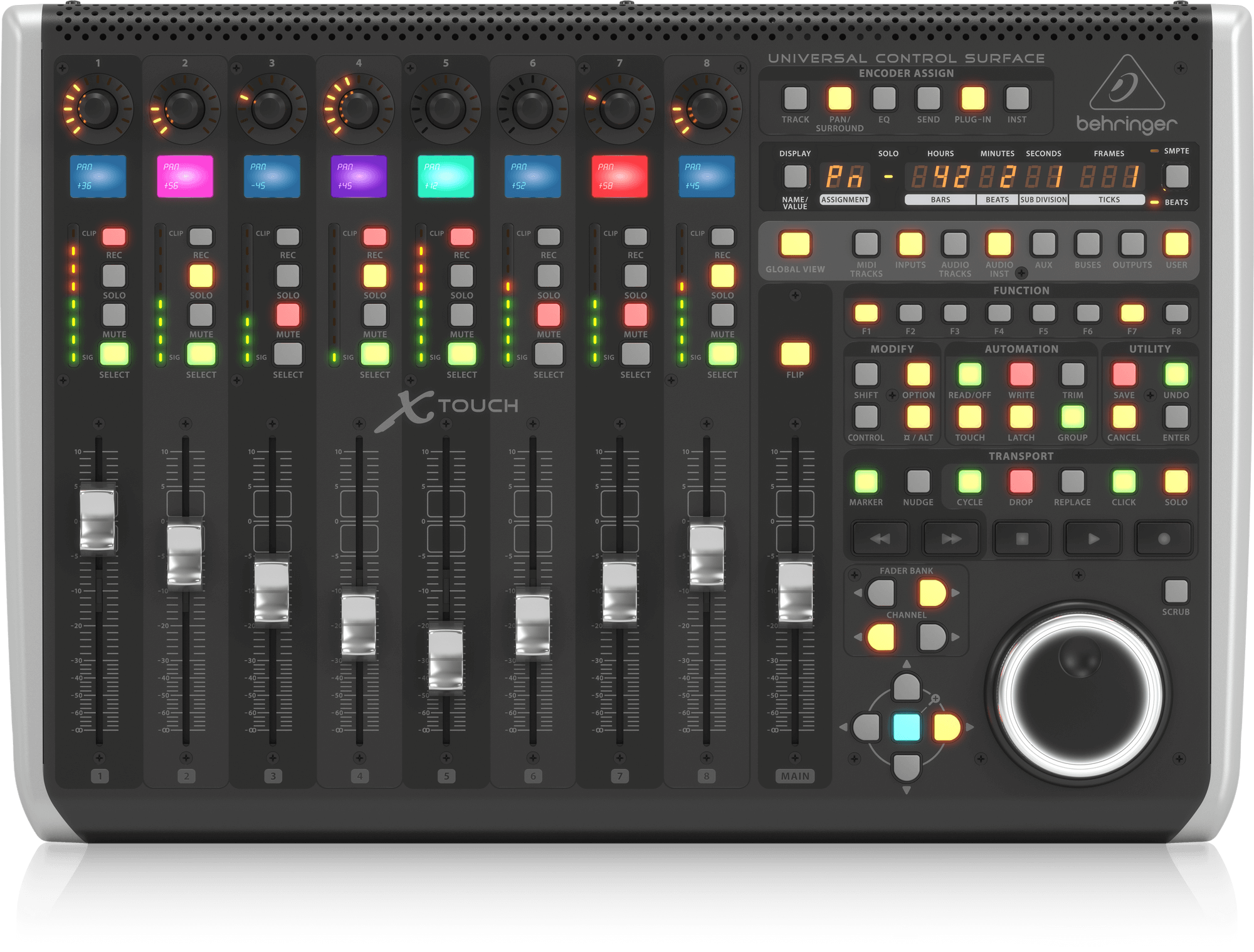
I agree, the BCx2000 was/is a really useful bit of kit, can’t understand why Behringer didn’t include dedicated transport controls, but apart from that it’s ideal
-

- Sam Spoons
Forum Aficionado - Posts: 22910 Joined: Thu Jan 23, 2003 12:00 am Location: Manchester UK
Still mourning the loss of my 'Jedi Poster" status 
People often mistake me for a grown-up because of my age.
People often mistake me for a grown-up because of my age.
Re: DIY MIDI Hardware Control Surface Question
That's the X-Touch, not the BCR2000
Re: DIY MIDI Hardware Control Surface Question
True but it is the successor to the BCF2000, they obviously listened to their customer base. 
-
- Sam Spoons
Forum Aficionado - Posts: 22910 Joined: Thu Jan 23, 2003 12:00 am Location: Manchester UK
Still mourning the loss of my 'Jedi Poster" status
People often mistake me for a grown-up because of my age.
People often mistake me for a grown-up because of my age.
Re: DIY MIDI Hardware Control Surface Question
Sam Spoons wrote: ↑Sat Nov 04, 2023 1:12 pm True but it is the successor to the BCF2000, they obviously listened to their customer base.
No, it's a quite different product. The actual successor to the 2000 that Behringer teased hasn't shipped yet...
..............................mu:zines | music magazine archive | difficultAudio | Legacy Logic Project Conversion
Re: DIY MIDI Hardware Control Surface Question
Maybe the X-Touch Compact then? But, unlike the full fat version, that doesn't have DIN midi 
-
- Sam Spoons
Forum Aficionado - Posts: 22910 Joined: Thu Jan 23, 2003 12:00 am Location: Manchester UK
Still mourning the loss of my 'Jedi Poster" status
People often mistake me for a grown-up because of my age.
People often mistake me for a grown-up because of my age.
Re: DIY MIDI Hardware Control Surface Question
I gave up waiting for the BCR32 and got a Qube Mobi one instead. Very happy with it.
-
- Drew Stephenson
Apprentice Guru -
Posts: 29719 Joined: Sun Jul 05, 2015 12:00 am
Location: York
Contact:
(The forumuser formerly known as Blinddrew)
Ignore the post count, I have no idea what I'm doing...
https://drewstephenson.bandcamp.com/
Ignore the post count, I have no idea what I'm doing...
https://drewstephenson.bandcamp.com/