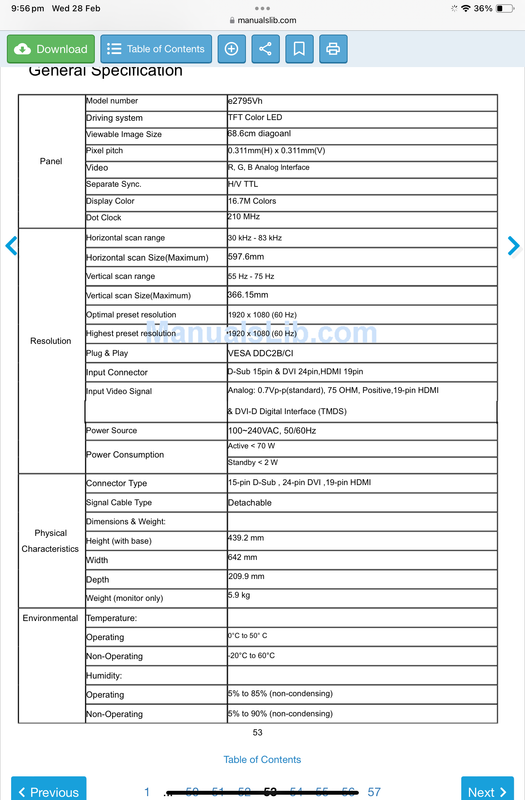
I have no idea what most of the specs mean or how the performance of any of these monitors compare to my old monitor.
Does anyone have any experience with any of these monitors/brands? What would you recommend from all of these for mainly Cubase, YouTube and some basic video editing?
I don't have a lot of knowledge around computer monitor specifications apart from size and resolution, but I'm a long time user of dual monitors, which I prefer over one wide monitor.
I fairly recently bought a pair of HP monitors based on reviews of their appropriateness for colour rendition for photography work and I also use them for video editing and I'm very pleased with them.
Thanks Bob. Those look like really good deals but unfortunately I will only have enough space for one of those. I can fit up to one single 38” monitor on my desk.
The curved widescreen monitors are very nice but they are obviously in general wide but not very deep. At work here we have curved Philips monitors which are I think 32 inch diagonal, and since we are plugging in laptops, we also have the primary laptop screen, which in my case is a 17 inch screen. I do find both screens very handy because it's easy to just drag something from one screen to another.
You *can* for some monitors set them up so that the PC thinks they are two separate screens but in general you're more up for trying to arrange windows so they don't overlap and this is a bit tedious compared to multiple monitors.
The current 'sweet spot' in terms of resolution vs cost seems to be around the 32 inch diagonal size for a monitor at QHD (2560 x 1440) resolution. You can pick up a range of monitors quite cheaply at this size and resolution, and I don't think full 4K resolution is really necessary unless you have a significantly larger screen. [I think my primary AOC monitor only cost me about £150]
You *can* of course mount two monitors on a stand vertically so that you could have e.g two 32 inch standard format monitors, one above the other. This would certainly be something I'd consider because it's cost-effective and flexible. There are pole stands with attached arms that fit to a standard set of mounting holes on the back of nearly all monitors (but not ALL - always check. I have a Samsung monitor that doesn't have these holes). These arms then allow the monitors to be tilted so that the top monitor could be tilted towards you a bit as you look up to it.
Unless you're very demanding in terms of colour matching, gaming etc, any standard LCD monitor these days will give you a bright, crisp picture through HDMI, so most of the other specs aren't terribly important.
I think if you're considering and ultra-wide (3440x1440) then it's definitely worth thinking about a curved monitor. I have a flat one and there's a clear effect of stuff being smaller towards the edges. It's not something you won't get used to but a curved face is a better experience I think.
I used to have two 27” monitors in my room and I used to find the bit between both screens a little frustrating at times as it got in the way fairly regularly.
I now have a different desk which isn’t as wide and is also a little taller. I sometimes get neck/back issues so I need something that’s not going to make me have to look up constantly. Being able to work with correct posture is really important for me.
The Dell ticks a lot of boxes and it is height adjustable. When fully down, it is only 39.3cm which is the lowest of all the options I’ve mentioned. It is on the pricier end of what I would like to spend and if there is a cheaper 34” option that can be under 40cm in height I would strongly consider it.
One thing I should mention is my motherboard is the ASUS Z390a and I’m using the onboard graphics. This is what I used to run my two previous 27” monitors.
Just to throw in more things to think about, depending on the clarity of the monitor they can be run at non-native resolutions. I have LG UHD monitors that I run at QHD. That allows apps to scale better on Windows for me; in general that means that text is not so tiny.
Not all monitors are equal for text clarity. Check the technical reviews.
BTW, the CPU determines the on-board graphics capabilities, not the motherboard. That simply supplies the physical outputs.
Thanks. My cpu is an i9 9900K.Will that be enough for when running Cubase 13 + various vsts, sample libraries and up to 40 tracks of audio. I will be upgrading my RAM to 128gb this next week.
Yes, but get the fastest storage you can for the sample libraries. Your board supports PCIe X4, so use it! I can recommend the WD Black SN850X. If you need 128GB of RAM, you must have some pretty big sample libraries!
dickiefunk wrote: ↑Thu Feb 29, 2024 7:05 pm
I am planning to do some more orchestral
Ahaha. Then you might possibly maybe I don't reaaallyy knooow Betty prefer a 4k screen as you will be able to fit more orchestral tracks vertically 2160 vertical on 4k than a 34curved widescreen with 1440 vertical.
I had a BenQ pd2700u 4K screen 27 inches I purrchased mine used £140.
Horizontally a 4k screen 3840 displays just a trifle more than a 34 screen 3440 horizontally.
I sit approx 2ft away from my 21inch 4k screen else more distance becomes difficult for me to read the small stuff. I'd have to get say a 40inch 4k screen to be able sit further back to read clearly from more distance.
::
My wind 14inch laptop is 4K 3840 horizontal, 2160 vertical so going to a 34inch curved screen with only 1440 vertical I loose some track space vertically.
Quick follow up to my original post. I went with the Dell S3422dw and am extremely happy with this monitor. The picture quality is fantastic and a noticeable step up from my old AOC monitors. Also, the size is perfect for my new studio desk.