I have a USB A, female-to-USB mini, male cable. If I hadn't used it to transfer MIDI data between my computer and a hardware voice processor, I wouldn't know if it was for MIDI or audio, despite looking it over in detail - it simply has written on it:
USB Cable AWM 2725 VW-1 80 degrees centigrade 30V 28AWG-IPR AND 28AWG-2C SHE
Or, gasp, does the same cable work for either? I've read two or three articles on line, and they suggest that's not the case, but don't come out and say so. Probably because everyone in the universe knows that answer except me
Posts:5284Joined: Fri Jan 10, 2003 12:00 amLocation: Hampton Roads, Virginia, USA
Home of the The SLUM Tapes (Shoulda Left Un-Mixed), mangled using Cubase Pro 14; W10 64 bit on Intel i5-4570 3.2GHz,16GB RAM;Steinberg UR28M interface; Juno DS88; UAD2 Solo/Native; Revoice Pro
Re: How can I tell by inspection if my USB cable is for audio or MIDI?
USB is a standard. The only difference in cables is those for data+charging (the norm), and those for charging only (which normally come supplied with either the equipment requiring charging of a USB charger). Charging-only cables aren't really USB, just a similar format.
Any USB cable that can carry data can carry both audio and MIDI. (MIDI doesn't have anything like the data rate of audio). So you only have to make sure that the USB type (not connection type) of your devices is compatible.
If you have a USB 2 keyboard, then it's happy as long as what it's connecting to is USB 2 or USB 3.x
For a USB 3 keyboard, then you need a USB 3 port to connect it to.
And a very old USB1.1 keyboard should be happy with any USB 1.1, 2 or 3 port.
Last edited by Wonks on Mon Aug 25, 2025 10:01 pm, edited 1 time in total.
USB cables carry data. That data could represent audio, or Midi, or video, or megabytes of stored information from a hard drive or memory card. The USB interface doesn't care.
But data can be transferred at different speeds, and the way a cable is constructed affects how quickly data can be transferred.
(NB. Some USB cables don't have the data lines connected, just the power lines. These are intended for charging/powering without permitting access to a device's data.)
Midi doesn't involve much data and it changes pretty slowly in modern computer terms. Audio involves more data and needs a faster transfer... and a hard drive involves a shed load of data and needs to move very fast if you're going to finish cloning that drive before you die.
So USB cables are specified in terms of maximum transfer speeds: the slowest is USB 1.0, faster is USB 2.0, fastest is USB 3.0... etc
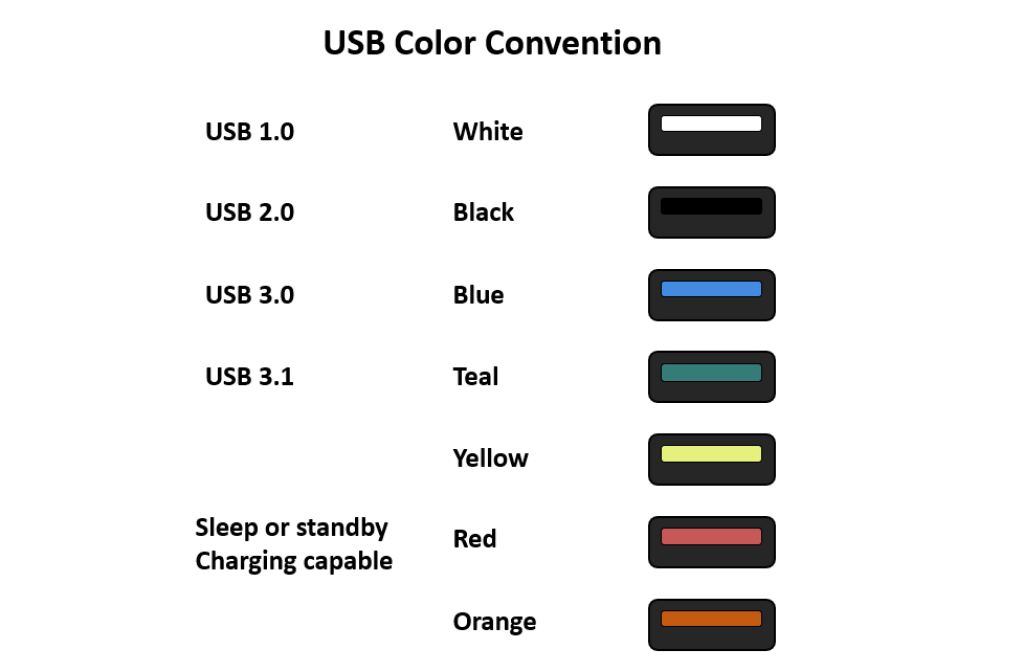
Usually, the cable is marked with the USB speed, and sometimes the plastic 'tongue' in the USB connector is colour-coded to indicate the type.
White is USB 1.0 or 1.1
Black is USB 2.0
Blue is USB 3.0
Teal is USB 3.1 or 3.2
USB 1.0 and 1.1 are pretty much obsolete now. USB 2.0 is almost universal and can handle midi or many tens of audio channels. USB 3 is faster and slowly taking over...
Technical Editor, Sound On Sound...
(But generally posting my own personal views and not necessarily those of SOS, the company or the magazine!)
In my world, things get less strange when I read the manual...
Re: How can I tell by inspection if my USB cable is for audio or MIDI?
Posts:5284Joined: Fri Jan 10, 2003 12:00 amLocation: Hampton Roads, Virginia, USA
Home of the The SLUM Tapes (Shoulda Left Un-Mixed), mangled using Cubase Pro 14; W10 64 bit on Intel i5-4570 3.2GHz,16GB RAM;Steinberg UR28M interface; Juno DS88; UAD2 Solo/Native; Revoice Pro
Re: How can I tell by inspection if my USB cable is for audio or MIDI?
Those diagrams are of A connectors. The colour code is pretty random in its application. On my be quiet! case all the A connectors are black. Aesthetic reasons, I would suppose. On my MSI motherboard USB 3.0 is blue, and everything faster is red or USB C:
You may be able to see that the red ports are labelled SS 10 or SS 20. That's superspeed and the speed in Gb/s. That's an easier way to do it than than 3.1 gen 1, 3.1 gen 2 ... The important spec is the speed.
For cables the B end identifies USB 3.0 or above:
And USB 3.0 (or above) micro B:
No matter what colour it is, if it doesn't have that connector, it won't do USB 3.0 or above speed.