I'm getting a horrible almost digital clipping sound from many of the distortion pedals like the Monster peddle where the sound is cutting out and clipping with a horrible digital gain type sound. This is a basic project I have not added anything else but one track, and my line levels are all perfect, -12 to -10. I've checked my levels in my RME UCX II Total Mix inputs and they're all perfect as well as the pre/post faders in Logic. When I turn the peddles off, the dry signal is clean. There are also issues with the gain knobs, especially in the Monster distortion, when I turn the gain up to 50 it gets crazy loud and over loads and clips, and then when you go even higher it starts to attenuate the gain down, strange. It's like there is some kind of internal issue with the gain levels in Logic that are not showing up on the meters.
The distortions all sound so bad and uneven like there are phasing issues. I've used software like guitar rig in the past and they sounded great, something is not right.
Also, what is with the levels on their amps, when I load one the gain and the master volume is up to 100% on both dials. And even many of the software midi instruments the outputs are not balanced, they're clipping the meters when you first load them. I've called support about this a few times now.
I should mention, my input track in my interface is +13dBu, set to instrument for high Z and I'm using just a little digital-gain bringing the levels up to about -12 or -10. Again the direct sound in logic is fine, it's all the distortion peddles that are doing crazy things.
Logic Pro distortion pedal, clipping, horrible distortion, level issues.
Re: Logic Pro distortion pedal, clipping, horrible distortion, level issues.
If you are using the pedals on their own, and not in front of an amp + speaker sim (especially the speaker sim), any distortion pedal is going to sound bad as you haven't got a virtual speaker filtering out just about all the frequencies above 5kHz-6kHz (depending on the speaker modelled).
The Monster is apparently based on a Foxx Fuzz, so there will be a lot of hard clipping and a lot of upper harmonics generated.
So are you using anything after it or is it on its own. If you've used Amplitude I expect you probably had the FX as part of a full amp chain.
Tell us if this isn't so.
The Monster is apparently based on a Foxx Fuzz, so there will be a lot of hard clipping and a lot of upper harmonics generated.
So are you using anything after it or is it on its own. If you've used Amplitude I expect you probably had the FX as part of a full amp chain.
Tell us if this isn't so.

Reliably fallible.
Re: Logic Pro distortion pedal, clipping, horrible distortion, level issues.
Wonks wrote: ↑Mon Sep 08, 2025 6:01 pm If you are using the pedals on their own, and not in front of an amp + speaker sim (especially the speaker sim), any distortion pedal is going to sound bad as you haven't got a virtual speaker filtering out just about all the frequencies above 5kHz-6kHz (depending on the speaker modelled).
No. even if you didn't have an amp first, that would not make the pedal distort or cut out, if anything that would be a weaker signal. I don't think you're understanding what I mean by bad sounding. It's a horrible distortion sound like an amp that's blown out and phasing issues.
I started out with amps in the signal path first and then added the pedals. The Amps by themselves sound great (except for buzzing noise) And the fact that many of them start up on 100 gain/vol when you load them is ridiculous. Some of their synths start out with the gain clipping too.
As I explained, the gain knob on the pedal is doing strange things, the volume goes up and then goes down when you keep turning it past 50%. That right there should tell you something is wrong. If I just run the guitar through the designer heads and cabinets, it sounds great (except for the buzzing sound as I mentioned) That buzzing sound is not there if I remove the Amp plugins. My source signal is crystal clear and clean without any of these amps or pedals. Note, I'm not having this issues with any of the effect plugins. Everything else seems ok as far as my signal.
Something is not working right. I'm 52 years old and I've been playing for 40 years. These sound terrible. There is a difference between digital clipping and sweet harmonic distortion when you push analog into the red (if that's the sound they are going for). This is a horrible digital clipping distortion and the sound cuts out completely like the signal is overloading. You'll hit a note on the guitar and the note will just disappear like when something is out of phase.
I've tried both ways. The amps sound good on their own (minus the buzzing) The pedals are over loading regardless of whether or not they are inserted after the amps or on their own. Nothing else was running, no other tracks were recorded or plugins inserted. I it was a new file.
I don't think Apple is really maintaining this product. There was another issue a few months back with the designer studio synth that they released that was freezing up the entire system. I was on the phone with support, we were able to reproduce that particular issue and capture a video which the support person admitted something was wrong so she submitted the video to their team. Like I said, the fact that many of their plugins are loading with the outputs set to full and clipping out makes me think that they are not really fixing the present issues.
I'm going to buy the ADA MP1 plugin and see if that works, then I just won't use their garbage pedal plugins.
On a side note. I feel like they just bought Logic to sell macs, which is the only reason I even own one and I'll just leave it at that. I call their Logic Pro support division and I get someone working at home with the kids screaming in the background, and they don't understand how a simple bus works. I'm not going to get into the few conversations I've had with some of them, but what is going on here? I'm not new to Logic, I've used it back when E-magic owned it v5.0 PC. Different world. Apple has done amazing things with it, and their systems are great recording computers. But are they maintaining this software or just adding new features. Feels like the later to me.
Last edited by openears on Tue Sep 09, 2025 8:06 am, edited 5 times in total.
Re: Logic Pro distortion pedal, clipping, horrible distortion, level issues.
Here is a copy of a short file of what I'm hearing, I'm just strumming a basic cord, and hitting a few individual notes.
https://www.pyramid-of-wisdom.com/logicissue.mp3
https://www.pyramid-of-wisdom.com/logicissue.mp3
Re: Logic Pro distortion pedal, clipping, horrible distortion, level issues.
I'm 64, and have been playing guitar even longer. I'm not a Mac person, so have never tried these particular plugs, but am just working from basic principles here.
I can't comment on the default volume and gain positions of some of these plugs. You can always save more reasonable settings as a preset and load those each time.
There's obviously been some misunderstanding of what I wrote.
If you go guitar>interface>DAW>monitor speakers it sounds nice and clean?
But if you go guitar>interface>DAW>fuzz plugin>speakers it sounds horrible?
Or are you going guitar>interface>DAW>fuzz plugin>guitar speaker sim(or amp sim with speaker sim)>speakers and it's sounding horrible?
As I said previously, without a guitar speaker sim or IR after the distortion/fuzz, you'll be getting all the near-square wave harmonics above 5kHz-6kHz that a real guitar amp speaker filters out. As your monitors are full audio frequency, you hear those harmonics if there's nothing to filter them out. And it's not a nice sound.
The real Foxx Fuzz generates a strong octave fuzz signal, so again, if there's nothing filtering the upper frequencies, it's going to sound bad (and that octave effect may possibly account for the buzz you hear). Given the octave effect, it may also sound better on single notes than on chords (think of analogue octave pedals which sound bad if not used on single notes).
I don't know what the nominal input level is for that Monster Pedal plug-in. Sometimes plugs are modelled to an extreme degree and expect a signal level that's more representative of a guitar level signal than a line input signal.
Have you tried dropping the input signal level down by say 10dB? Does it sound any better? You can always up the signal level afterwards.
Otherwise it may just be a poorly written plug-in or it may just model the way the real pedal works.
I can't comment on the default volume and gain positions of some of these plugs. You can always save more reasonable settings as a preset and load those each time.
There's obviously been some misunderstanding of what I wrote.
If you go guitar>interface>DAW>monitor speakers it sounds nice and clean?
But if you go guitar>interface>DAW>fuzz plugin>speakers it sounds horrible?
Or are you going guitar>interface>DAW>fuzz plugin>guitar speaker sim(or amp sim with speaker sim)>speakers and it's sounding horrible?
As I said previously, without a guitar speaker sim or IR after the distortion/fuzz, you'll be getting all the near-square wave harmonics above 5kHz-6kHz that a real guitar amp speaker filters out. As your monitors are full audio frequency, you hear those harmonics if there's nothing to filter them out. And it's not a nice sound.
The real Foxx Fuzz generates a strong octave fuzz signal, so again, if there's nothing filtering the upper frequencies, it's going to sound bad (and that octave effect may possibly account for the buzz you hear). Given the octave effect, it may also sound better on single notes than on chords (think of analogue octave pedals which sound bad if not used on single notes).
I don't know what the nominal input level is for that Monster Pedal plug-in. Sometimes plugs are modelled to an extreme degree and expect a signal level that's more representative of a guitar level signal than a line input signal.
Have you tried dropping the input signal level down by say 10dB? Does it sound any better? You can always up the signal level afterwards.
Otherwise it may just be a poorly written plug-in or it may just model the way the real pedal works.
Reliably fallible.
Re: Logic Pro distortion pedal, clipping, horrible distortion, level issues.
Yes. And levels in RME's Total Mix look great on the inputs, software and output sections during input monitors as well as play back. But the sound is horrible with the plugins.
Correct. Everything in logic sounds great. As soon as I add a pedal, it sounds like the end of the world.
No, the pedals are added last (always)
Wonks wrote: ↑Tue Sep 09, 2025 9:49 am As I said previously, without a guitar speaker sim or IR after the distortion/fuzz, you'll be getting all the near-square wave harmonics above 5kHz-6kHz that a real guitar amp speaker filters out. As your monitors are full audio frequency, you hear those harmonics if there's nothing to filter them out. And it's not a nice sound.
I don't understand what you mean putting an IR after. You mean IR reverb? I'm not using reverb. If you are referring to the amps, I'm putting the amps before the pedals because they are mono, Either way, I've tested both ways, the pedals are producing a horrible sound regardless of whether or not they are placed first or last. What do my monitors have to do with this? The monitors sound great without the plugin.
Wonks wrote: ↑Tue Sep 09, 2025 9:49 am The real Foxx Fuzz generates a strong octave fuzz signal, so again, if there's nothing filtering the upper frequencies, it's going to sound bad (and that octave effect may possibly account for the buzz you hear). Given the octave effect, it may also sound better on single notes than on chords (think of analogue octave pedals which sound bad if not used on single notes).
No, single notes are cutting out. I don't know what you mean by filtering upper octaves? Are you saying to add a low pass filter to filter the highs? I don't understand. All the pedals in logic sound horrible. I'm going to have to look to 3d party plugins. The only ones that sound good are the FX, like phase, and delay. They can't mess that up.
Well we know that Apple gets the levels wrong based on how their plugins all load at 100% gain and volume by default. I don't know what I'm doing wrong with this fuzz pedal.
Yes I've tried that.
I think you nailed it, This would not be the first time. If I should find a solution, I promises to update this thread. I appreciate your effort on this Wonks!
Last edited by openears on Tue Sep 09, 2025 11:19 am, edited 1 time in total.
Re: Logic Pro distortion pedal, clipping, horrible distortion, level issues.
The IR I mentioned in this case is an IR of a guitar speaker. That or a simulated guitar speaker.
Yes; you could use a high-pass filter at the end with quite a steep roll-off, though a speaker cabinet emulation will sound better.
Any distortion pedal will sound bad once you get beyond the very mildest of overdrive sounds if it doesn't have a low-pass filter after it of some sort.
So if you insist on putting pedals after amps, at least stick a cabinet module after them to get back to what you'd hear coming from a guitar speaker.
Yes; you could use a high-pass filter at the end with quite a steep roll-off, though a speaker cabinet emulation will sound better.
Any distortion pedal will sound bad once you get beyond the very mildest of overdrive sounds if it doesn't have a low-pass filter after it of some sort.
So if you insist on putting pedals after amps, at least stick a cabinet module after them to get back to what you'd hear coming from a guitar speaker.
Reliably fallible.
Re: Logic Pro distortion pedal, clipping, horrible distortion, level issues.
I think you just pointed out something I was doing wrong Wonks.
I guess it was the order of the pedals being placed after the amp. I know in the real world you insert pedals before an amp usually, but I was thinking, that because the amp-designer was mono, that the pedals need to go after the amp since most of them are effects.
So correct me if I'm wrong:
---
Distortion pedals go before amps?
And is this the same for the FX pedals also? Or can they be placed after the amp if they are stereo?
I guess it was the order of the pedals being placed after the amp. I know in the real world you insert pedals before an amp usually, but I was thinking, that because the amp-designer was mono, that the pedals need to go after the amp since most of them are effects.
So correct me if I'm wrong:
---
Distortion pedals go before amps?
And is this the same for the FX pedals also? Or can they be placed after the amp if they are stereo?
Last edited by openears on Tue Sep 09, 2025 11:28 am, edited 3 times in total.
Re: Logic Pro distortion pedal, clipping, horrible distortion, level issues.
I'd definitely put distortion emulation before amp/speaker emulation.
The distortion emulation inherently adds a lot of strong high frequency harmonics which will sound unpleasant in their raw state.
An amp/speaker emulation will roll-off a great deal of those upper harmonics, leaving a rather more pleasant and familiar distorted guitar sound
The distortion emulation inherently adds a lot of strong high frequency harmonics which will sound unpleasant in their raw state.
An amp/speaker emulation will roll-off a great deal of those upper harmonics, leaving a rather more pleasant and familiar distorted guitar sound
-

- Hugh Robjohns
Moderator -
Posts: 43697 Joined: Fri Jul 25, 2003 12:00 am
Location: Worcestershire, UK
Contact:
Technical Editor, Sound On Sound...
(But generally posting my own personal views and not necessarily those of SOS, the company or the magazine!)
In my world, things get less strange when I read the manual...
(But generally posting my own personal views and not necessarily those of SOS, the company or the magazine!)
In my world, things get less strange when I read the manual...
Re: Logic Pro distortion pedal, clipping, horrible distortion, level issues.
Reverbs, delay, flanger and chorus can all go before or after amps, but in a full amp modelling package, they'll typically be placed between the amp and the speaker, or in an FX loop if the amp being modelled has an FX loop (not all do).
Yes, typically compression, boost and distortion pedals (plus wah) will go before an amp. You can use the output levels from pedals to drive the front end of valve amps harder, and get more distortion from the amp.
You can add reverb, delay and compression (plus chorus and flange) after the speaker, but you'd typically use studio style FX plugs for those, due to the generally higher quality of FX (though high end digital FX pedals can rival all but the most expensive hardware FX units these days).
Yes, typically compression, boost and distortion pedals (plus wah) will go before an amp. You can use the output levels from pedals to drive the front end of valve amps harder, and get more distortion from the amp.
You can add reverb, delay and compression (plus chorus and flange) after the speaker, but you'd typically use studio style FX plugs for those, due to the generally higher quality of FX (though high end digital FX pedals can rival all but the most expensive hardware FX units these days).
Reliably fallible.
Re: Logic Pro distortion pedal, clipping, horrible distortion, level issues.
Great to know Hugh, I was not aware of that. Thank you!
The distortion is sounding more controlled and normal now. Thanks to the both of you.
Just for clarification. I don't know if there is an option in logic's amp designer for placing things between the amp and speakers, the amps and speakers load as a pre packaged kind of way. They are just plugins that you inject into Logic's channel slots. But putting the pedals first is easy. I'll do that from now on..lol
The distortion is sounding more controlled and normal now.
Thanks to the both of you.Just for clarification. I don't know if there is an option in logic's amp designer for placing things between the amp and speakers, the amps and speakers load as a pre packaged kind of way. They are just plugins that you inject into Logic's channel slots. But putting the pedals first is easy. I'll do that from now on..lol
Last edited by openears on Tue Sep 09, 2025 1:40 pm, edited 3 times in total.
Re: Logic Pro distortion pedal, clipping, horrible distortion, level issues.
This is the frequency response plot (from the Celestion website) of a Vintage 30 guitar speaker
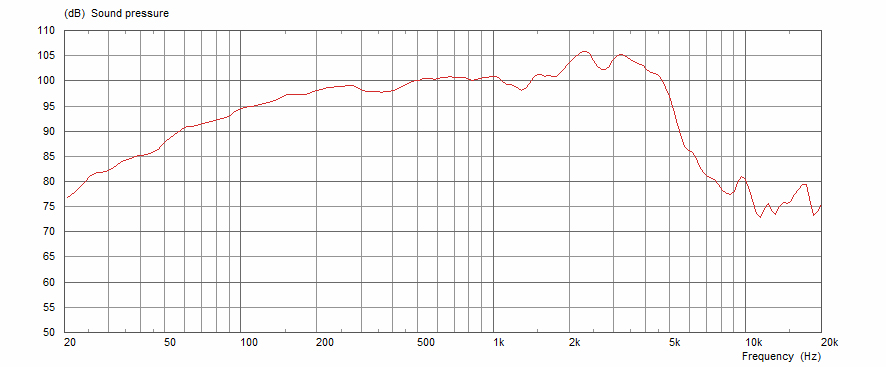
You can see that it's reasonably flat between 200Hz and 4.7kHz, after which the output falls off rapidly and is 15dB down at 6kHz and roughly 20-25dB down above 10kHz.
So you should be able to realise what a lot of high end the speaker removes from the signal.
A standard Strat single coil pickup doesn't output much above 4kHz in its basic signal, so you barely notice any difference if playing clean through either a guitar speaker or full-range monitors (humbuckers will have slightly less treble than this).
But start to distort the guitar signal and you are adding in a lot of extra harmonics above those frequencies. You'll get a bit of a brighter sound through a guitar speaker as it can reproduce frequencies up to the point that the response falls off, but it curtails all those extra high frequencies produced when you start to clip the signal.
Your monitor speakers will reproduce up to 20kHz and beyond, so without the filtering a speaker cab sim provides, you hear all those extra frequencies. Hearing all those extra upper frequencies isn't nice; they can be at a very similar amplitude to the main guitar signal, so tend to take over and make it very unpleasant to listen to.
You can see that it's reasonably flat between 200Hz and 4.7kHz, after which the output falls off rapidly and is 15dB down at 6kHz and roughly 20-25dB down above 10kHz.
So you should be able to realise what a lot of high end the speaker removes from the signal.
A standard Strat single coil pickup doesn't output much above 4kHz in its basic signal, so you barely notice any difference if playing clean through either a guitar speaker or full-range monitors (humbuckers will have slightly less treble than this).
But start to distort the guitar signal and you are adding in a lot of extra harmonics above those frequencies. You'll get a bit of a brighter sound through a guitar speaker as it can reproduce frequencies up to the point that the response falls off, but it curtails all those extra high frequencies produced when you start to clip the signal.
Your monitor speakers will reproduce up to 20kHz and beyond, so without the filtering a speaker cab sim provides, you hear all those extra frequencies. Hearing all those extra upper frequencies isn't nice; they can be at a very similar amplitude to the main guitar signal, so tend to take over and make it very unpleasant to listen to.
Reliably fallible.
Re: Logic Pro distortion pedal, clipping, horrible distortion, level issues.
Good if you've got it under control, but the sound byte you put up does sound odd. Sounds like a feedback loop or delay issue, or maybe a buffer issue.
Hard to say without having the actual project to look at, but you've had some great advice!
Hard to say without having the actual project to look at, but you've had some great advice!
-

- Dave Rowles
Frequent Poster -
Posts: 1589 Joined: Thu Feb 28, 2008 12:00 am
Location: Isle of Man
Contact:
http://www.manninmusic.com Teacher - Isle of Man
http://www.manninmusic.shop Music Shop - Isle of Man
https://www.facebook.com/mannin.sound - PA Hire/Sound Engineer - Isle of Man
http://www.manninmusic.shop Music Shop - Isle of Man
https://www.facebook.com/mannin.sound - PA Hire/Sound Engineer - Isle of Man
Re: Logic Pro distortion pedal, clipping, horrible distortion, level issues.
@ Wonks,
That was a great explanation. I wasn't aware of the pickups either, but the speaker's response acting as a filter makes total sense.
@Dave
No, it was actually the order of the pedals. As soon as I placed them before the amp sim in the FX channel section, all that went away. The clipping in the monster pedal was the only place that clipping was really happening. The clipping was more related to how the (Grain) button worked when you move it from center to R or L. But everything sounds normal now.
That was a great explanation. I wasn't aware of the pickups either, but the speaker's response acting as a filter makes total sense.
@Dave
No, it was actually the order of the pedals. As soon as I placed them before the amp sim in the FX channel section, all that went away. The clipping in the monster pedal was the only place that clipping was really happening. The clipping was more related to how the (Grain) button worked when you move it from center to R or L. But everything sounds normal now.