"It's not possible to use Omni I/O as a stand alone unit, not connected to a computer" - just checking to see if true …

For everything after the recording stage: hardware/software and how you use it.

Re: "It's not possible to use Omni I/O as a stand alone unit, not connected to a computer" - just checking to see if true …

Post by Hugh Robjohns »

It's really not as difficult as you fear, Alexis! ;)

It appears that the D-sub connector on the breakout box is a female socket. That being the case, you just need to buy a matching 15-pin male D-sub plug (and the shell to cover it).

The pins numbers are marked on the plastic substrate of the plug, and you have the diagrams above too. (Just pay careful attention to whether the diagrams are showing you the solder side or the visible front side of the plug, because the two are obviously opposites of one another! The pin layout of a 'front view' of the socket is the same as the solder side of the plug...)

All you need then need to do is solder short wire links between the appropriate pins on the plug, as detailed above, to 'loop-back' the analogue outs to the analogue ins, effectively bypassing the normal route via the computer.

With the wire links soldered in place and carefully checked (it's easy to get solder bridges between adjacent pins if you're new to soldering D-subs), you can fix the shell over the plug. The shell gives you something to hang on to when installing or removing the loop-back plug, as well as providing some screening (assuming it's a metal shell) for the wires inside.

Does that help?

H
User avatar
Hugh Robjohns
Moderator
Posts: 43685 Joined: Fri Jul 25, 2003 12:00 am Location: Worcestershire, UK
Technical Editor, Sound On Sound...
(But generally posting my own personal views and not necessarily those of SOS, the company or the magazine!)
In my world, things get less strange when I read the manual... 

Re: "It's not possible to use Omni I/O as a stand alone unit, not connected to a computer" - just checking to see if true …

Post by alexis »

Hugh Robjohns wrote:It's really not as difficult as you fear, Alexis! ;)

It appears that the D-sub connector on the breakout box is a female socket. That being the case, you just need to buy a matching 15-pin male D-sub plug (and the shell to cover it).

The pins numbers are marked on the plastic substrate of the plug, and you have the diagrams above too. (Just pay careful attention to whether the diagrams are showing you the solder side or the visible front side of the plug, because the two are obviously opposites of one another! The pin layout of a 'front view' of the socket is the same as the solder side of the plug...)

All you need then need to do is solder short wire links between the appropriate pins on the plug, as detailed above, to 'loop-back' the analogue outs to the analogue ins, effectively bypassing the normal route via the computer.

With the wire links soldered in place and carefully checked (it's easy to get solder bridges between adjacent pins if you're new to soldering D-subs), you can fix the shell over the plug. The shell gives you something to hang on to when installing or removing the loop-back plug, as well as providing some screening (assuming it's a metal shell) for the wires inside.

Does that help?

H

Yes, thank you Hugh. I think I need to go to an electronics store and lay eyes on a plug to fully understand. Right now I see 15 pins plugged into the 15 sockets of the breakout cable (obviously). After that's where it gets fuzzy. I can't see those same pins having solder on them, so (cue imagination) I see the back end of the same 15 pins visible at the back end of the sub - with that being where the soldering takes place and ultimately the shell is positioned. If that is incorrect, it will be immediately apparent I'd guess when I actually hold one of these things in my hand.

What about the danger to my Omni I/O , if the above assignments are incorrect? The original source info is difficult to obtain (I'm asking on the M-Audio forum now), and there's always the possibility of a typo, etc.
User avatar
alexis
Longtime Poster
Posts: 5282 Joined: Fri Jan 10, 2003 12:00 am Location: Hampton Roads, Virginia, USA
Home of the The SLUM Tapes (Shoulda Left Un-Mixed), mangled using Cubase Pro 14; W10 64 bit on Intel i5-4570 3.2GHz,16GB RAM;Steinberg UR28M interface; Juno DS88; UAD2 Solo/Native; Revoice Pro

Re: "It's not possible to use Omni I/O as a stand alone unit, not connected to a computer" - just checking to see if true …

Post by Hugh Robjohns »

alexis wrote:I think I need to go to an electronics store and lay eyes on a plug to fully understand.

Here's a 15-way D-sub from the pin side:

Image

...and here's the solder side:

Image

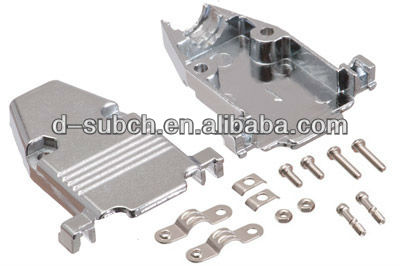
And you'll also need a shell to cover the back of the plug:

Image

Right now I see 15 pins plugged into the 15 sockets of the breakout cable (obviously).

yes.. or plugged straight into the back of the Omni box, rather than the cable (which would be neater!)

I can't see those same pins having solder on them, so (cue imagination) I see the back end of the same 15 pins visible at the back end of the sub - with that being where the soldering takes place and ultimately the shell is positioned. If that is incorrect, it will be immediately apparent I'd guess when I actually hold one of these things in my hand.

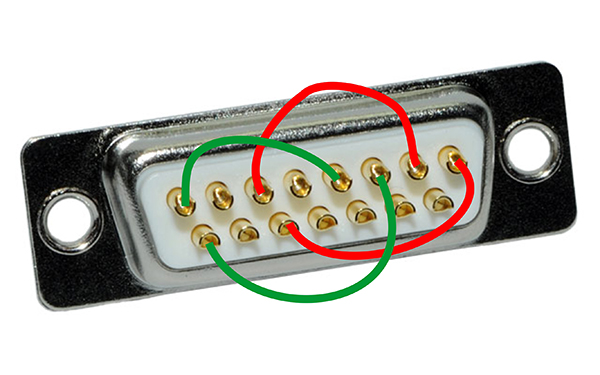
You just need to solder four linking wires inside, something like this:

Image

(I've simply illustrated the wiring suggested above -- the colours are simply to differentiate the wires, and I've not checked the pin numbers are accurate)

What about the danger to my Omni I/O , if the above assignments are incorrect?

It would be worthwhile finding out if there are power rails on any of the pins, because you won't want to get shorts on those, but other than that it seems pretty straight forward.

H
User avatar
Hugh Robjohns
Moderator
Posts: 43685 Joined: Fri Jul 25, 2003 12:00 am Location: Worcestershire, UK
Technical Editor, Sound On Sound...
(But generally posting my own personal views and not necessarily those of SOS, the company or the magazine!)
In my world, things get less strange when I read the manual... 

Re: "It's not possible to use Omni I/O as a stand alone unit, not connected to a computer" - just checking to see if true …

Post by alexis »

Hugh Robjohns wrote:
alexis wrote:I think I need to go to an electronics store and lay eyes on a plug to fully understand.

Here's a 15-way D-sub from the pin side:

Image

...and here's the solder side:

Image

And you'll also need a shell to cover the back of the plug:

Image

Right now I see 15 pins plugged into the 15 sockets of the breakout cable (obviously).

yes.. or plugged straight into the back of the Omni box, rather than the cable (which would be neater!)

I can't see those same pins having solder on them, so (cue imagination) I see the back end of the same 15 pins visible at the back end of the sub - with that being where the soldering takes place and ultimately the shell is positioned. If that is incorrect, it will be immediately apparent I'd guess when I actually hold one of these things in my hand.

You just need to solder four linking wires inside, something like this:

Image

(I've simply illustrated the wiring suggested above -- the colours are simply to differentiate the wires, and I've not checked the pin numbers are accurate)

What about the danger to my Omni I/O , if the above assignments are incorrect?

It would be worthwhile finding out if there are power rails on any of the pins, because you won't want to get shorts on those, but other than that it seems pretty straight forward.

H

Thank you, Hugh!!!

I'll keep trying to find out about the pin assignments. Finally (I think!) - do the "shared ground shields" get soldered to the appropriate mate also (pin 11 to pin 7, pin 9 to pin 14)?
User avatar
alexis
Longtime Poster
Posts: 5282 Joined: Fri Jan 10, 2003 12:00 am Location: Hampton Roads, Virginia, USA
Home of the The SLUM Tapes (Shoulda Left Un-Mixed), mangled using Cubase Pro 14; W10 64 bit on Intel i5-4570 3.2GHz,16GB RAM;Steinberg UR28M interface; Juno DS88; UAD2 Solo/Native; Revoice Pro

Re: "It's not possible to use Omni I/O as a stand alone unit, not connected to a computer" - just checking to see if true …

Post by Hugh Robjohns »

alexis wrote:do the "shared ground shields" get soldered to the appropriate mate also (pin 11 to pin 7, pin 9 to pin 14)?

No, there's no point. They are internally shared grounds anyway, and the extra wiring would clutter up the plug for no benefit.

H
User avatar
Hugh Robjohns
Moderator
Posts: 43685 Joined: Fri Jul 25, 2003 12:00 am Location: Worcestershire, UK
Technical Editor, Sound On Sound...
(But generally posting my own personal views and not necessarily those of SOS, the company or the magazine!)
In my world, things get less strange when I read the manual... 

Re: "It's not possible to use Omni I/O as a stand alone unit, not connected to a computer" - just checking to see if true …

Post by alexis »

Hugh Robjohns wrote:
alexis wrote:do the "shared ground shields" get soldered to the appropriate mate also (pin 11 to pin 7, pin 9 to pin 14)?

No, there's no point. They are internally shared grounds anyway, and the extra wiring would clutter up the plug for no benefit.

H

Beautiful, thank you Hugh.

With any luck I'll get a confirmation on the pin assignments from M-Audio before the weekend, and then I'll be well on my way.

Thank you again!
User avatar
alexis
Longtime Poster
Posts: 5282 Joined: Fri Jan 10, 2003 12:00 am Location: Hampton Roads, Virginia, USA
Home of the The SLUM Tapes (Shoulda Left Un-Mixed), mangled using Cubase Pro 14; W10 64 bit on Intel i5-4570 3.2GHz,16GB RAM;Steinberg UR28M interface; Juno DS88; UAD2 Solo/Native; Revoice Pro

Re: "It's not possible to use Omni I/O as a stand alone unit, not connected to a computer" - just checking to see if true …

Post by Wonks »

I'm just wondering if it's really worth all the trouble. I used to have a Delta 66 and Omni I/O. It was a useful little unit, but when I changed to a MOTU Traveller, I did notice a big improvement in the pre-amp quality, especially in the level of detail in the recorded sound. You could now pick up a used unit that's fairly recent and cheap that will have better pre-amps than the ones in the Omni and will be easier to interface.
User avatar
Wonks
Jedi Poster
Posts: 19208 Joined: Thu May 29, 2003 12:00 am Location: Freethorpe, Norfolk, UK
Reliably fallible.

Re: "It's not possible to use Omni I/O as a stand alone unit, not connected to a computer" - just checking to see if true …

Post by alexis »

Wonks wrote:I'm just wondering if it's really worth all the trouble. I used to have a Delta 66 and Omni I/O. It was a useful little unit, but when I changed to a MOTU Traveller, I did notice a big improvement in the pre-amp quality, especially in the level of detail in the recorded sound. You could now pick up a used unit that's fairly recent and cheap that will have better pre-amps than the ones in the Omni and will be easier to interface.

Thank you for your response, oh leporine one!

I actually have another interface which is my primary one ... this is just to make some use of the Omni I/O rather than have it sit on a shelf - live use, another headphone output, etc.

Thanks again!
User avatar
alexis
Longtime Poster
Posts: 5282 Joined: Fri Jan 10, 2003 12:00 am Location: Hampton Roads, Virginia, USA
Home of the The SLUM Tapes (Shoulda Left Un-Mixed), mangled using Cubase Pro 14; W10 64 bit on Intel i5-4570 3.2GHz,16GB RAM;Steinberg UR28M interface; Juno DS88; UAD2 Solo/Native; Revoice Pro

Re: "It's not possible to use Omni I/O as a stand alone unit, not connected to a computer" - just checking to see if true …

Post by alexis »

I am almost there! :lol:

I bought the D-pin, and a digital electrical tester. No live power on any of the pins, as far as I can tell.

Then just like Hugh and others suggested, I sent signals into each of the Omni I/O's analog inputs, and checked which socket on the D-pin the signals appeared on. Conversely, I sent signals into each socket to determine which analog outputs on the Omni I/O the signals appeared on.

For the record, the pin assignments noted above by Will Bailey are correct, i.e., no typos, etc., as far as my unit is concerned, and all units I would guess.

So the next step is to connect in1 to out1, in2 to out2, ... in4 to out4 on the diagram below, then finally put a shell on it as Hugh has pointed out.

Last question (famous last words) - the back of my D sub pin looks just like the one Hugh posted above (with the colored lines connecting), i.e., with little "tubes" sticking out the back. It almost looks like the tiny tubes would be ready to accept really tiny pins attached to tiny wires that could make the connections, instead of soldering. Is that possible, or is that just what things that need to be soldered look like?

For reference, for me or anyone else down the road:

Image

Finally just for anyone else: The purpose of all these shenanigans is to convert the Omni I/O two preamps and multiple routings (2 independent headphones out, Direct Outs 1-4, Monitor/Record outs, S/PDIF outs, and FX send/returns) to something that can be used stand-alone, i.e., independently of the PCI card/computer. For example, as a preamp for live use, an extra headphone amp (x2), etc.

Thanks again!
User avatar
alexis
Longtime Poster
Posts: 5282 Joined: Fri Jan 10, 2003 12:00 am Location: Hampton Roads, Virginia, USA
Home of the The SLUM Tapes (Shoulda Left Un-Mixed), mangled using Cubase Pro 14; W10 64 bit on Intel i5-4570 3.2GHz,16GB RAM;Steinberg UR28M interface; Juno DS88; UAD2 Solo/Native; Revoice Pro

Re: "It's not possible to use Omni I/O as a stand alone unit, not connected to a computer" - just checking to see if true …

Post by Hugh Robjohns »

alexis wrote:the back of my D sub pin looks just like the one Hugh posted above (with the colored lines connecting), i.e., with little "tubes" sticking out the back. It almost looks like the tiny tubes would be ready to accept really tiny pins attached to tiny wires that could make the connections, instead of soldering. Is that possible, or is that just what things that need to be soldered look like?

No, the 'tubes' are where you place the wire and then solder. There are no 'plug pins' and attaching them to the wire would be harder than simply soldering the wires into the holes anyway!

H
User avatar
Hugh Robjohns
Moderator
Posts: 43685 Joined: Fri Jul 25, 2003 12:00 am Location: Worcestershire, UK
Technical Editor, Sound On Sound...
(But generally posting my own personal views and not necessarily those of SOS, the company or the magazine!)
In my world, things get less strange when I read the manual... 

Re: "It's not possible to use Omni I/O as a stand alone unit, not connected to a computer" - just checking to see if true …

Post by alexis »

Hugh Robjohns wrote:
alexis wrote:the back of my D sub pin looks just like the one Hugh posted above (with the colored lines connecting), i.e., with little "tubes" sticking out the back. It almost looks like the tiny tubes would be ready to accept really tiny pins attached to tiny wires that could make the connections, instead of soldering. Is that possible, or is that just what things that need to be soldered look like?

No, the 'tubes' are where you place the wire and then solder. There are no 'plug pins' and attaching them to the wire would be harder than simply soldering the wires into the holes anyway!

H

Ok then - off to the solder girl!

Thanks!
User avatar
alexis
Longtime Poster
Posts: 5282 Joined: Fri Jan 10, 2003 12:00 am Location: Hampton Roads, Virginia, USA
Home of the The SLUM Tapes (Shoulda Left Un-Mixed), mangled using Cubase Pro 14; W10 64 bit on Intel i5-4570 3.2GHz,16GB RAM;Steinberg UR28M interface; Juno DS88; UAD2 Solo/Native; Revoice Pro

Re: "It's not possible to use Omni I/O as a stand alone unit, not connected to a computer" - just checking to see if true …

Post by alexis »

Ladies and gentlemen - it works! :):):):bouncy:

All soldered up with a "metallized" covering hub ... I can now use the unit as a free-standing pair of pretty decent pre-amps for live use (or, I think, even as a 3rd and 4th mic input into my current interface) ... or a pretty decent headphone amp x 2. It's got a pair of inserts, 4 individual direct outs, a Mono out/Stereo return aux channel ... much better than before the modification, when it was barely better than a brick (since it required a PCI card and my new computer doesn't have a PCI slot)!

Thank you everyone, especially Hugh - as always - and also to wherever you are Will Bailey, 2 years later, for supplying the pin out assignments and saving hours of time!

You guys are :angel::angel: !
User avatar
alexis
Longtime Poster
Posts: 5282 Joined: Fri Jan 10, 2003 12:00 am Location: Hampton Roads, Virginia, USA
Home of the The SLUM Tapes (Shoulda Left Un-Mixed), mangled using Cubase Pro 14; W10 64 bit on Intel i5-4570 3.2GHz,16GB RAM;Steinberg UR28M interface; Juno DS88; UAD2 Solo/Native; Revoice Pro

Re: "It's not possible to use Omni I/O as a stand alone unit, not connected to a computer" - just checking to see if true …

Post by Hugh Robjohns »

8-)
User avatar
Hugh Robjohns
Moderator
Posts: 43685 Joined: Fri Jul 25, 2003 12:00 am Location: Worcestershire, UK
Technical Editor, Sound On Sound...
(But generally posting my own personal views and not necessarily those of SOS, the company or the magazine!)
In my world, things get less strange when I read the manual... 

Re: "It's not possible to use Omni I/O as a stand alone unit, not connected to a computer" - just checking to see if true …

Post by Martin Walker »

Hurrah!

Only two years and you're sorted 8-)

And thanks for giving my January 2001 review of the "M Audio Delta 66 Soundcard & Omni I/O Front End" a couple of airings in the process :smirk:

Ah, that takes me back to the halcyon days of AKM AK4524 codec chips and GSIF-compatible drivers :beamup:

Martin
User avatar
Martin Walker
Moderator
Posts: 22574 Joined: Wed Jan 13, 2010 8:44 am Location: Cornwall, UK

Re: "It's not possible to use Omni I/O as a stand alone unit, not connected to a computer" - just checking to see if true …

Post by alexis »

Martin Walker wrote:Hurrah!

Only two years and you're sorted 8-)

And thanks for giving my January 2001 review of the "M Audio Delta 66 Soundcard & Omni I/O Front End" a couple of airings in the process :smirk:

Ah, that takes me back to the halcyon days of AKM AK4524 codec chips and GSIF-compatible drivers :beamup:

Martin

You are welcome, imo none of the praise you gave it was misplaced, it was a great unit. Just to clarify, it wasn't a 2-year project, I just found I didn't actually need to modify until now! :)
User avatar
alexis
Longtime Poster
Posts: 5282 Joined: Fri Jan 10, 2003 12:00 am Location: Hampton Roads, Virginia, USA
Home of the The SLUM Tapes (Shoulda Left Un-Mixed), mangled using Cubase Pro 14; W10 64 bit on Intel i5-4570 3.2GHz,16GB RAM;Steinberg UR28M interface; Juno DS88; UAD2 Solo/Native; Revoice Pro

Re:

Post by DINKIN »

I just purchased one of these off of eBay and I would like some assistance with understanding what the pinout plug connector should look like completed:

Are we just using jumper wires, or are there other components like resistors and capacitors and inductors and diodes?

If we are just using jumper wires, how do we limit the voltage and current so you don't damage the pre-amps?

I'm a little confused regarding the protection scheme and overcurrent protection, unless I'm just over thinking this?

Please advise, and if there's a pinout or diagram I would greatly appreciate it!

Thank you so much
Last edited by Forum Admin on Thu Sep 10, 2020 8:53 am, edited 1 time in total.
DINKIN
Posts: 1 Joined: Wed Sep 09, 2020 11:11 pm
Post Reply