I posted recently about Ryzen 7, but I am nervous about that platform, since system stability is important to me. So I decided to price an Intel system.
The main decision is the processor. I am thinking of choosing the Core i7-7700 over the faster 7700K. The main reason is that this processor runs at 65W instead of 91W, so it's not only greener but cooler. This means I don't need to run the fan so hard, or at all. The result is a quieter system, which is important to me.
Using the Passmark scores, I am going to see a 2.18x improvement in speed over my old system. With the 7700K, the factor is 2.45. I doubt this increment is relevant.
For the motherboard I chose the Asus PRIME Z270-A, which has a lot more capability than the -P model. It took me a while to figure out that it has Thunderbolt and USB 3.1, lacking on the other model. Also 6 SATA connectors instead of just 4, plus a lot more USB ports in front and back. That's worth a small premium, for sure.
Everyone complains about the stock Intel coolers. I want the option to run totally passive, though I won't know until I try how realistic this is. The Cooler Master Hyper 612 Ver. 2 is huge and should work well even without the fan on.
For memory the Corsair Red Vengeance DDR4-3000 is a good compromise between speed and price. I will start with two 8GB sticks. The black version is on the ASUS QVL, so I am guessing this is OK too.
Priced at Scan, this totals £586.
That's only a tiny bit more than a Ryzen 7 1700 system with slower memory. But the Ryzen chip itself would be faster, for sure.
I will re-use the following from my old system:
Fractal Design Define R2 case
Antec Signature 650 PSU
LG GH22NS40 DVD
Gigabytes GTX 960 (4GB RAM)
Samsung 840 EVO (250 GB)
Comments and advice welcome.
System build: 7700 versus 7700k
System build: 7700 versus 7700k

website | blog | soundcloud | label
Re: System build: 7700 versus 7700k
robin746 wrote: For the motherboard I chose the Asus PRIME Z270-A, which has a lot more capability than the -P model. It took me a while to figure out that it has Thunderbolt and USB 3.1, lacking on the other model.
Yes, it has the USB-C on board, but it only has a header to allow the mounting of a drop in additional Thunderbolt card rather than shipping with it in the box or onboard.
robin746 wrote: Everyone complains about the stock Intel coolers. I want the option to run totally passive, though I won't know until I try how realistic this is. The Cooler Master Hyper 612 Ver. 2 is huge and should work well even without the fan on.
They've just managed to hit upon one of my pet peeves this morning as when I went to check the TDP rating of that cooler, I only then realised that C.M. is another firm that doesn't seem to list it on the product spec. Seriously CoolerMaster, you've got one job to do here....
Anyhow, a 65W CPU isn't likely to run all that hot as you say, I guess it'll be fine and even if you can't make it fully passive you'll probably be fine with a really slow fan profile and a bit of testing and tweaking.
robin746 wrote: For memory, the Corsair Red Vengeance DDR4-3000 is a good compromise between speed and price. I will start with two 8GB sticks. The black version is on the ASUS QVL, so I am guessing this is OK too.
I wouldn't put any stock in QVL's as far as memory goes these days. Most firms match chips and controllers from different batches when building DIMM's and in a lot of cases, the QVL is out of date before it even makes it to the printers as the components on the shelf are rarely the same combination that was available when the QVL testing was taking place. Thankfully it's rare to see a board not function with any given random pack of memory these days when you're running at stock unless you're pushing it above its rated settings on the CPU based memory controller.
So keeping that in mind RAM speed makes no difference to audio work as long as you are not bottlenecking (and you won't be with modern RAM), so unless you're planning to be doing a load of video editing on here too, don't feel you need to spend a premium on memory if the is something cheaper and in spec available. Those chips are rated to support 2400MHz memory officially and anything above that is overclocking on the memory side which might involve (depending on the RAM speed in question) it making ratio and clocking adjustments under the hood to accommodate it and if any headaches are going to creep in with memory it's often when the BIOS gets it wrong in regard to the cranked memory clocks.
I'm not saying that with the correct setup you won't get it running fine with higher rated memory, as you most likely will with a careful setup, I'm just saying that if your otherwise not overclocking the CPU itself then the isn't a whole lot of point in making the rest of the setup more complicated than it needs to be when chances are you won't be seeing any real gains from it.
-
- Pete Kaine
Frequent Poster - Posts: 3217 Joined: Thu Jul 10, 2003 12:00 am Location: Manchester
Kit to fuel your G.A.S - https://www.scan.co.uk/shop/pro-audio
Re: System build: 7700 versus 7700k
With that board and an oversized cooler, low profile RAM might be needed.
I recently built a system with that MB and a 7700k and I haven't heard a fan yet. I've had to check to see if they were even spinning. Only peep I hear from it is the HDDs during start-up. After that, not a sound.
I recently built a system with that MB and a 7700k and I haven't heard a fan yet. I've had to check to see if they were even spinning. Only peep I hear from it is the HDDs during start-up. After that, not a sound.
-
- Guest271017
Frequent Poster - Posts: 1104 Joined: Wed Jul 20, 2016 12:42 am
Re: System build: 7700 versus 7700k
Thanks to you both for helpful posts!
My misunderstanding! I do not currently have a Thunderbolt device but want to be able to support one in the future.
In any case, Scan only stocks Corsair memory. These sticks were the same price as slower sticks, while still getting nowhere near the theoretical OC maximum. I don't plan on pushing it above the rating. But I do some video editing and this activity might increase in the coming years. I realise the gain will be small.
According to the mobo spec sheet, the base memory speed is 2133 MHz. I can leave it at that if there is any chance of instabilities, since these are not worth a small improvement in performance, IMO.
How would I know if this is indeed needed?
Out of interest I checked these chips against my old processor:
i7-920 = 130W
i7-7700 = 65W
i7-7700K = 91W
So even with the fastest chip I am a much lower power/heat regime than before. And I managed just fine with my quiet built and a Scythe cooler that might now be considered inferior. In fact the only time a fan powers up is if my graphics card has to contend with a game. At those times, noise is not my priority.
So, OK, you have me looking at the 7700K again. Price is the same between the two.
Pete Kaine wrote:Yes, it has the USB-C on board, but it only has a header to allow the mounting of a drop in additional Thunderbolt card rather than shipping with it in the box or onboard.
My misunderstanding! I do not currently have a Thunderbolt device but want to be able to support one in the future.
Pete Kaine wrote:I wouldn't put any stock in QVL's as far as memory goes these days.
In any case, Scan only stocks Corsair memory. These sticks were the same price as slower sticks, while still getting nowhere near the theoretical OC maximum. I don't plan on pushing it above the rating. But I do some video editing and this activity might increase in the coming years. I realise the gain will be small.
According to the mobo spec sheet, the base memory speed is 2133 MHz. I can leave it at that if there is any chance of instabilities, since these are not worth a small improvement in performance, IMO.
mashedmitten wrote:With that board and an oversized cooler, low profile RAM might be needed.
How would I know if this is indeed needed?
mashedmitten wrote:I recently built a system with that MB and a 7700k and I haven't heard a fan yet. I've had to check to see if they were even spinning. Only peep I hear from it is the HDDs during start-up. After that, not a sound.
Out of interest I checked these chips against my old processor:
i7-920 = 130W
i7-7700 = 65W
i7-7700K = 91W
So even with the fastest chip I am a much lower power/heat regime than before. And I managed just fine with my quiet built and a Scythe cooler that might now be considered inferior. In fact the only time a fan powers up is if my graphics card has to contend with a game. At those times, noise is not my priority.
So, OK, you have me looking at the 7700K again. Price is the same between the two.
Last edited by robin746 on Tue Sep 19, 2017 12:49 pm, edited 3 times in total.
website | blog | soundcloud | label
Re: System build: 7700 versus 7700k
Pete's from Scan Audio. 
I can't recall if the low profile information was included in the MB or cooler instructions or if I read it elsewhere. I got lucky and followed a build spec (thanks Pete ) so I didn't get caught out.
I spec'd a BeQuiet case and fans, but the cooler has a different fan, IIRC. I was going to switch it for a BeQuiet, but it hasn't been an issue. The only evidence I see that the system's running are the power light and disk activity LED.
My understanding is that base CPU clock speed is important for realtime processes like audio over other factors. Maybe Pete could clear that up a little.
This was my first build so I opted for the 7700k to see what overclocking was all about among other reasons but I'm running everything at base speed. No need for me to overclock, this system handles everything I throw at it without it but it's nice to have the option. I'd do the same again.
I can't recall if the low profile information was included in the MB or cooler instructions or if I read it elsewhere. I got lucky and followed a build spec (thanks Pete
) so I didn't get caught out. I spec'd a BeQuiet case and fans, but the cooler has a different fan, IIRC. I was going to switch it for a BeQuiet, but it hasn't been an issue. The only evidence I see that the system's running are the power light and disk activity LED.
My understanding is that base CPU clock speed is important for realtime processes like audio over other factors. Maybe Pete could clear that up a little.
This was my first build so I opted for the 7700k to see what overclocking was all about among other reasons but I'm running everything at base speed. No need for me to overclock, this system handles everything I throw at it without it but it's nice to have the option. I'd do the same again.
-
- Guest271017
Frequent Poster - Posts: 1104 Joined: Wed Jul 20, 2016 12:42 am
Re: System build: 7700 versus 7700k
mashedmitten wrote:I can't recall if the low profile information was included in the MB or cooler instructions or if I read it elsewhere.
I found this review with useful pictures that illustrate the cooler even has an offset, so it is much less likely to conflict with RAM. Haven't found a counter-example. And this is not the fanciest RAM anyway. No LEDs or fin-tails here!
I have also read up on the importance of single core speed for audio, which I was already aware of from my last builds. The additional multicores of the Ryzen don't seem necessary.
So, I am now tending towards the 7700K.
P.S. Scan are fantastic. Though located in Ireland, I have bought most of my components from them for over a decade.
P.P.S. I keep reading "mashedmitten" as "mashedkitten".

Last edited by robin746 on Tue Sep 19, 2017 3:51 pm, edited 1 time in total.
website | blog | soundcloud | label
Re: System build: 7700 versus 7700k
robin746 wrote: In any case, Scan only stocks Corsair memory. These sticks were the same price as slower sticks, while still getting nowhere near the theoretical OC maximum. I don't plan on pushing it above the rating. But I do some video editing and this activity might increase in the coming years. I realise the gain will be small.
Cool, well if the price is one you're happy with then great and if you're doing some video editing, then even better!
robin746 wrote: According to the mobo spec sheet, the base memory speed is 2133 MHz. I can leave it at that if there is any chance of instabilities, since these are not worth a small improvement in performance, IMO.
The only info you need here really is the information that Intel prints in their official spec listings for the chip you've chosen rather than the mobo specs as the memory controller is on the CPU die these days and not the motherboard.
In the case of the 7700K that page is here: https://ark.intel.com/products/97129/In ... o-4_50-GHz and outlines only that the 2133MHz and 2400MHz are officially supported by the CPU of choice and for an easy life I'd stick with either of those.
Otherwise, it certainly shouldn't be unstable if setup correctly. The key is getting some stress tests on it prior to completing the build and thrashing it for a few hours with AIDA/Prime/OCCT or something of the ilk. If you do go with the faster memory, just make sure you head in and set up the memory timings and voltages correctly and give it a burn test to ensure it's all stable. If so, tis a winner.
mashedmitten wrote:With that board and an oversized cooler, low profile RAM might be needed.robin746 wrote: How would I know if this is indeed needed?
On a Z270 board, you should be alright.
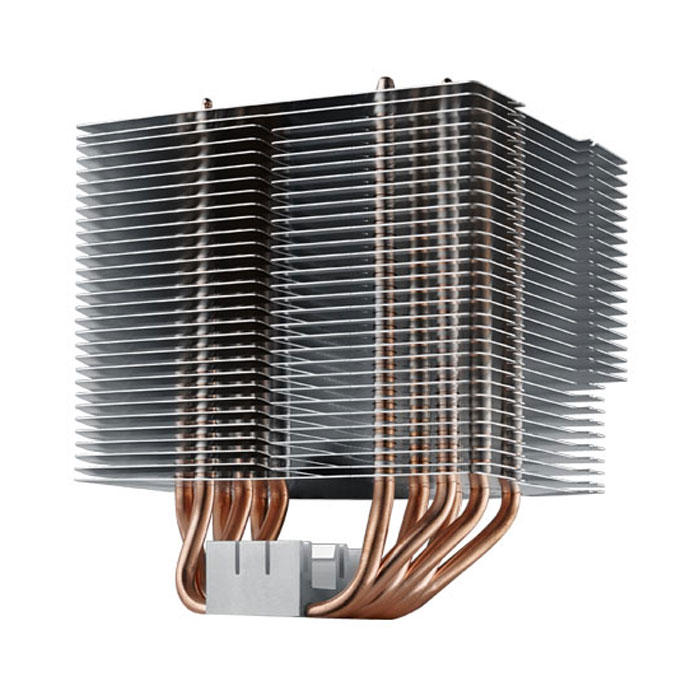
If you look at the image above you can see the heat-pipes are slanted off center. They do this so that the memory sits on one side and then the overhanging metal will slope off in the other direction, meaning no memory overhang when used on those boards.
robin746 wrote: So, OK, you have me looking at the 7700K again. Price is the same between the two.
The most interesting difference is that the standard editions tend to stagger their cores when they turbo them so that only one core hits the max clock speed and the rest step down in 100MHz increments. The 7700K, on the other hand, should be able to boost them all to max. Normally I'd say set all the cores to turbo max (so 4.5GHz) to get a bit more value out of it, with the mid-range chips it's extremely simple to do and adds a fairly small amount of heat to deal with, certainly nothing that would trouble a large cooler.
robin746 wrote:P.P.S. I keep reading "mashedmitten" as "mashedkitten".
Ang on... it isn't mashedkitten?!?!?

TBH you're not the only one on this. Can we petition a change please admins?
Last edited by Pete Kaine on Tue Sep 19, 2017 4:52 pm, edited 4 times in total.
-
- Pete Kaine
Frequent Poster - Posts: 3217 Joined: Thu Jul 10, 2003 12:00 am Location: Manchester
Kit to fuel your G.A.S - https://www.scan.co.uk/shop/pro-audio
Re: System build: 7700 versus 7700k
Pete Kaine wrote:Ang on... it isn't mashedkitten?!?!? TBH you're not the only one on this. Can we petition a change please admins?
I can go by my evil alter ego, bustedfist.

-
- Guest271017
Frequent Poster - Posts: 1104 Joined: Wed Jul 20, 2016 12:42 am
Re: System build: 7700 versus 7700k
Thanks for the additional clarifications... a brilliant source of info!
Think I need to add an M2 SSD and then I am done. Having two SSDs will mean I can keep my active projects on one.
For hard drives I am currently targeting Seagate, as they have been reported to offer the best failure rates. Last time I bought Toshiba for the same reason. These things tend to go in cycles.
Of course, Pete, you may have different advice based on your detailed experience!
Think I need to add an M2 SSD and then I am done. Having two SSDs will mean I can keep my active projects on one.
For hard drives I am currently targeting Seagate, as they have been reported to offer the best failure rates. Last time I bought Toshiba for the same reason. These things tend to go in cycles.
Of course, Pete, you may have different advice based on your detailed experience!
website | blog | soundcloud | label
Re: System build: 7700 versus 7700k
There are different M2 drives, SATA and NVMe. The latter is faster.
-
- Guest271017
Frequent Poster - Posts: 1104 Joined: Wed Jul 20, 2016 12:42 am
Re: System build: 7700 versus 7700k
I'm fairly sure that the K series only have a higher TDP because they are officially designated for over-clocking plus their stock speeds are higher.
So if you set the K series chip to run at the same speed as the vanilla 7700 it wouldn't consume any more power.
In fact the K series are the cream of the crop as Intel bin their chips based on performance so they may even consume less power than the vanilla 7700 when set at the same speed.
This is because typically the best chips for over-clocking run at a lower voltage which means lower power consumption as watts consumed is proportional to the square of the voltage.
So voltage is a bigger factor than clock speed wattage wise as watts scales linearly with clock speed.
As high power consumption is a major deterrent to overclocking a low voltage chip is a big advantage but not the only one; some chips are just golden regardless.
Keep in mind that Intel are releasing a new 8 series desktop platform in about 2 weeks which is using their third generation 14nm process which is almost definitely more power efficient.
As well as that they are increasing the core count so it will be cheaper as well per core.
The i5 and i7 will now be 6 core rather than 4 and the i3 becomes 4 core.
As always the lower clock speed chips use a lower voltage so have a lower TDP so the i5-8400 is a 6 core chip with a 65W TDP supposedly costing about £175. It lacks the maximum clock speed of the i7-7700 but not by much maybe! Worth checking out as 6 cores are better than 4 cores plus hyper-threading especially if the price is lower.
It's not advised to aim to passively cool a 65W TDP CPU as the noise of your case fans will be increased more than the noise you save by not having a CPU fan.
It's not difficult to silently cool a 65W CPU with 2 silent 120mm fans running at ~700 RPM, one on the CPU heatsink and one on the case.
A small amount of air is all it takes to cool a 65W CPU as long as you don't have a lot of other heat sources inside the case.
So if you set the K series chip to run at the same speed as the vanilla 7700 it wouldn't consume any more power.
In fact the K series are the cream of the crop as Intel bin their chips based on performance so they may even consume less power than the vanilla 7700 when set at the same speed.
This is because typically the best chips for over-clocking run at a lower voltage which means lower power consumption as watts consumed is proportional to the square of the voltage.
So voltage is a bigger factor than clock speed wattage wise as watts scales linearly with clock speed.
As high power consumption is a major deterrent to overclocking a low voltage chip is a big advantage but not the only one; some chips are just golden regardless.
Keep in mind that Intel are releasing a new 8 series desktop platform in about 2 weeks which is using their third generation 14nm process which is almost definitely more power efficient.
As well as that they are increasing the core count so it will be cheaper as well per core.
The i5 and i7 will now be 6 core rather than 4 and the i3 becomes 4 core.
As always the lower clock speed chips use a lower voltage so have a lower TDP so the i5-8400 is a 6 core chip with a 65W TDP supposedly costing about £175. It lacks the maximum clock speed of the i7-7700 but not by much maybe! Worth checking out as 6 cores are better than 4 cores plus hyper-threading especially if the price is lower.
It's not advised to aim to passively cool a 65W TDP CPU as the noise of your case fans will be increased more than the noise you save by not having a CPU fan.
It's not difficult to silently cool a 65W CPU with 2 silent 120mm fans running at ~700 RPM, one on the CPU heatsink and one on the case.
A small amount of air is all it takes to cool a 65W CPU as long as you don't have a lot of other heat sources inside the case.
Re: System build: 7700 versus 7700k
mashedmitten wrote:I can go by my evil alter ego, bustedfist.

robin746 wrote: For hard drives I am currently targeting Seagate, as they have been reported to offer the best failure rates. Last time I bought Toshiba for the same reason. These things tend to go in cycles.
You're right, they do seem to go in batch cycles and the more annoying problem is that you often don't discover this until 6 months down the line and they've already switched to new models at the factory end.
The Toshibas are good drives, they run a bit hot but the failure rate doesn't seem to rise because of it (at least from the return rates I've seen), so I wouldn't argue there.
Seagate isn't my preference, although they just seem to be the ones I've had the least luck with batch wise. As you say, it isn't a reason to write them all off as it does go in cycles and sometimes you end up just not being lucky.
I've always had a preference for WD's myself and they've always done well for me, but I'm sure other people will have experiences to share that may not agree with that but then that's how it goes.
Agharta wrote:It's not advised to aim to passively cool a 65W TDP CPU as the noise of your case fans will be increased more than the noise you save by not having a CPU fan.
The are solutions out there that with the right case allow you to go fully passive. I've had a couple of specs setup for a few years now that 100% moving parts free. The cooler in them is rated to 95w and I tend to cap the chip in use at 65w's to ensure nothing gets too crazy. If you pick a case with a load of holes all over it and plenty of meshing then it's pretty do-able.
I wouldn't choose to do it with any random cooler though and if someone is looking to do it I'd say make sure they pick a heatsink designed for the task at hand.
-
- Pete Kaine
Frequent Poster - Posts: 3217 Joined: Thu Jul 10, 2003 12:00 am Location: Manchester
Kit to fuel your G.A.S - https://www.scan.co.uk/shop/pro-audio
Re: System build: 7700 versus 7700k
Pete Kaine wrote:Agharta wrote:It's not advised to aim to passively cool a 65W TDP CPU as the noise of your case fans will be increased more than the noise you save by not having a CPU fan.
The are solutions out there that with the right case allow you to go fully passive. I've had a couple of specs setup for a few years now that 100% moving parts free. The cooler in them is rated to 95w and I tend to cap the chip in use at 65w's to ensure nothing gets too crazy. If you pick a case with a load of holes all over it and plenty of meshing then it's pretty do-able.
I wouldn't choose to do it with any random cooler though and if someone is looking to do it I'd say make sure they pick a heatsink designed for the task at hand.
Agreed, it's certainly possible to build a PC that is passively cooled with a 65W CPU but you'd need to design the whole system around that.
The OP's system spec has a PSU with an always on fan and a GPU with a fan which might also be always on and possibly case fans.
So going for a passive CPU cooler can only do so much in helping noise levels in that system.
It may be significant but you may achieve a lower noise level by using a silent fan on an appropriate CPU heatsink and addressing the other noise makers.
In this case by using a PSU that runs fanless up until your typical wattage level, a GPU that has the fan stopped when not loaded and tweaking your case fans.
CPU fans can be the worst culprits but once they are out of the equation other noise sources can become more noticeable and can be harder to address.
If silence or very low noise is your goal you need to look at the system holistically; no Reiki required.
I had a Q6600 system with a 95W CPU and it had 3 fans in total but was inaudible even under full CPU load in the summer in an environment with a very low background noise level.
The secret for me was having 3 Nexus 120mm fans running at around 700 RPM as well as choosing a CPU heatsink known to work well with low airflow, a passive PSU and a case designed for silence.
So 65W is not an issue for silence unless you are using an mITX build where the compactness can compromise your fan choices.
Re: System build: 7700 versus 7700k
Agharta wrote: If silence or very low noise is your goal you need to look at the system holistically; no Reiki required.
Yep, fully with you on that!
Something will always make a noise, it's no more than of whack-a-mole. Even if you are a 100% SSD and passive with no motors or spinning things going on, I can promise you that if you then stick your head in the case that you'll hear some degree of coil whine or other electrical noise.
Of course, if you put the side back on and place it under the desk, you shouldn't hear it from your seated position. Same can normally be said about the case fans and heatsink on 300RPM headers through and you have no hot spots building up.
So yeah, great advice, it really does depend on where you place it. You can spend a lot of money nailing that last 10db around the noise floor, which to be fair can often be solved by pushing the case further under the desk.
-
- Pete Kaine
Frequent Poster - Posts: 3217 Joined: Thu Jul 10, 2003 12:00 am Location: Manchester
Kit to fuel your G.A.S - https://www.scan.co.uk/shop/pro-audio
Re: System build: 7700 versus 7700k
Pete Kaine wrote:So yeah, great advice, it really does depend on where you place it. You can spend a lot of money nailing that last 10db around the noise floor, which to be fair can often be solved by pushing the case further under the desk.
Yeah, buy a larger desk and sit at the opposite end to where the PC is installed.
Re: System build: 7700 versus 7700k
Agharta wrote:Keep in mind that Intel are releasing a new 8 series desktop platform in about 2 weeks which is using their third generation 14nm process which is almost definitely more power efficient.
Oh great. I hadn't considered that something new was just around the corner. But I suppose this is always the case!
A quick read shows that these Coffee Lake chips will be 15% faster on average, so not enough to wait for. In the past I have only upgraded when necessary, or when speed increases topped 100%. That translates to real-world work efficiency improvements.
The jump from 4 to 6 cores makes no difference for audio work, in most cases. My main programmes (Reaktor, Max) don't utilise multiple cores and I rarely run processes in parallel.
Agharta wrote:It's not advised to aim to passively cool a 65W TDP CPU as the noise of your case fans will be increased more than the noise you save by not having a CPU fan.
Indeed, it is a matter of trade-offs. When I first built my last system it had a fanless graphics card etc. But that blew up and I decided to replace it with something with real horsepower.
At this point I am not chasing silence though I would prefer not to overdo the noise either!
website | blog | soundcloud | label
Re: System build: 7700 versus 7700k
robin746 wrote:Agharta wrote:Keep in mind that Intel are releasing a new 8 series desktop platform in about 2 weeks which is using their third generation 14nm process which is almost definitely more power efficient.
Oh great. I hadn't considered that something new was just around the corner. But I suppose this is always the case!
There isn’t usually a new platform due out in the next two weeks though as on average a new mainstream Intel platform is released once every 12 months at best.
robin746 wrote:A quick read shows that these Coffee Lake chips will be 15% faster on average, so not enough to wait for. In the past I have only upgraded when necessary, or when speed increases topped 100%. That translates to real-world work efficiency improvements.
Coffee Lake seemingly is Kaby Lake with extra cores so at the architecture level don’t expect more performance per core.
The bigger difference potentially is the new version of the 14nm manufacturing process which could lead to higher clock speeds and/or low power consumption with the latter being useful for easier cooling.
The other difference is pricing as the quad cores even the K series are well under £200 and the i5 6 cores start at ~£175 with the i5-8600K being around £230.
robin746 wrote:The jump from 4 to 6 cores makes no difference for audio work, in most cases. My main programmes (Reaktor, Max) don't utilise multiple cores and I rarely run processes in parallel.
In that case an i7 quad core is overkill and no less so than an i5 six core which lacks HT so is 6 thread v 8 thread of the i7-7700.
From what you have said you only require a dual core, with or without HT, with as high a clock speed as possible.
The i3-7350K is 4.2GHz at stock but should easily hit 4.8 to 5GHz at moderate power consumption and costs under £150.
The Coffee Lake version is quad core rather than dual + HT and around £175.
You could even get away with a £55 Pentium G3258 which is dual core, unlocked and good for 4.5+ GHz. It’s an old platform though.
The new platform also supports Thunderbolt 3 natively which whilst niche will interest some.
I’d wait the 2 weeks due to the possibility of better power efficiency, clear lower prices and having a platform that supports 6 cores for a potential future upgrade.
Re: System build: 7700 versus 7700k
Agharta wrote:In that case an i7 quad core is overkill and no less so than an i5 six core which lacks HT so is 6 thread v 8 thread of the i7-7700. From what you have said you only require a dual core, with or without HT, with as high a clock speed as possible.
The i3-7350K is 4.2GHz at stock but should easily hit 4.8 to 5GHz at moderate power consumption and costs under £150.
This is a compelling argument.
The single core Passmark scores of the i3-7350K are 97% that of the i7-7700k. If I am optimising my system only for audio applications, this makes sense.
However, in the general Passmark test the scores of the i3-7350K are 61% that of the i7-7700k. In general usage I play games, use office software, create graphics, browse the net, etc.... like everyone else! With multiple programmes running this might be the most appropriate benchmark.
The price is £148 versus £314. Power consumption is 60W versus 90W.
I would like to hear what others make of this.
(There seems no way to monitor this thread and no way to tag people. Is that just a limitation of this forum, or am I missing something?)
website | blog | soundcloud | label
Re: System build: 7700 versus 7700k
robin746 wrote:The single core Passmark scores of the i3-7350K are 97% that of the i7-7700k. If I am optimising my system only for audio applications, this makes sense.
However, in the general Passmark test the scores of the i3-7350K are 61% that of the i7-7700k. In general usage I play games, use office software, create graphics, browse the net, etc.... like everyone else! With multiple programmes running this might be the most appropriate benchmark.
The price is £148 versus £314. Power consumption is 60W versus 90W.
I would like to hear what others make of this.
If you need more general oomph but still with the higher single core performance then the Coffee Lake i3 K is the one to go for as its 4 core for ~£175.
Above that you have the Coffee Lake i5 K which is 6 core for around £230.
robin746 wrote:(There seems no way to monitor this thread and no way to tag people. Is that just a limitation of this forum, or am I missing something?)
Beneath the last post and the Post a Reply button there are 3 black buttons and the middle one is Subscribe and the right one is Bookmark topic.
Re: System build: 7700 versus 7700k
Ah yes, I was subscribed. Ha!
Maybe not getting emails however. Will check it out.
Maybe not getting emails however. Will check it out.
website | blog | soundcloud | label
Re: System build: 7700 versus 7700k
robin746 wrote: The jump from 4 to 6 cores makes no difference for audio work, in most cases. My main programmes (Reaktor, Max) don't utilize multiple cores and I rarely run processes in parallel.
Just for clarity are you only ever using these as standalone tools, or are you running them within a sequencer at any time?
Last edited by Pete Kaine on Fri Sep 22, 2017 10:35 am, edited 1 time in total.
-
- Pete Kaine
Frequent Poster - Posts: 3217 Joined: Thu Jul 10, 2003 12:00 am Location: Manchester
Kit to fuel your G.A.S - https://www.scan.co.uk/shop/pro-audio
Re: System build: 7700 versus 7700k
I usually use them standalone. I have been building apps in Reaktor for 15 years or so and tend to create music by improvising with custom ensembles. With Max it's mostly because I teach the programme.
My other processor intensive task would be editing and rendering video. In fact, that is no doubt the most demanding.
My other processor intensive task would be editing and rendering video. In fact, that is no doubt the most demanding.
website | blog | soundcloud | label
Re: System build: 7700 versus 7700k
robin746 wrote:I usually use them standalone. I have been building apps in Reaktor for 15 years or so and tend to create music by improvising with custom ensembles. With Max it's mostly because I teach the programme.
My other processor intensive task would be editing and rendering video. In fact, that is no doubt the most demanding.
Cool, yes, I was just asking as running those tools inside a sequencer would result in the extra cores being well and truly leveraged, but it sounds like your usage profile will indeed favour faster single cores over having more of them.
Also, without a doubt given all that information the video editing will be the one to benefit from any extra cores, rather than anything audio.
-
- Pete Kaine
Frequent Poster - Posts: 3217 Joined: Thu Jul 10, 2003 12:00 am Location: Manchester
Kit to fuel your G.A.S - https://www.scan.co.uk/shop/pro-audio
Re: System build: 7700 versus 7700k
[OK, scrapping my last post.]
Wikipedia has compiled the tech specs of Coffee Lake from the spoilers. The main improvement in these processors is an increase in cores and cache.
The i7-8700K runs at 3.7 GHz which is less than the Kaby Lake i7-7700K at 4.2. The 4.7 GHz turbo is a tad more than the older 4.5 GHz.
The new i5-8600K is similar. It runs at 3.6 / 4.3 GHz compared with the current i5-7600K at 3.8 / 4.2 GHz. But the pricing of i5 will no doubt continue to be nearly as much as the i7 chips. So they make no sense, IMO.
The new i3-8350K runs at 4.0 GHz, and turbo doesn't apply to this architecture. This is slower than the current i3-7350K at 4.2 GHz. And it runs at 91W instead of 60W. I don't understand this chip at all. (To quote the Sex Pistols!)
It's reported that some of these chips won't be available until early next year.
Conclusion: These new chips are a panic response to Ryzen, with its huge number of cores and threads. We will need to wait for something more substantial from Intel.
Wikipedia has compiled the tech specs of Coffee Lake from the spoilers. The main improvement in these processors is an increase in cores and cache.
The i7-8700K runs at 3.7 GHz which is less than the Kaby Lake i7-7700K at 4.2. The 4.7 GHz turbo is a tad more than the older 4.5 GHz.
The new i5-8600K is similar. It runs at 3.6 / 4.3 GHz compared with the current i5-7600K at 3.8 / 4.2 GHz. But the pricing of i5 will no doubt continue to be nearly as much as the i7 chips. So they make no sense, IMO.
The new i3-8350K runs at 4.0 GHz, and turbo doesn't apply to this architecture. This is slower than the current i3-7350K at 4.2 GHz. And it runs at 91W instead of 60W. I don't understand this chip at all. (To quote the Sex Pistols!)
It's reported that some of these chips won't be available until early next year.
Conclusion: These new chips are a panic response to Ryzen, with its huge number of cores and threads. We will need to wait for something more substantial from Intel.
Last edited by robin746 on Fri Sep 22, 2017 4:49 pm, edited 3 times in total.
website | blog | soundcloud | label